Accordion FAQ WordPress Plugin 2.2.1
Wordpress Plugins Codecanyon 4.8 (4.6K reviews)
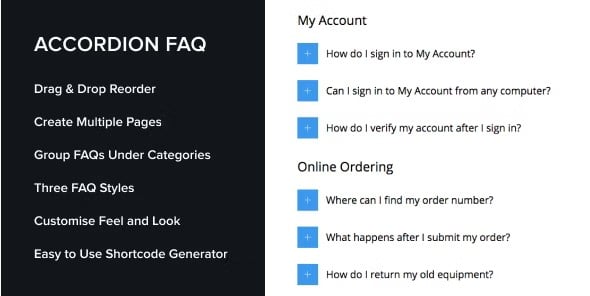
The Accordion FAQ WordPress Plugin is a practical tool for adding question-and-answer sections for your users to a WordPress site. It lets you create multiple FAQ pages, each with its own set of questions and answers, and then display them using either an accordion layout or a list layout. With the accordion style, visitors click on a question and the answer expands beneath it, while any previously opened answer closes automatically. This keeps long lists of questions compact and reduces scrolling. The alternative list style presents every question and answer fully expanded, which works well for shorter sets of FAQs. The plugin includes a shortcode generator, so you can generate a shortcode for any FAQ group and place it in a post, page, or sidebar widget. There are also custom templates available, giving you control over the visual presentation so your FAQ sections blend with the rest of your theme.
Setting up the plugin is straightforward. After installing and activating it, you can build FAQ groups directly from the WordPress admin area. Each group can hold as many questions and answers as you need, and you can create several separate groups if you want different FAQ sections on different pages. The shortcode generator is the main way to place your FAQs on the front end. You select the group you want to display, decide between the accordion or list style, and the plugin produces a shortcode ready to paste into any post, page, or widget. For sidebar usage, a standard text widget works fine to hold the shortcode. The included custom templates give you some control over how the questions and answers are rendered, so your FAQ sections do not have to look exactly like the default output. Because everything runs through the normal WordPress interface, there is no need to edit theme files.
The accordion interaction is designed for pages with a lot of questions. Instead of presenting visitors with a wall of text, the plugin lets you keep answers hidden until they are needed. Clicking a question expands its answer, and opening a new question collapses the previous one, which keeps the page clean and easy to scan. This is particularly helpful for support pages, product documentation, and frequently asked questions sections where people are looking for one specific answer. When you have more than a handful of questions, accordion mode keeps things readable and manageable. The list style option serves a different purpose. It shows every question and answer out in the open, which can be better for short FAQ sets or for readers who want to skim everything without clicking. Having both display modes means you can choose the right approach for the amount of content you are working with, all from the same plugin.
The plugin package comes as a standard WordPress plugin zip file, which you upload through the Plugins menu and activate like any other extension. It is the same installation file distributed by the original author, so you are getting the genuine plugin without modifications. Once activated, the plugin sits in your admin menu, where you can create and manage your FAQ groups at any time. If you later need to change the question order, edit an answer, or switch a group from accordion to list style, you can do so without touching the front end. The plugin does not require any coding or special setup, and the shortcode-based approach means it works with most WordPress themes that support standard content areas. For site owners who need a simple, reliable way to present FAQs, this plugin covers the core requirements directly. It handles the essential job of presenting FAQs without extra bulk.
 Admin Columns
- Last updated
- August 2, 2026
- Delivery
- Digital
- Availability
- In stock
- Version
- 2.0
- Category
- Wordpress Plugins
- Item type
- plugin
For shoppers browsing Wordpress Plugins, Accordion FAQ WordPress Plugin is recorded as a plugin. The page below separates supplied product information from general store and license terms.
Usage rights depend on the license selected at checkout. Review the complete terms before using this item for client work, redistribution, SaaS, or more than one end product.