Announce - 4x Responsive Email + Online Builder Latest Version
HTML Templates Themeforest 4.8 (1.1K reviews)
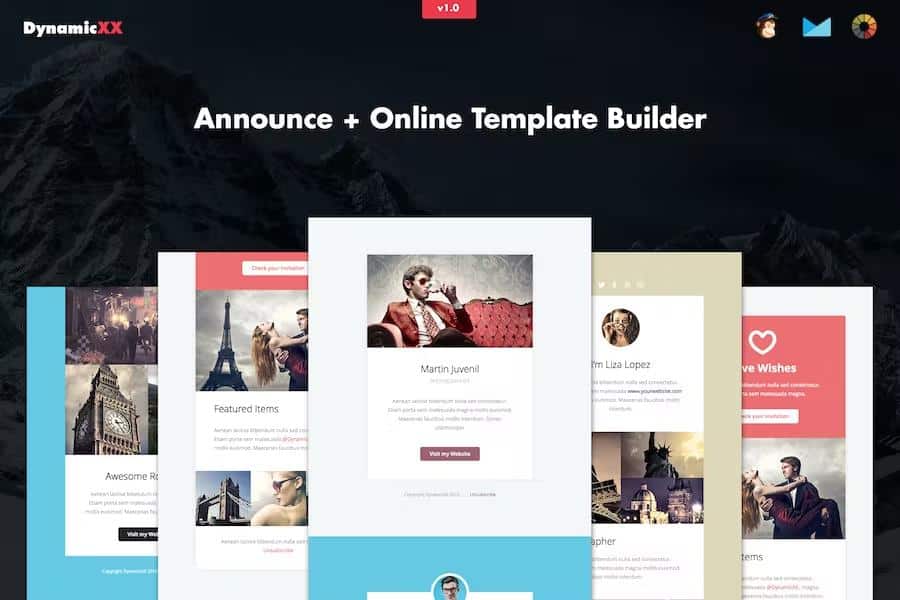
Announce is an online builder for responsive email templates. You work on a full-width canvas where each module can be dragged into place, duplicated, or hidden from view. Click a headline and type to replace it, and you can add links to buttons or images. Color controls apply shades instantly across the entire design. Background images can be uploaded from your desktop or referenced by URL if you prefer to pull assets from a server. Every action can be undone or redone, so testing variations is quick. A preview mode shows the email on a realistic screen, so you can spot spacing issues before export. The builder also has save and upload options, letting you store your work for later or load a previous file. You do not need to know HTML to produce a functional design; the interface handles the underlying code for you, and the module-based approach keeps the structure organized.
Once you are happy with the layout, you can export the template as an HTML file and save it straight to your desktop. That exported file works with several major email platforms. It is Litmus-tested, meaning the rendering has been checked against common email clients. You can drop the HTML into MailChimp, Campaign Monitor, Constant Contact, iContact, or Aweber without needing to convert anything. The markup also passes W3C validation, so it relies on standard web code rather than proprietary tricks. The layout itself is fully responsive, adapting to narrow phone screens and wider desktop windows. Because the design is full-width, it uses the available space without awkward side margins. The export process is straightforward: you get a single HTML file and no extra configuration. The online editor's save function lets you keep multiple iterations, and the upload option allows you to reopen a previously exported build and keep editing.
Similar products
 Themeforest
Compatibility is a major focus. Announce supports Apple Mail, Android, AOL, Outlook.com, Yahoo Mail, Thunderbird, Microsoft Outlook 2003/2007/2010, Outlook Express, Windows Mail, Lotus Notes 8/8.5, OperaMail, and the iPad and iPhone (including the 4, 5, 6, and 6+). Live Mail and Notes are also covered. Most of these clients will display the template correctly, though rendering differences can appear. There are two known limitations that come with most email builders. Outlook does not render background images, so it falls back to a solid background color instead. Outlook also replaces custom fonts with a standard web font. The Gmail app for Android is not supported, so subscribers reading through that app may not see the intended design. Testing with your own audience is still recommended, as rendering quirks vary by version and settings. The email client coverage is broad, which matters when you are sending to a list with mixed devices and older software.
The template files you receive are clean and ready to use, but the images appearing in the live previews are not included in the download package. That means you can look at the demo to see how the builder works, but when you export, you will need to supply your own photographs or graphics. This keeps the file size small and avoids licensing complications. The builder itself gives you enough control to change colors, text, links, and backgrounds, so you can make the template feel like your own. It is a practical tool for anyone who needs to produce a professional newsletter or promotional email without writing code. The module system means you can build a layout that fits your content rather than forcing your content into a fixed structure. Using the undo and redo buttons, you can experiment freely and revert when needed. Announce is aimed at marketers, small business owners, and anyone else who regularly sends HTML emails.
- Item type
- template
- Category
- HTML Templates
- Version
- Latest Version
- Availability
- In stock
- Delivery
- Digital
- Last updated
- September 3, 2026
Announce - 4x Responsive Email + Online Builder is listed in HTML Templates as a template. The supplied description, preview, version, price, and recorded product details are collected here for review.
Usage rights depend on the license selected at checkout. Review the complete terms before using this item for client work, redistribution, SaaS, or more than one end product.