AppGUE - Mobile App Showcase Elementor Pro Template Kit Latest Version
Elementor Kits Themeforest 4.8 (4.1K reviews)
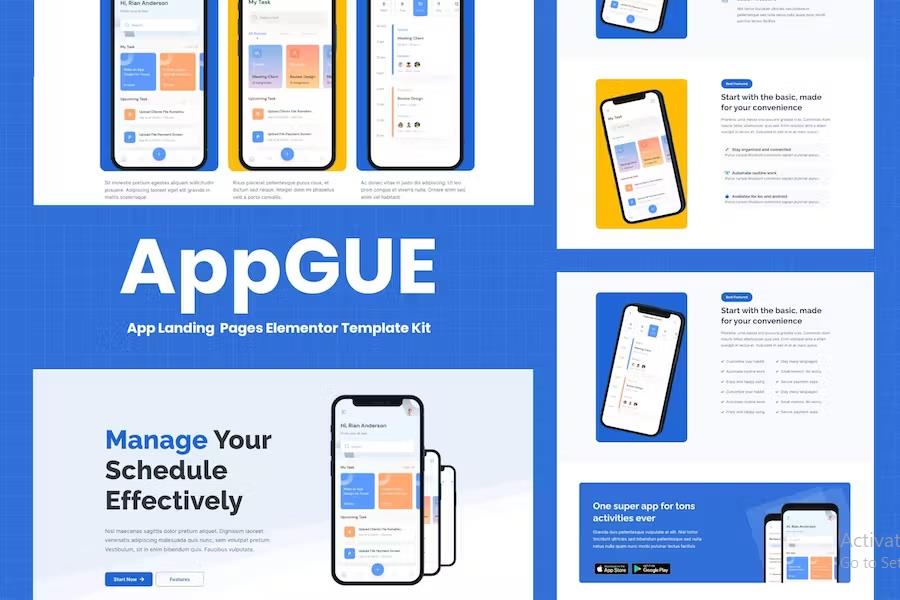
AppGUE is a specialized collection of pre-designed marketing pages built specifically for the Elementor Pro page builder inside WordPress. Creators building a promotional website for a mobile application or digital service can use these layouts to establish a professional web presence without writing code. The package contains twelve distinct page designs covering the primary sections typically required for software marketing. Users find three different homepage layouts, an about page, a dedicated pricing table page, a features overview, an introductory team page, and a full blogging section with a single post template. Additional layouts include a specific question page, a detailed answer page, and functional header and footer templates. Contact forms are handled through an included Metform layout. Every single page design adapts correctly to different screen sizes, ensuring the layouts function properly on desktop monitors, tablets, and smartphones. The package relies on the standard WordPress environment and connects directly with the Elementor page builder ecosystem for visual layout modifications.
More from this category
 Themeforest

Building a complete marketing site with this layout collection requires specific software plugins to be active on the WordPress installation. The primary requirements include the core Elementor plugin, the Elementor Header and Footer Builder, MetForm, ElementsKit Lite, and the Gum Elementor Addon. Hosting servers must meet standard technical specifications such as PHP version seven or higher with the PHPZip extension enabled, a memory limit of at least 512 megabytes, and MySQL version 5.6 or MariaDB version 10 or greater. Modern web browsers like Chrome or Firefox are recommended for accessing the editing interface. Setting up the layout templates involves uploading the downloaded kit file through the Envato Elements plugin interface inside the WordPress dashboard. Administrators start by importing the global kit styles before bringing in individual page templates. Once imported, pages appear inside the saved templates section of the Elementor builder, allowing site managers to assign them to newly created WordPress pages easily.
Customizing the imported layouts happens entirely inside the visual Elementor editing environment by clicking on text, images, and structural blocks. Page settings require configuring the view to full width and hiding the default title through the builder interface. Global headers and footers can be managed through the header and footer plugin settings by assigning the imported templates to display across the entire site. Forms included via Metform require a quick import process where block templates are loaded into the form builder widget. Users open the form builder interface, load the saved template from the folder tab, make adjustments, and save the changes so the form renders correctly on the live page. The styling matches across all templates through the global kit style settings, maintaining visual consistency throughout the website. Demo images shown in the preview are sourced from Envato Elements and need to be replaced with personal graphics or licensed separately if users wish to keep the exact stock photography.
Managing the visual layout of a mobile app website becomes straightforward through this template collection because all structural elements are pre-arranged. Developers and site owners save significant time by avoiding the need to build marketing pages from blank canvases. The design choices focus heavily on app marketing requirements, emphasizing feature highlights, pricing tiers, and direct download links. Visitors to the finished website experience a clean interface that highlights software capabilities effectively. Anyone managing a WordPress site who possesses basic familiarity with the Elementor page builder can arrange these layouts, adjust colors, modify typography, and swap out placeholders. The system remains entirely self-contained within the WordPress dashboard, meaning no external software tools are necessary to complete the site building process. By combining structured page layouts with standard plugin functionality, this kit offers a practical method for presenting mobile software projects to prospective users on the web.
- Item type
- template kit
- Category
- Elementor Kits
- Version
- Latest Version
- Availability
- In stock
- Delivery
- Digital
- Last updated
- August 2, 2026
The AppGUE - Mobile App Showcase Elementor Pro Template Kit listing is available in Elementor Kits as a template kit. Check the description, item facts, and purchase details to assess its relevance to a project.
Usage rights depend on the license selected at checkout. Review the complete terms before using this item for client work, redistribution, SaaS, or more than one end product.