Bitcoin Animated Banner Google Web Designer Latest Version
HTML Templates Codecanyon 4.8 (2.9K reviews)
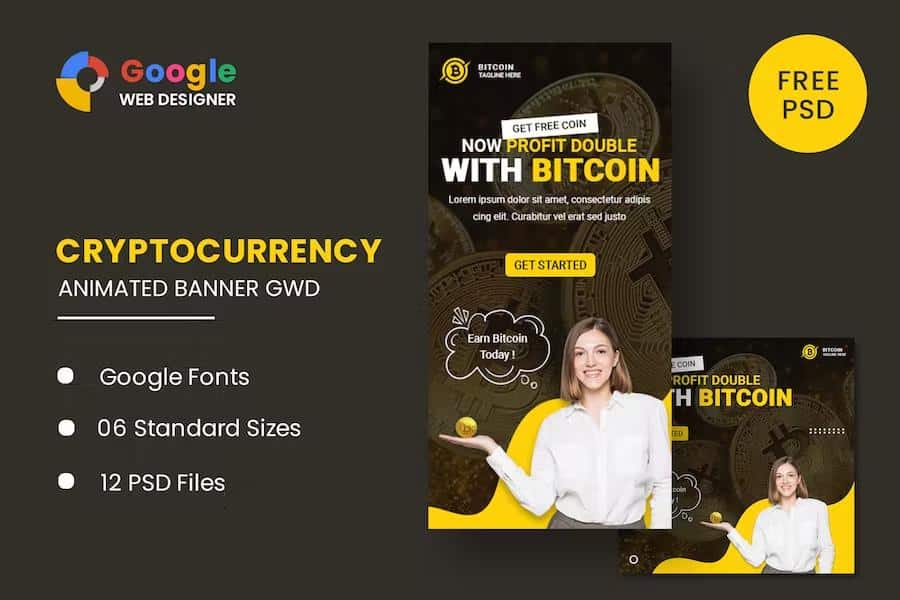
This is an animated banner set designed specifically for bitcoin-related promotional work. It comes in six standard display sizes: 160x600, 180x150, 300x250, 300x600, 320x50, and 728x90. Those cover skyscrapers, rectangles, mobile banners, and leaderboards, so you can run a cohesive campaign across different ad placements. These are some of the most common formats used in display advertising. That makes them easy to plug into existing ad campaigns without needing resized versions. The templates are built in Google Web Designer, a free tool from Google that lets you create HTML5 animations without writing code by hand. Each banner uses HTML5 and CSS3 effects to create motion, which keeps the files lightweight and compatible with modern browsers. The design style is clean and modern, with a Bitcoin-themed aesthetic that uses the classic orange Bitcoin symbol and related visual cues. You can use these as a base for your own projects, like running ads for an exchange, a wallet service, or a crypto news site.
The download contains six HTML ad templates that are ready to use. These are the actual animated banners, configured for each of the six sizes. You also get twelve PSD banner templates, which means there are two Photoshop files per size. The PSD files give you a static design that you can edit in Photoshop to adjust colors, text, and layout before exporting to images. This is useful if you want to create static fallback versions or customize the visuals in more detail. That gives you flexibility for both design and final production. The HTML templates use Google Web Fonts, so typography looks sharp and consistent across devices without requiring you to manually embed font files. Everything is organized by size, which makes it easy to find the file you need for a particular ad slot. The templates are meant to be edited in Google Web Designer, so the source structure is clean and layer-based.
Working with these templates is straightforward if you have basic experience with Google Web Designer or similar tools. You open the HTML file, and the animation timeline, layers, and properties panel are all available for editing. Changing the text in the banner is as simple as clicking on the text layer and typing your own message. You can also adjust the animation timing, swap colors, or reposition elements directly in the interface. Because everything is vector and CSS-based, resizing the elements within a fixed canvas is easy without losing quality. The Google Web Designer software itself is free, so you don't need to invest in expensive design tools to make changes. After editing, you can publish the banner as a standard HTML5 ad or export it using the built-in publishing options. Duplicating a template is also possible if you want to tweak an edited version for a different campaign. That gives you a solid base for building your own banner variations.
One thing to know is that the images shown in the previews are display-only. They are not included in the main download package, which makes sense because those photos are credited to their respective authors and are meant to be placeholders. This means you will need to supply your own imagery for the final banners. The PSD and HTML files have placeholders where the demo images sit, so you can easily replace them with your own screenshots, product photos, or licensed graphics. The included instructions say to give credit to the authors if you happen to use the same placeholder images, but for actual campaign use you will likely want something original. Overall, this is a practical starting point for creating Bitcoin banner ads without building animations from scratch. You get a solid set of layouts and motion patterns, and you can easily adapt them to fit your specific message.

 Themeforest
- Last updated
- August 2, 2026
- Delivery
- Digital
- Availability
- In stock
- Version
- Latest Version
- Category
- HTML Templates
- Item type
- template
Bitcoin Animated Banner Google Web Designer is one of the HTML Templates items recorded as a template. The content below uses the supplied listing information and current local catalog data.
Usage rights depend on the license selected at checkout. Review the complete terms before using this item for client work, redistribution, SaaS, or more than one end product.