Build Website Animated Banner GWD Latest Version
HTML Templates Codecanyon 4.8 (522 reviews)
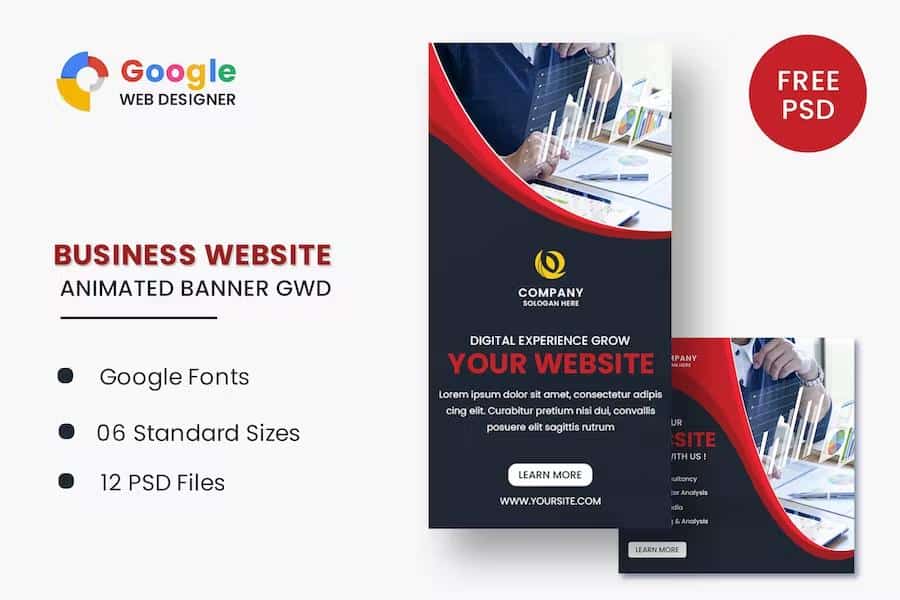
These animated banner templates were built for websites that need polished advertising creatives without a long production timeline. Created in Google Web Designer, the pack covers six standard display sizes: 160 by 600, 180 by 150, 300 by 250, 300 by 600, 320 by 50, and 728 by 90. That range covers skyscrapers, rectangles, leaderboards, and mobile strips, so a single purchase gives you a consistent set for most ad placements. Each template uses HTML5 and CSS3 effects to produce motion, hover states, and smooth transitions. Because the files are native to Google Web Designer, you can open them, tweak the text, swap colors, and adjust timing without writing code. The templates are responsive within their fixed dimensions, so the animation plays consistently on desktop and mobile browsers. No external libraries are required; everything runs on plain HTML, CSS, and JavaScript generated by the tool. The finished banners export as HTML ad tags that run on standard ad servers and web pages.
Other products to consider
 Themeforest
The download includes six ready-to-use HTML ad templates and twelve PSD banner templates. The HTML files are complete and can be uploaded straight to a hosting folder or ad server after you replace the demo text with your own. The PSDs provide the same six sizes, with two design versions each, giving you extra layout choices before you hand off to a developer or export assets yourself. All templates use Google Web Fonts, so the typography stays sharp across devices and browsers. Because everything is organized by size, you can quickly locate the file you need and avoid resizing confusion. The templates are layered and grouped in both formats, making it simple to edit individual elements without breaking the design. Each HTML file has a clear layer structure and a timeline that shows which animation belongs to which element. Nothing is locked down, so you can change colors, swap backgrounds, or replace the sample buttons whenever your campaign needs a different look.
Google Web Designer is free software from Google, and these templates are made specifically for it. You can open any HTML file, select an element, and change text, links, or animation properties directly in the timeline. Duration, easing, and delay are all adjustable, so you can fine-tune the motion to match your campaign's pace. The CSS3 effects include fading, sliding, and scaling, controlled through a familiar visual interface. The PSD files are equally flexible if you prefer to start in Photoshop, prepare custom backgrounds, and then bring the layers into a Web Designer project. The PSDs match the same six standard sizes and use named folders for layer management. Note that the images visible in the previews are for demonstration only and are not part of the download. You will need to supply your own photos, illustrations, or product shots, and credit the original photographers if you reuse their work from the previews.
This set suits small business owners, freelance designers, and marketing teams who need a handful of banner sizes that look consistent together. Instead of building each format from scratch, you can start from these templates and finish the production in a focused session. You can also duplicate any template and modify it to create additional sizes if your campaign expands beyond the six included units. That keeps the workflow predictable without forcing you to learn a new tool. The animations are subtle enough for corporate sites and flexible enough for promotional campaigns, and because the source files are included, you retain full control over the final output. Keep in mind the demo images are placeholders; plan to use your own licensed photos or generate graphics from your brand assets. With a little time in Google Web Designer, you can have a functional animated campaign across six common ad units, ready for testing.
- Item type
- template
- Category
- HTML Templates
- Version
- Latest Version
- Availability
- In stock
- Delivery
- Digital
- Last updated
- August 28, 2026
The Build Website Animated Banner GWD listing is available in HTML Templates as a template. Check the description, item facts, and purchase details to assess its relevance to a project.
Usage rights depend on the license selected at checkout. Review the complete terms before using this item for client work, redistribution, SaaS, or more than one end product.