Business Event Animated Banner Google Web Designer Latest Version
HTML Templates Codecanyon 4.8 (436 reviews)
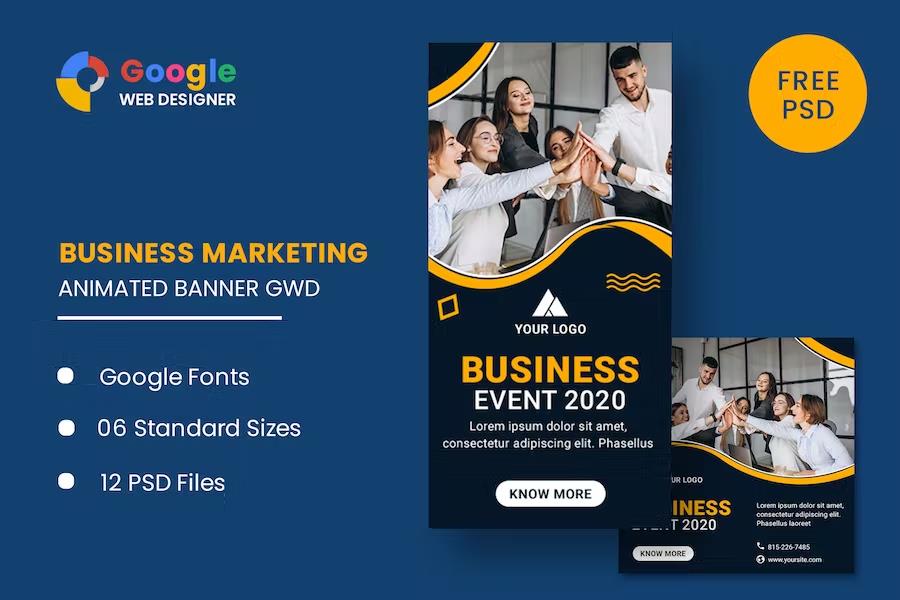
Business Event Animated Banner Google Web Designer is a collection of six HTML5 banner templates created for promoting business events. The package covers six standard ad dimensions: 160×600, 180×150, 300×250, 300×600, 320×50, and 728×90. That includes tall skyscrapers, mobile banners, leaderboards, and rectangles, so you can match a single campaign across different placements. All animations are built with HTML5 and CSS3 effects, which means smooth, lightweight motion that runs reliably in browsers and ad networks. The source files are made in Google Web Designer, a free application from Google, and they remain fully editable. Typography relies on Google Web Fonts, so the text stays crisp and consistent across devices. You can change headline text, replace background colors, adjust animation timing, and modify individual layer properties without touching code. This makes the set a practical starting point for businesses, event organizers, or agencies that need several banner dimensions without starting each one from zero.
The download package contains six ready-to-use HTML ad templates and twelve PSD banner templates. The HTML files open directly in Google Web Designer, where you can edit the text, adjust animation timing, and export the finished banner for publishing. The twelve PSD files give you a deeper editing path for people who want to redesign backgrounds, incorporate their own photography, or prepare static fallback images for ad networks that require them. Since both formats are included, you can pick the workflow that fits your project. Work inside the free Google Web Designer application for quick changes, or open the PSDs in Photoshop to rebuild a visual direction before animating. The templates share a consistent business-event aesthetic, so the different sizes and formats feel unified within one campaign. Sample text is included, and the layout structure is in place, but the photographs you see in the previews are not part of the package. You'll add your own images to complete each ad.
Each of the six dimensions is represented by a dedicated HTML file, so you don't have to manually resize the same project for different ad placements. The animations use CSS3 transitions and keyframe effects to create subtle motion like fading, sliding, or pulsing call-to-action buttons. Because the files are built in Google Web Designer, you can preview the animation timeline, adjust the duration, and fine-tune when elements appear and disappear. The typography is set with Google Web Fonts, which means the fonts load from Google's libraries and render consistently across most browsers. Keep in mind that the photographs shown in the preview images are not included in the download. Those images belong to their respective photographers. You will need to supply your own pictures, or contact the original authors for permission and include proper credit if you choose to use the same visuals. The image areas in the templates are left open for your own visuals without disturbing the animation structure.
Other products to consider
 Themeforest
The HTML portion works entirely with free tools. Banners open directly in Google Web Designer, while the PSD files require Photoshop or a compatible program for more detailed redesign work. Both paths lead to the same outcome: a set of animated banners ready for your event information. The six sizes match common ad placements, from mobile strips to large rectangles and skyscrapers. You can reuse the same branding, colors, and tone across every format. This is especially helpful when you have to produce a full campaign quickly. Instead of creating each banner from a blank canvas, you start with a solid structure and simply change the parts that matter. The animation effects are built directly into the templates, so there is no need to write custom JavaScript or CSS by hand. Google Web Fonts handle typography consistently without embedding font files. The templates put the focus on your event content, not on solving technical layout problems.
- Last updated
- August 2, 2026
- Delivery
- Digital
- Availability
- In stock
- Version
- Latest Version
- Category
- HTML Templates
- Item type
- template
The catalog entry for Business Event Animated Banner Google Web Designer is grouped with HTML Templates and classified as a template. Available product information is shown below with related items from the local catalog.
Usage rights depend on the license selected at checkout. Review the complete terms before using this item for client work, redistribution, SaaS, or more than one end product.