Buttons X - Powerful Button Builder for WordPress 1.9.73
Wordpress Plugins Codecanyon 4.8 (4.8K reviews)
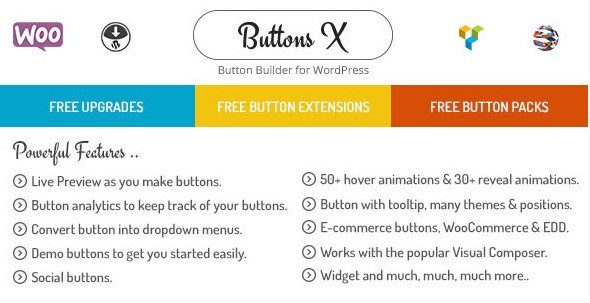
Buttons X is a WordPress plugin that puts a complete button-building toolkit directly inside your dashboard. Instead of editing HTML or relying on a theme's limited button styles, you can craft any button you imagine and drop it into your content right away. The plugin serves people who need flexible call-to-action buttons, link prompts, navigation aids, or decorative elements. It works with the standard WordPress editor and gives you a dedicated interface for shaping every detail. Size, label, color, and behavior are all under your control. A live preview shows your changes as you make them, so there is no guessing about how the final product will look. The interface stays close to the familiar WordPress experience, and you do not need a separate page builder. The buttons you create can be inserted anywhere you normally place content. If you maintain multiple sites, you can carry your button designs along with you, saving time on repetitive setup.
Building a button visually means you can experiment with backgrounds, borders, and gradients without touching code. The styling panel covers solid colors, gradient fills, border thickness, corner radius, and hover states. You can also add animation to draw attention, whether that is a subtle pulse, a shake, or a smooth transition. For those times when you need a starting point, the plugin includes a collection of demo buttons. Pick one, tweak it, and make it your own. A cloning feature duplicates any button you have already built, so you can create variations quickly. The built-in analytics tracks how many times each button gets clicked, which is useful for measuring the performance of calls to action. When you need to move work between websites, the export and import options let you transfer button configurations as files. That makes it simple to keep a consistent set of buttons across a network of sites.
More from this category
 Codecanyon

Because you work inside the WordPress dashboard, there is no need to jump between a design tool and your site. The plugin gives you a dedicated button editor that opens right where you manage your content. Once you save a button, you can insert it into posts, pages, widgets, or any other content area that accepts shortcodes or blocks. The exact method depends on how your theme is set up, but the plugin is designed to fit the standard editing workflow. The demo buttons included in the package provide a quick way to see what is possible, and the live preview makes it easy to adjust spacing, alignment, and typography. The entire experience focuses on creating a finished button without writing a single line of CSS. For users who manage client sites, the export and import functionality is especially handy because it removes the need to rebuild buttons from scratch.
Using Buttons X comes down to a simple workflow: create, style, and place. You do not need to know CSS, JavaScript, or any other web language to get the result you want. The plugin gives you the controls you would expect from a visual builder, but it keeps everything contained within the dashboard. That means fewer tabs, fewer copied code snippets, and less time spent troubleshooting. For content editors who want consistent, branded buttons across their site, the ability to clone and save designs is a practical advantage. The export and import files also make it easy to share button styles with teammates or transfer them to another WordPress installation. While the feature set covers the essentials, the plugin remains straightforward to approach. Anyone with basic WordPress knowledge can start building buttons right after installation, and the live preview helps you learn what each option does as you go.
- Last updated
- August 2, 2026
- Delivery
- Digital
- Availability
- In stock
- Version
- 1.4.0
- Category
- Wordpress Plugins
- Item type
- plugin
The catalog entry for Buttons X - Powerful Button Builder for WordPress is grouped with Wordpress Plugins and classified as a plugin. Available product information is shown below with related items from the local catalog.
Usage rights depend on the license selected at checkout. Review the complete terms before using this item for client work, redistribution, SaaS, or more than one end product.