CobaltApps Lefty Skin For Dynamik Website Builder 1.0
Wordpress Themes Cobaltapps 4.8 (4.3K reviews)
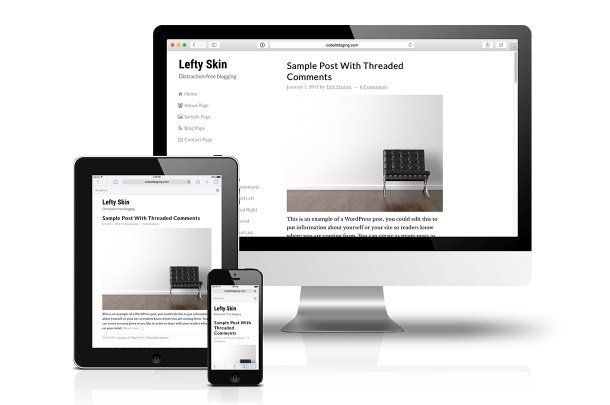
CobaltApps Lefty is a skin designed specifically for Dynamik Website Builder, a popular layout and design framework built on the Genesis child theme system for WordPress. A skin in this context is essentially a pre-built design profile that you can upload and apply to an existing Dynamik setup. Lefty leans toward a minimalist aesthetic, putting written content front and center. Its stated purpose is removing visual clutter, which makes it a good match for blogs, news sites, portfolios, or any website where the text should carry the experience rather than competing with decorative elements. The skin does not require you to start from scratch. Once installed through the Dynamik interface, it supplies the underlying styling, typography choices, and spacing structure, while still leaving the broader design controls in your hands. In plain terms, Lefty gives you a clean starting point so you do not have to assemble every style rule manually. For anyone already using Dynamik, this removes the guesswork from the early stages of building a site.
Other products to consider

 Themeforest
The main thing Lefty does is simplify how your pages look. Instead of multiple sidebars, flashy backgrounds, or heavy borders, the layout gives articles and pages room to breathe. Large readable text, quiet color choices, and restrained use of imagery define the general feel. Because it is built on Dynamik Website Builder, the skin inherits that framework's flexible grid and customization options. You can adjust column widths, header positioning, and other structural parts without touching a single line of code. The skin is also fully responsive, meaning it adapts to phones, tablets, and desktop monitors by resizing and reflowing content automatically. For site owners who want a professional, understated look without spending hours tweaking theme files, this approach saves effort. The focus remains on the reader's experience, with navigation and content hierarchy doing the heavy lifting rather than decorative flourishes. The end result is a page that feels calm and organized, even when the content underneath is dense.
On the technical side, Lefty offers two practical benefits: search engine friendliness and ease of use. Because the design is clean and the underlying markup comes from the Dynamik framework, search engines have an easier time reading your content and understanding the structure of your pages. A content-focused layout also tends to keep important text higher on the page, which is generally beneficial for SEO. For the person managing the site, the skin simplifies the decision-making process. You do not need to design a new layout from the ground up; you simply install Lefty and then use the Dynamik customizer to fine-tune colors, fonts, and layout details. This makes it suitable for someone who knows what they want the final site to look like but does not want to spend time on low-level CSS work. The controls stay within Dynamik, so there is no separate panel to learn. That translates to less time spent on upkeep and more time spent on the content itself.
What you receive is the skin file itself, packaged as a standard zip download. That file is intended for use exclusively with CobaltApps Dynamik Website Builder; it is not a standalone theme for WordPress. The skin is meant to be applied to a site that already runs Dynamik, so the existing framework handles the heavy lifting. The new design takes over the presentation layer, giving the site a consistent, minimal look across all pages. The product suits people who appreciate minimal web design but still want the freedom to adjust things later. Nothing about the skin locks you into a rigid template; it is a starting point with a strong visual identity. For editors, writers, or small business owners who value clarity and readability, Lefty offers a straightforward way to move away from crowded layouts and let the content speak for itself.
- Item type
- theme
- Category
- Wordpress Themes
- Version
- 1.4
- Availability
- In stock
- Delivery
- Digital
- Last updated
- August 12, 2026
Listed under Wordpress Themes, CobaltApps Lefty Skin For Dynamik Website Builder is a theme. This presentation keeps the product name and recorded facts intact while organizing the details for easier review.
Usage rights depend on the license selected at checkout. Review the complete terms before using this item for client work, redistribution, SaaS, or more than one end product.