Coder – Syntax Highlighter for Elementor 1.0.11
Wordpress Plugins Codecanyon 4.8 (4.5K reviews)
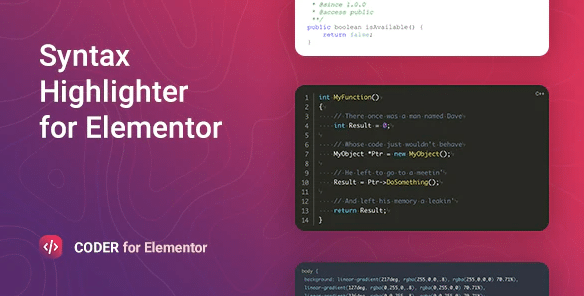
Coder is a WordPress plugin that brings syntax highlighting to Elementor, the popular page builder. It attaches directly to your Elementor workflow, allowing you to place highlighted code blocks inside your layouts without touching a single line of HTML. The plugin is built on Prism.js, a lightweight open-source syntax highlighter known for its speed and minimal footprint. When you add a code block through Coder, Prism.js processes the text and colors it according to the programming language you specify. This makes blog posts, tutorials, and documentation pages much easier to read. Instead of staring at plain, monochrome code, visitors see keywords, strings, functions, and comments in distinct colors. The result is a polished, professional look that fits naturally into any Elementor design. Because the highlighting happens inside the page editor, you see exactly how the code will appear to readers before publishing. No switching between a code editor and a browser is required just to format a few lines.
More from this category
 FacetWP
Integration with Elementor is straightforward. After installing and activating the plugin, a new Elementor widget appears in the page builder's widget list. You drag it into the canvas, paste your code, and choose the language from a dropdown. Configuration options cover common preferences like line numbers, highlighting specific lines, and selecting a color scheme. The widget sits in your Elementor layout like any other element, so you can place it inside columns, tabs, or full-width sections, and it will inherit Elementor's responsive behavior. Everything is handled through Elementor's familiar interface, so there is no separate settings page to hunt for. The plugin's easy configuration means you can set up a code block in under a minute. Because it uses Elementor's native rendering system, the highlighted output updates in real time as you edit, giving you immediate visual feedback. This tight integration removes the usual friction of copying code from an external tool and pasting formatted HTML.
Under the hood, Coder uses Prism.js, a lightweight open-source syntax highlighter. Prism.js is intentionally modular, so the plugin only loads the components needed for the languages you actually use. This keeps the page weight low and does not slow down your site. The library supports a broad range of programming languages, markup languages, and configuration formats, including JavaScript, Python, CSS, HTML, PHP, and many more. When you select a language, Coder passes that information to Prism, which then applies the appropriate tokenization rules. The plugin does not require you to manually escape code, so pasting raw snippets works as expected. Because Prism.js is widely maintained, you get reliable support for newer languages and syntax features as the library updates. The output is clean, accessible markup that search engines can still read. If your audience copies code from your site, they get plain text without any hidden formatting or extra characters.
The plugin is distributed as a standard WordPress plugin zip file from Codecanyon, the well-known digital marketplace for plugin and theme creators. Once you have the file, you install it like any other WordPress plugin via the Plugins menu. No coding knowledge is required, and you do not need to modify your theme or create child themes for it to work. For developers, technical bloggers, and anyone who teaches programming, Coder removes the hassle of manually styling code snippets. It fits into Elementor's visual editing paradigm while keeping the final output lightweight and readable. If you maintain a site where code appears regularly, this plugin gives you a simple, consistent way to present it without constantly switching between browser tabs or external highlighter services. You can use it with any Elementor layout, including single posts, pages, and custom post types. There are no complex shortcodes or custom fields to manage. Just choose the language, paste your code, and you are done.
- Last updated
- May 10, 2026
- Delivery
- Digital
- Availability
- In stock
- Version
- 1.3.0
- Category
- Wordpress Plugins
- Item type
- template kit
Coder – Syntax Highlighter for Elementor is one of the Wordpress Plugins items recorded as a template kit. The content below uses the supplied listing information and current local catalog data.
Usage rights depend on the license selected at checkout. Review the complete terms before using this item for client work, redistribution, SaaS, or more than one end product.