Content Timeline - Responsive WordPress Plugin 4.4.3
Wordpress Plugins Codecanyon 4.8 (1.7K reviews)
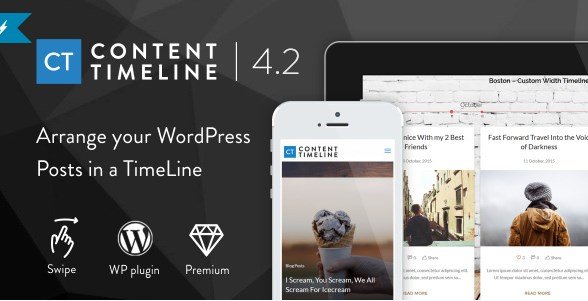
Content Timeline is a WordPress plugin built for displaying posts and categories along a sliding, horizontal timeline. Rather than showing your content in a standard list, it organizes entries chronologically on a line that visitors can move left or right. You can choose to pull in all posts or restrict the timeline to specific categories, which gives you control over what appears. The plugin is fully responsive, meaning it adapts to any screen width while keeping the timeline usable and readable. On phones and tablets, a built-in swipe function allows readers to flick through the timeline with a natural touch gesture. Desktop users can click and drag or use the visible controls. Because the timeline is driven by your actual posts and categories, it updates automatically whenever you publish new content. This makes it a practical tool for blogs, portfolios, event recaps, agency case studies, or any site that wants to present a visual history without building a custom solution.
The timeline comes with a broad set of options for changing how it looks and behaves. You can hide the navigation controls if you prefer a cleaner look, or hide the timeline bar itself and keep only the content cards. Another option lets you remove the year and month labels, so the display focuses purely on the entries. The small circular elements that mark each point on the timeline can be renamed to suit your own terminology. Altogether, this plugin includes eleven independent settings for customizing how the timeline moves and looks. These controls are grouped in the WordPress admin panel, so you can experiment with different configurations without writing any code. You can also leave everything at its default state and still get a working timeline immediately. The settings are practical rather than overwhelming, and each one has a clear effect on the final presentation. No coding is required for any of these adjustments.
Related products
 Memberpress
Content Timeline is designed to respond to more than just mouse clicks. Keyboard users can move through the timeline using their keyboard, which is helpful for accessibility and for people who prefer keyboard shortcuts. The plugin also exposes five class events that developers can hook into with custom JavaScript. These events trigger at specific moments, such as when the timeline moves or when an item becomes active. For smoother movement, the transition uses easing effects, so slides accelerate and decelerate naturally instead of jumping abruptly. Beyond those events, the plugin ships with seven embedded script control methods. The control methods are straightforward to call and work with the same timeline instance you see on the page. These methods give you a way to programmatically move the timeline, jump to a specific card, or trigger certain actions from your own code. Together, these features make the timeline flexible for use in more complex projects where a simple slider just won't fit.
The overall design of Content Timeline feels intuitive from the moment you activate it. The plugin is built around a clear visual metaphor, and the admin options are labeled in plain language, so you don't need to guess what each toggle does. It is fully flexible in the sense that it can adapt to different types of content, from brief announcements to long-form articles, and it works well on any device. The timeline is also fully interactive, meaning visitors can control when they see the next item, jump directly to a particular point, and re-engage with the content as they please. Because it runs entirely within your WordPress site, there is no external service to set up. Once installed, you can drop it into a page or post and start presenting your history in a way that is both functional and visually engaging. The interactive nature also makes it easy for site owners to keep visitors engaged with older content.
- Item type
- plugin
- Category
- Wordpress Plugins
- Version
- 1.0.2
- Availability
- In stock
- Delivery
- Digital
- Last updated
- August 9, 2026
Content Timeline - Responsive WordPress Plugin is one of the Wordpress Plugins items recorded as a plugin. The content below uses the supplied listing information and current local catalog data.
Usage rights depend on the license selected at checkout. Review the complete terms before using this item for client work, redistribution, SaaS, or more than one end product.