CROX | Esports & Gaming HTML Template Latest Version
HTML Templates Themeforest 4.8 (1.4K reviews)
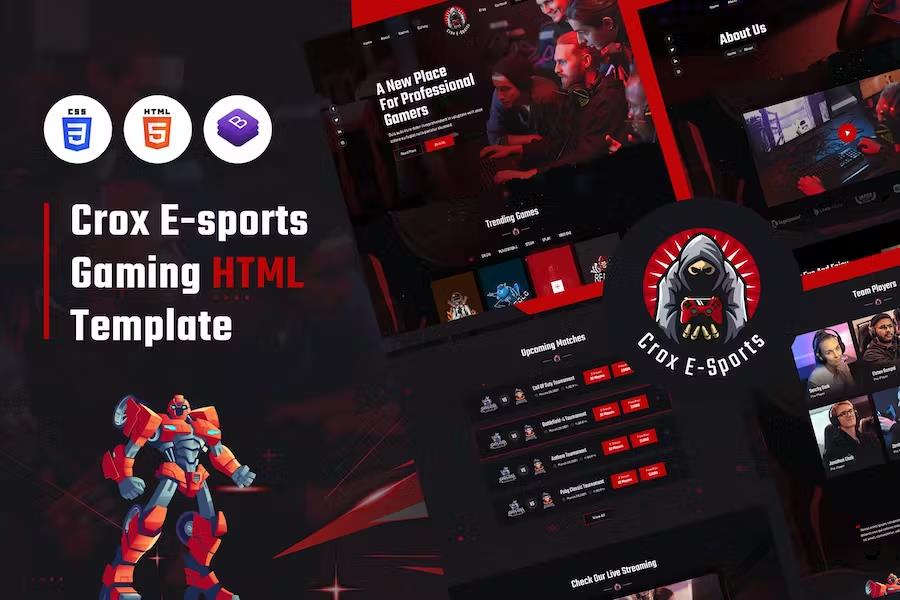
The CROX Esports and Gaming HTML Template gives creators and teams a ready-made digital foundation built specifically for competitive gaming culture. This custom design package focuses on community interaction, allowing players to connect their gaming consoles and communicate with fellow enthusiasts through a dedicated hub. The layout presents a modern, clean, and unique visual style constructed around current web development standards. Seven distinct page templates come included in the package, covering essential sections like the homepage, about pages, galleries, and match details. Site administrators can display artworks, tournament schedules, and gaming services directly to visitors using these structured layouts. Built using the Bootstrap framework alongside standard markup and styling languages, the template provides a solid architectural base for web projects. Search engine visibility is supported through clean coding practices, helping visitors find the platform easily via web searches. Browser compatibility ensures that the pages render correctly across different viewing software used by visitors daily.
Customizing the visual elements requires basic text editing software such as Notepad, Notepad++, or Adobe Dreamweaver. Modifying the text and structural content simply involves opening any of the provided HTML files inside an editor and changing the text lines to match specific project requirements. Styling adjustments follow a similar process through the main stylesheet document. Finding specific elements like banner images is straightforward by searching the code for designated selectors such as the banner container class. Changing colors throughout the site involves locating the primary color code inside the default stylesheet and replacing those values with new color selections to establish a custom visual identity. The design supports unlimited color variations, giving creators total freedom to match their team branding or personal preferences without structural limitations. Every file is organized logically within the folder directory, making the editing workflow clear for individuals who possess basic knowledge of web page construction.
Visual movement and dynamic transitions on the pages rely on a pre-integrated animation script that triggers effects as visitors scroll through the content. Adjusting these entrance motions happens by modifying or adding predefined class names directly within the HTML markup. The package includes all necessary assets and supporting files organized inside a structured directory to keep the project workspace tidy. Developers do not need to build common layouts from scratch because the template already provides fully styled components for gaming communities, team presentations, and media galleries. Each pre-built page adheres to valid coding standards to maintain consistent performance across different screen resolutions and hardware devices. Anyone building a portal for a gaming clan, streaming community, or tournament organizer will find the included layouts cover standard communication and presentation needs. The design language favors dark tones and high-contrast accents typical of modern gaming aesthetics, ensuring an authentic look right out of the box.
Setting up the template involves extracting the downloaded files and uploading them to a web hosting server using an FTP client. Local testing can be performed instantly by opening the index file in any standard web browser after unpacking the archive. Modifying the navigation menus, footer details, and social media links is accomplished by editing the relevant markup blocks found on each page. The developer documentation outlines the exact file paths for images, stylesheets, and scripts so that updates can be made quickly. Projects started with this package remain entirely independent of proprietary content management systems, giving site owners full control over their code and database requirements. Performance remains swift due to the lightweight nature of the static HTML and CSS files. Organizing tournaments, publishing match results, and sharing community artwork becomes straightforward once the pages are populated with custom text and media assets. Teams and independent gamers gain an immediate online presence that reflects professional standards within the competitive gaming industry without requiring advanced front-end development expertise.
More from this category
 Themeforest


- Last updated
- August 2, 2026
- Delivery
- Digital
- Availability
- In stock
- Version
- Latest Version
- Category
- HTML Templates
- Item type
- template
The CROX | Esports & Gaming HTML Template listing is available in HTML Templates as a template. Check the description, item facts, and purchase details to assess its relevance to a project.
Usage rights depend on the license selected at checkout. Review the complete terms before using this item for client work, redistribution, SaaS, or more than one end product.