EventoZilla - Event Calendar WordPress Plugin 1.5.3
Wordpress Plugins Codecanyon 4.8 (4.9K reviews)
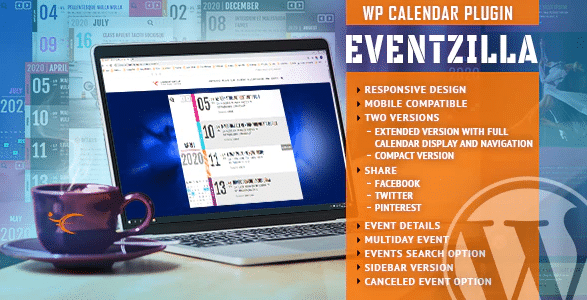
EventoZilla is a WordPress plugin built for anyone who needs a reliable event calendar. It takes the guesswork out of displaying upcoming dates, gatherings, and schedules by giving you a clean, functional calendar that fits naturally into your existing layout. The plugin is constructed to respond to the screen it is viewed on, so whether a visitor is on a large desktop monitor, a tablet, or a small phone held horizontally or vertically, the calendar adjusts its dimensions to stay readable and usable. That means no pinching, zooming, or awkward side-scrolling to see the full schedule. The result is an event display that works across every screen size. You can choose between a full-width presentation that stretches across the content area or a centered layout that sits more discreetly on the page. This flexibility makes it suitable for community sites, small business pages, or any project where the calendar needs to match the design rather than fight it.
Setting up the plugin is straightforward, which is a key consideration for WordPress users who do not want to spend hours fiddling with settings. EventoZilla was designed with an emphasis on easy configuration. Once the plugin is installed, you can get a working calendar up without having to touch a line of code. The options panel gives you control over the basic appearance and placement, so you can decide how the calendar aligns with your content and how much space it occupies. Because it connects directly with the WordPress environment, it behaves like a native part of your site rather than an external widget that looks out of place. This direct integration also means that you can manage events and calendar settings from your existing WordPress dashboard, keeping everything in one place. For site owners who have worked with other plugins, the setup process here should feel familiar and uncomplicated.
Related products
 WPForms
The calendar automatically adapts its width to whatever device is browsing the website. This is more than just a mobile-friendly claim; it is a structural feature of the plugin. Depending on the screen size and orientation, the layout shifts so that events remain clear and clickable. With the full-width option, the calendar can stretch across the entire available area, which works well for sites with a magazine-style layout or a homepage that needs to feature upcoming dates prominently. A centered option, on the other hand, creates a more contained block that looks balanced within a narrower content column. These two choices give you a quick way to match the calendar's footprint to the overall page design. Beyond these core options, the plugin includes additional settings and refinements that are covered in the official documentation. Those extras allow you to fine-tune behavior and presentation without cluttering the main interface. The result is a calendar that feels like a built-in part of your site.
For WordPress users who want to display events without wrestling with complicated coding, EventoZilla offers a practical solution. It is distributed through Codecanyon as a premium plugin, so you can expect a professionally supported codebase. Once installed, you can rely on the calendar to respond to every visitor's screen and orientation, making it a dependable piece of your site's front end. There is no need to rewrite stylesheets or build a custom post type from scratch; the plugin handles the heavy lifting while you focus on the actual events you want to publish. The straightforward configuration and responsive behavior combine to save you time during setup and maintenance. Whether your site is a small community hub or a larger content platform, the calendar's flexible layout choices work with your theme rather than against it. EventoZilla is a no-frills tool that does exactly what an event calendar should do: present your dates clearly and consistently on any device.
- Item type
- plugin
- Category
- Wordpress Plugins
- Version
- 3.5.0
- Availability
- In stock
- Delivery
- Digital
- Last updated
- September 2, 2026
The catalog entry for EventoZilla - Event Calendar WordPress Plugin is grouped with Wordpress Plugins and classified as a plugin. Available product information is shown below with related items from the local catalog.
Usage rights depend on the license selected at checkout. Review the complete terms before using this item for client work, redistribution, SaaS, or more than one end product.