Explorer - Responsive Email + Themebuilder Access Latest Version
HTML Templates Themeforest 4.8 (1.4K reviews)
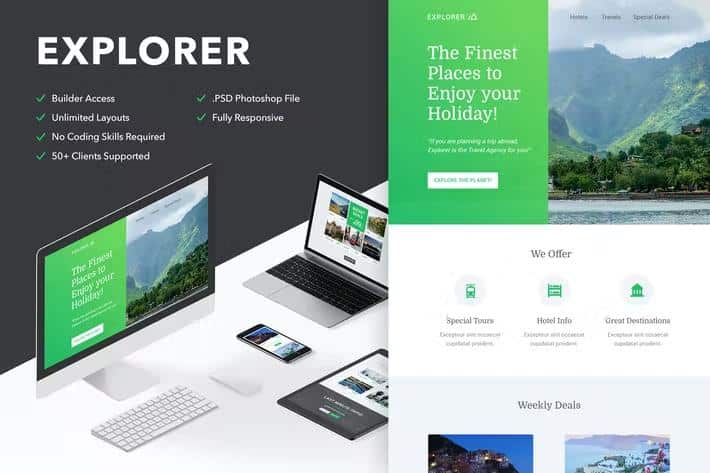
Explorer is a responsive email template for anyone who wants a polished newsletter without wrestling with code. The download includes Photoshop files if you prefer working in layers, plus ready-to-use HTML files and versions formatted specifically for MailChimp and Campaign Monitor. A documentation folder walks you through the setup. The template itself uses a full-width design with clean, commented code throughout, so if you open the HTML you can find your way around without much trouble. It renders across a broad range of email clients, from Apple Mail and Gmail to Outlook, Yahoo, AOL, Thunderbird, Lotus Notes and mobile devices like iPhone and iPad. Bear in mind that the Gmail app is not supported, and older Outlook versions may not display background images; these are standard email quirks the design accounts for. That makes it a dependable foundation whether you are building a one-off campaign or a series of monthly newsletters.
The real highlight is the free themebuilder access that comes with your purchase. You open the template in the builder and start clicking — drag modules around, duplicate them or delete them entirely. Unlimited structures mean the layout is not locked down like many newsletter templates. Colours are easy to change, text edits happen directly in place, and background images can be linked to your own custom URL. There's also undo and redo for your experiments. A responsive preview mode shows how your newsletter looks on desktop versus mobile before you export. Exporting is as simple as saving the file to your desktop for use elsewhere. If you plan to use Campaign Monitor, there's dedicated support: text, buttons and images are all editable there, and Repeater and Layout tags are included, though the builder does not support every single feature in that platform. The whole thing works visually, so you are never forced to touch the markup unless you want to.
Similar products
 Themeforest
Compatibility is broad. The template works with MailChimp, Campaign Monitor, FreshMail, ActiveCampaign, StampReady, iContact, Constant Contact and Aweber, so you have real options depending on which service you prefer. On the desktop client side, it covers Apple Mail, AOL, Outlook.com, Yahoo Mail, Thunderbird, Microsoft Outlook back to 2003, Outlook Express, Windows Mail, Lotus Notes 8 and 8.5, and OperaMail. Mobile coverage includes iPad and iPhones through the 6 and 6+. That range of support is useful in a pre-built template because email clients behave so differently across devices and versions. Custom Google Fonts are supported in clients like iOS Mail, Apple Mail, the default Android client, and Thunderbird; other clients simply fall back to standard web fonts, which is a sensible safety net. Keep in mind that the image files used in the demo are not part of the download, so you will need your own images, but the template credits list free resources you can use.
A few practical points based on the most common questions. The builder itself is not included as something you host on your own server — it's a hosted tool you access after purchase. You'll receive the standard .html newsletter file, plus separate files formatted for MailChimp and Campaign Monitor, so importing into those services is straightforward. That means less fiddling around at the import stage when you just want to get a campaign out the door. If you need help with small customizations, the support team is available to assist. For Gmail background images that won't stretch full width, the fix is to upload a larger background image so it fully covers the area, since Gmail doesn't support CSS background images. Custom web fonts render in the clients mentioned above; the rest default to a standard fallback. The template credits acknowledge free resources like Unsplash, Dribbble, and Picjumbo — images are not included, but plenty of free options exist.
- Last updated
- August 2, 2026
- Delivery
- Digital
- Availability
- In stock
- Version
- Latest Version
- Category
- HTML Templates
- Item type
- theme
This page summarizes the available listing data for Explorer - Responsive Email + Themebuilder Access in HTML Templates. The item type is recorded as theme, with further details shown below.
Usage rights depend on the license selected at checkout. Review the complete terms before using this item for client work, redistribution, SaaS, or more than one end product.