HTML5 Audio Player WordPress Plugin 3.5.6
Wordpress Plugins Codecanyon 4.8 (2.2K reviews)
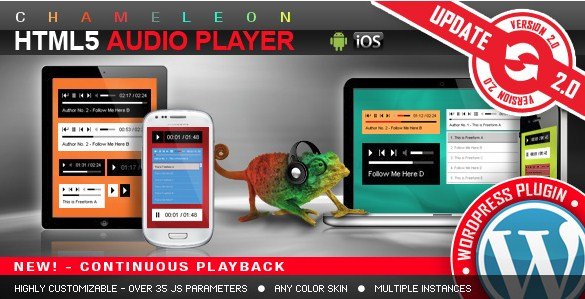
HTML5 Audio Player is a WordPress plugin that puts audio files directly in your site through a shortcode. Visitors never get bounced to an external service; the player appears right inside a post, page, or sidebar, and listening starts without opening a new tab. The plugin works in two modes. It can display as a full-featured player with a visible control bar, which suits musicians posting a single track, podcasters adding an episode to a written article, or course creators attaching a short lecture clip. Alternatively, it can run in the background, playing a gentle soundtrack behind your content with no visible player shown at all. Everything follows the native HTML5 audio standard, so there is no Flash add-on or third-party script to keep updated; the browser itself handles decoding and playback. Adding the player to a page is a shortcode job, typically one line of text pasted into the editor, which keeps the workflow quick for anyone who publishes audio regularly.
Color customization runs through the plugin settings, where you can match the player visually to your site. The main button color, the progress bar shade, and the highlight tones that appear while a track is playing are all adjustable. If a site uses a dark header and a light content area, you can adjust the player per position rather than living with a generic skin. Individual interface pieces can be shown or hidden separately, so a minimal player and a full-featured player use the same plugin. That leaves you with a stripped-down icon-only player in the sidebar, or a complete transport bar on a featured post. Optional parameters in the shortcode handle the rest, so two players on the same site never need to look or behave identically. Configuration stays in one place within the WordPress admin, so defaults are set once and individual placements are tweaked through the shortcode.
Similar products

 Fooevents
The player is designed to work on phones and tablets, not just desktop browsers. Controls respond to touch, so visitors can tap play, drag the progress bar, or adjust volume without a mouse. Sizes adjust to the screen, keeping the player proportions intact on a narrow phone display and on a wide desktop layout. This matters if a fair amount of your visitors come from social media links, where audio content often gets opened directly in a mobile browser. For someone listening on a commute, the standard HTML5 controls behave the way people already expect, with playback handled by the phone's native audio system. Responsive behavior also means you do not need a separate mobile theme or a second plugin just to keep audio playable. Whatever you record and upload to the WordPress media library is the same file your mobile visitors hear. A podcast episode, a band demo, or a spoken intro all sound as you intended on any device.
You receive the plugin as a single zip archive, exactly as the original developer published it. Installation happens through the WordPress admin panel under Plugins, and after activation the plugin is ready to configure. There are no subscription services, no accounts on an external audio platform, and no streaming fees attached to the plugin itself. Full control over your media files remains with you, and the audio plays from your own hosting. The plugin was originally listed by the Codecanyon marketplace, where its documentation covers each shortcode option and color setting. It explains the small details, like how each shortcode option is applied and the effect of changing the color values. Nothing needs to be compiled, no API key is requested, and no separate player app has to be downloaded. If you run a WordPress site and want a direct way to present audio, this plugin does it in one package, without sending visitors elsewhere.
- Last updated
- August 9, 2026
- Delivery
- Digital
- Availability
- In stock
- Version
- 6.2.4
- Category
- Wordpress Plugins
- Item type
- plugin
The catalog entry for HTML5 Audio Player WordPress Plugin is grouped with Wordpress Plugins and classified as a plugin. Available product information is shown below with related items from the local catalog.
Usage rights depend on the license selected at checkout. Review the complete terms before using this item for client work, redistribution, SaaS, or more than one end product.