Ice Cream Animated Banner Google Web Designer Latest Version
HTML Templates Codecanyon 4.8 (1.7K reviews)
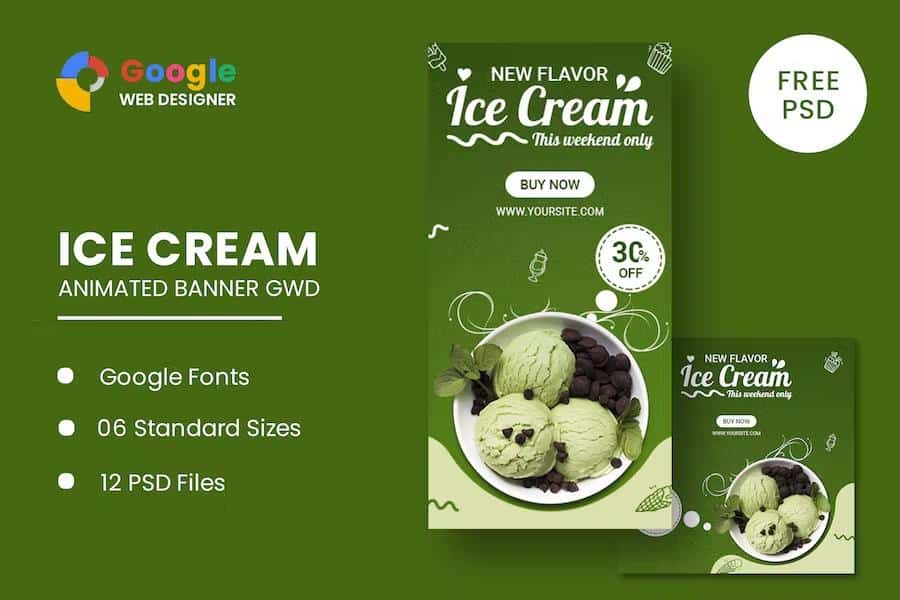
Putting together animated HTML ads from scratch can take hours, especially when you need multiple sizes. This product is a collection of animated banner templates with a cheerful ice cream theme, built for businesses that want professional display ads without hiring a designer. The six standard sizes are 160×600, 180×150, 300×250, 300×600, 320×50, and 728×90, so you can run the same campaign across skyscrapers, rectangles, leaderboards, and mobile strips. Each template is made with Google Web Designer, which means the animation relies on HTML5 and CSS3 effects instead of obsolete plugins. You receive a finished ad that already moves and transitions smoothly; your job is to drop in your own product images, change the wording, and adjust the colors to match your brand. The included Google Web Fonts help maintain clean, consistent typography in every size, so the banners look like one cohesive set rather than six separate designs. Consistency matters across ad networks.
The download includes six HTML ad templates that are ready to use, plus twelve PSD banner templates for more involved editing. The HTML files are the finished product; you can open them in Google Web Designer and publish them directly as display ads. Each one already contains the full animation timeline, interactive hover states, and exit links. The PSD files are the layered source artwork. If you want to rearrange the composition, swap out background decorations, or create a custom variant that isn't included in the six sizes, you do that in Photoshop first and then bring the pieces back into Google Web Designer. Having both formats gives you flexibility. You can make quick text changes directly in the HTML files, or go deeper and replace every visual element using the PSD source. For someone managing an ad budget, this saves hours of repetitive coding because the motion design and responsive behavior are already handled.
Similar products
 Themeforest
Google Web Designer is the free tool used to build these banners, and you will need it to make any changes. It runs on Windows and Mac and is built for creating interactive HTML5 content, so you do not need to write code by hand. The animation effects are all CSS3 based, which means they play smoothly in modern browsers on desktop and mobile. The project files are organized clearly: the layers panel labels each element, and the timeline handles the animation curves and keyframes. Editing text is as simple as double-clicking the headline. Colors can be changed through the swatches. You can even swap in a different Google Font if the included one does not match your brand voice. The learning curve is gentle because the interface uses familiar design tools like shapes, drawing tools, and a properties panel. If you have used any animation software before, you will feel at home quickly.
One thing to know before you start: the photos you see in the preview screenshots are for display purposes only. They are not bundled with the download. The templates use placeholder images created by individual photographers and designers, and the product notes ask you to credit those authors if you keep their images. The cleanest solution is to replace the placeholders with your own product photography, licensed stock images, or free images from a source like Unsplash or Pexels. This is common with template packs, and it means the final ad will have your actual branding rather than generic ice cream photos. The PSD files make this swap simple: each image sits on its own layer, so you can double-click the thumbnail to place a new photo. The HTML files also reference image files in a folder, so you can overwrite them without touching the code. After the images are replaced, the animations still work unchanged.
- Item type
- template
- Category
- HTML Templates
- Version
- Latest Version
- Availability
- In stock
- Delivery
- Digital
- Last updated
- September 8, 2026
This listing covers Ice Cream Animated Banner Google Web Designer, a HTML Templates from template. Use the source description and recorded item details below to check whether it fits the intended project.
Usage rights depend on the license selected at checkout. Review the complete terms before using this item for client work, redistribution, SaaS, or more than one end product.