Instagram Feed Box WordPress Plugin 1.0.0
Wordpress Plugins Codecanyon 4.8 (4.6K reviews)
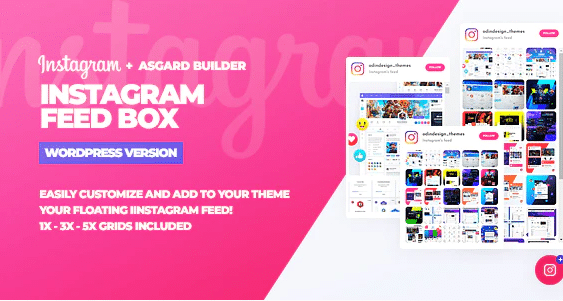
Managing social media content alongside a personal blog or business site often requires extra plugins that connect different online platforms directly to your WordPress dashboard. Instagram Feed Box is a specific tool built for website administrators who want to display their personal or brand photo albums right on their pages. Instead of manually uploading pictures twice or sending visitors away from your main domain to view your latest posts, this software pulls your visual media straight onto your layout. Visitors can browse your gallery items without ever leaving the page, creating a unified browsing experience that keeps people interested in your brand. Setting up the display involves connecting your social account credentials through the standard plugin settings page and placing the resulting widget elements wherever you want them to appear on your site layout. Photographers, travelers, restaurants, and online shops frequently use this exact method to showcase fresh visual updates directly to their web audience. Clean code architecture ensures that your pages load properly while displaying your imported photo grids correctly across desktop screens, tablets, and smaller mobile devices.
Configuration options allow you to choose how many pictures appear in your gallery and arrange them in specific grid layouts that match your existing site design. Proper setup takes only a few minutes because the interface avoids complicated technical menus and sticks to straightforward settings fields. You simply authenticate your social account connection, select your preferred display style, and generate the shortcode needed for placement inside your posts or sidebars. Standard WordPress customization tools also let you adjust margins, borders, and image spacing to fit the visual identity of your blog or online storefront. Displaying real-time updates from your photo album helps maintain an active, fresh feel on your homepage without requiring constant manual updates to your site files. Visitors viewing your posts will see your latest uploaded media immediately reflected in the active gallery feed without any complicated caching delays or broken image links getting in the way.
Similar products
 AIT Plugins
Plugin integration happens directly inside the standard WordPress administration dashboard where you install other site addons and manage regular theme files. You upload the provided archive package through the default plugin upload screen, activate the software, and locate the new menu item added to your sidebar controls. Standard WordPress security practices apply to this installation, and the plugin respects your current theme styling to prevent visual conflicts or layout breaks. Maintaining your public gallery requires very little ongoing maintenance once the initial connection gets established between your website and the social platform. Photos automatically update according to your feed parameters, keeping your web pages current with your latest mobile uploads and professional photography posts. Site administrators appreciate having a direct method for sharing social media galleries that does not require writing custom code or hiring a developer to build an integration from scratch.
Performance considerations remain important for any site displaying external media files, and this plugin handles image loading efficiently to protect your page speeds. Caching mechanisms store local copies of your feed data temporarily, reducing the number of external requests made every time a visitor loads your homepage. This thoughtful approach helps your pages open quickly while still presenting an accurate, up-to-date representation of your public photo gallery. Compatibility with standard caching plugins and page builders means you can drop your social feeds into custom layouts, landing pages, or footer widgets without experiencing unexpected software conflicts. Anyone running a WordPress site who wants to bridge the gap between their photo albums and their web visitors will find this tool handles the technical connection smoothly. Clear documentation from the original author assists with any specific configuration questions that might arise during your initial setup process on a live server environment.
- Last updated
- August 9, 2026
- Delivery
- Digital
- Availability
- In stock
- Version
- 2.0.2
- Category
- Wordpress Plugins
- Item type
- plugin
Instagram Feed Box WordPress Plugin is one of the Wordpress Plugins items recorded as a plugin. The content below uses the supplied listing information and current local catalog data.
Usage rights depend on the license selected at checkout. Review the complete terms before using this item for client work, redistribution, SaaS, or more than one end product.