James - Responsive Email + Online Template Builder Latest Version
HTML Templates Themeforest 4.8 (362 reviews)
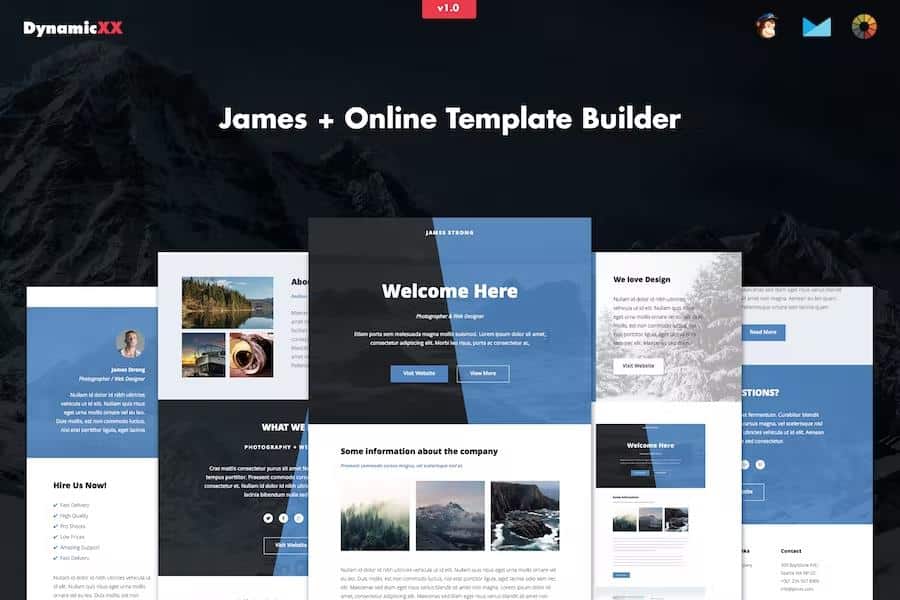
James is an online builder for crafting responsive email templates and web layouts without writing a line of code. You work on a visual canvas where each part of the design is a module that can be dragged into position, duplicated when you want a matching section, or hidden when it doesn't belong. The output is a single HTML file that adapts to any screen, from a narrow phone to a wide desktop display. That responsiveness is built into every template, so you don't have to adjust spacing or font sizes manually for different devices. The tool is suited for people who need to produce clean, professional-looking emails quickly, but who don't have the time to hand-code each one. Everything you need to build, adjust, and export a template lives in the same online workspace, and your projects stay manageable even as you work on larger layouts. You can save your progress and return later without losing anything.
Building a layout starts by choosing a structure and then replacing the placeholder content with your own. Dragging modules around the canvas reorders the page, and the duplicate option lets you copy a card, a button, or a whole section in one click. Hiding a module keeps it in the file but removes it from the rendered design, which is handy when you have blocks that only appear in certain versions. Colour changes are applied by selecting a new value from the picker, and text updates happen directly on the canvas, so you see the result immediately. Background images can be pulled from your computer or from a URL, and any element can carry a link. The preview mode renders the template the way a recipient will see it, and redo/undo covers those last actions. When the layout is ready, export it as an HTML file to your desktop. The upload option brings an existing file into the builder for further editing.
Similar products

 Themeforest

The generated templates have been put through Litmus testing, which means they're checked against the rendering quirks of the most common email clients. They also pass W3C validation, so the underlying HTML is clean and standards-compliant. Every layout uses a full-width, responsive structure, so it stretches to fill a desktop screen and collapses gracefully on smaller phones and tablets. Email clients covered include Apple Mail, AOL, Outlook.com, Yahoo Mail, Thunderbird, Microsoft Outlook 2003 through 2010, Outlook Express, Windows Mail, Lotus Notes 8 and 8.5, OperaMail, Live Mail, Notes, and the native mail apps on iPad and iPhone 4 through 6 and 6+. Some limitations exist on the rendering side. The Gmail app for Android is not supported, and Outlook will swap background images for a solid colour and replace custom fonts with a standard web font when it displays your message. These are known constraints of the clients themselves, not defects in the builder.
Once you export the HTML file, you can move it into the email platform you use. The templates are compatible with MailChimp, Campaign Monitor, Constant Contact, iContact, and Aweber, so you can import the file and continue with your existing subscriber lists and campaigns. Because the output is standard HTML, it also works outside those five services, as long as the destination accepts custom-coded emails. The builder itself is where all the design work happens, and the finished file carries over the structure, styles, and responsive behaviour you set up in the canvas. The same file can be reused across multiple services without re-doing the design work. One practical detail: the images shown in the live previews on the product page are not included in the download package. Those are just visual examples, so you'll want to replace them with your own photos and graphics before sending the final version. The template is the tool's deliverable; the imagery is up to you.
- Last updated
- August 2, 2026
- Delivery
- Digital
- Availability
- In stock
- Version
- Latest Version
- Category
- HTML Templates
- Item type
- template
This page summarizes the available listing data for James - Responsive Email + Online Template Builder in HTML Templates. The item type is recorded as template, with further details shown below.
Usage rights depend on the license selected at checkout. Review the complete terms before using this item for client work, redistribution, SaaS, or more than one end product.