Logger - Changelog & Custom List for Elementor 1.0.7
Wordpress Plugins Codecanyon 4.8 (1.6K reviews)
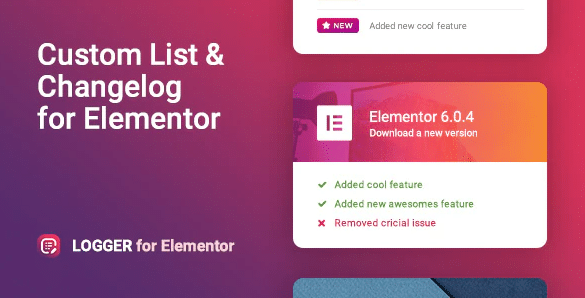
Logger is an add-on widget for Elementor that lets you build a formatted list of product changes, version notes, or any set of details you want to show in a clean, ordered layout. Instead of manually coding an HTML list or using a generic text block, you drop the widget into any Elementor-powered page and start adding entries. The plugin comes as a standard file from Codecanyon, so installation follows the usual WordPress process: upload, activate, and the widget appears in the Elementor panel. Its purpose is straightforward—turn raw version history into a legible changelog that visitors can browse without getting lost. You control what goes into each line, from the version number to the description, and the widget handles the visual formatting for you. This makes it especially useful for developers, product managers, or anyone who maintains a site with frequent updates. The widget is built to work with Elementor’s interface, so there is no separate settings page to learn.
Setting up the widget is straightforward. You add it to a section, then fill in each entry with the information you want to appear. The layout keeps each change separate, so readers can scan through updates without confusion. You can include a version label, a short heading, and a longer description for every item. If your product has a long history, you can add as many entries as needed and reorder them easily. The widget follows Elementor's styling system, so colors, typography, spacing, and borders match the settings you already use. The list looks like a native part of your design. Basic tasks like sorting entries or marking the latest release take only a few clicks, and the preview updates immediately. No code is required, and the backend stays clean—each item appears in a simple editable form. You can also decide which fields are visible, keeping the list as minimal or as detailed as you want.
This widget is called "Logger," but it works for more than just product updates. The same list structure suits any situation where you need to present a sequence of items with dates, labels, or short descriptions. For example, a team might use it for internal release announcements, a documentation site could list API changes, or a content-driven page might show a chronological history of revisions. Because it is a custom list widget, the content is fully flexible—you decide what each entry contains and how many entries to include. The plugin does not lock you into a specific template or force a certain number of fields. This flexibility is what separates it from a plain text editor: you get a consistent layout without giving up control over the actual content. If your needs change later, you can simply edit the entries in the widget or rearrange them without rebuilding the entire section.
The practical benefit is that your changelog or list stays organized without extra design work. Since the widget lives inside Elementor, everything you already know about building pages applies here—drag it where you want it, style it with the standard controls, and see the result instantly. The plugin is distributed through Codecanyon, which means you receive the same zip package as any other buyer. There are no subscription mechanics or hidden requirements beyond having Elementor installed and active on your WordPress site. That is the only dependency, and it is a common one for people who use this page builder. Once the widget is in place, it simply does its job: presenting your list cleanly and letting readers focus on the changes themselves. For anyone who regularly publishes version notes or maintains any kind of itemized record, Logger removes the repetitive part of formatting and leaves you with a straightforward, dependable tool.
 PaidMembershipPro


- Item type
- template kit
- Category
- Wordpress Plugins
- Version
- 1.0
- Availability
- In stock
- Delivery
- Digital
- Last updated
- August 9, 2026
This page summarizes the available listing data for Logger - Changelog & Custom List for Elementor in Wordpress Plugins. The item type is recorded as template kit, with further details shown below.
Usage rights depend on the license selected at checkout. Review the complete terms before using this item for client work, redistribution, SaaS, or more than one end product.