Marketing Animated Banner Google Web Designer Latest Version
HTML Templates Codecanyon 4.8 (4.2K reviews)
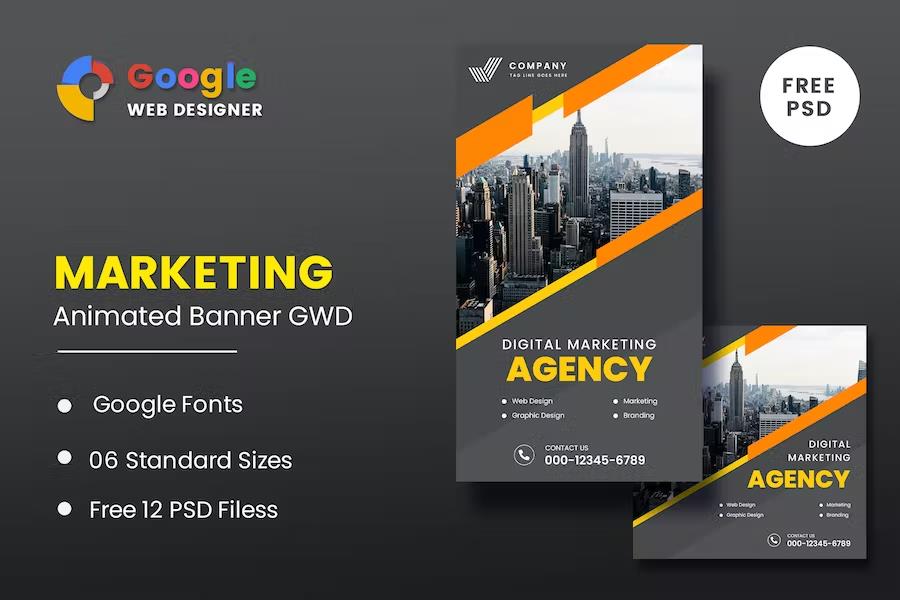
Marketing Animated Banner Google Web Designer is a set of HTML5 ad templates built specifically for Google Web Designer, a free application from Google. Instead of constructing animated ads from an empty canvas, you open one of these project files and find a fully designed layout with motion, layering, and clickable elements already coordinated. The collection covers a wide selection of standard display sizes, including 300x250 medium rectangles, 728x90 leaderboards, 300x600 half-page ads, 160x600 wide skyscrapers, 468x60 banners, 120x600 vertical banners, and mobile-friendly 320x50 and 320x100 formats. This lets you use the same visual style across many placements. The movement and interactivity run on CSS animations and JavaScript, which keep the files lightweight and compatible with modern browsers. Every element is editable within the Google Web Designer interface, giving you a straightforward timeline-based workflow for fine-tuning timing and transitions. These are practical, production-ready ads for real campaigns. They work on standard display networks.
Similar products
 Themeforest


While the templates come fully designed, the content is meant to be swapped out. You can replace placeholder images with your own product photos, change the text to reflect your offer, adjust button labels, and apply your own colors and fonts to match your brand. Since the project files are structured in layers, editing one section does not break the rest of the animation. The HTML and CSS are cleanly organized, so more advanced users can dig into the code if they want deeper changes. Because the output is standard HTML5, the finished banners run in Chrome, Firefox, Safari, Edge, and Opera. The design scales to different screen sizes without losing clarity, and the animation timing remains consistent across devices. The files also load quickly, which is important for ad placements that measure user experience. You can also create new combinations by mixing elements from different templates. This flexibility means one template pack can power an entire campaign.
The download contains Google Web Designer project files with .gwd extensions, along with the underlying HTML, CSS, and JavaScript resources. To work with these templates, you need Google Web Designer installed on your computer; it is free to download from Google. The product has been updated over several releases, with changes that added new banner dimensions, refined animation easing, improved cross-browser rendering, and reduced file sizes. The latest version includes a set of carefully tuned animation sequences and updated color options for easier brand matching. There are documentation files that explain how to adjust elements and prepare the finished ad for publishing. If you need a banner size that is not in the list, you can create a custom canvas in Google Web Designer and copy the existing elements into it. Because the full source code is included, nothing is locked down, and you can modify the files however your project requires.
This template pack is aimed at people who need professional animated ads without building a production pipeline from scratch. Marketing teams can prepare campaign creatives in a single afternoon. Freelance designers can hand off editable project files to clients who want to make small updates later. Small business owners who do not have a dedicated design department can produce visually consistent ads themselves. The workflow is simple: open a template, replace the text and images, check the animation in the preview mode, and export the file as HTML5. The resulting ad can be uploaded to advertising platforms that support HTML5 files, including Google Ads and other major display networks. There is no requirement to write code or understand JavaScript, though the code remains accessible for those who want to fine-tune it. The finished banners work for e-commerce promotions, event announcements, seasonal sales, and similar time-sensitive campaigns. They are especially handy when you need multiple ad variations in different sizes for A/B testing.
- Item type
- template
- Category
- HTML Templates
- Version
- Latest Version
- Availability
- In stock
- Delivery
- Digital
- Last updated
- August 2, 2026
Marketing Animated Banner Google Web Designer appears in the HTML Templates catalog and is classified as a template. The page focuses on information available in the listing rather than unsupported performance or compatibility claims.
Usage rights depend on the license selected at checkout. Review the complete terms before using this item for client work, redistribution, SaaS, or more than one end product.