Medical Animated Banner GWD Latest Version
HTML Templates Codecanyon 4.8 (685 reviews)
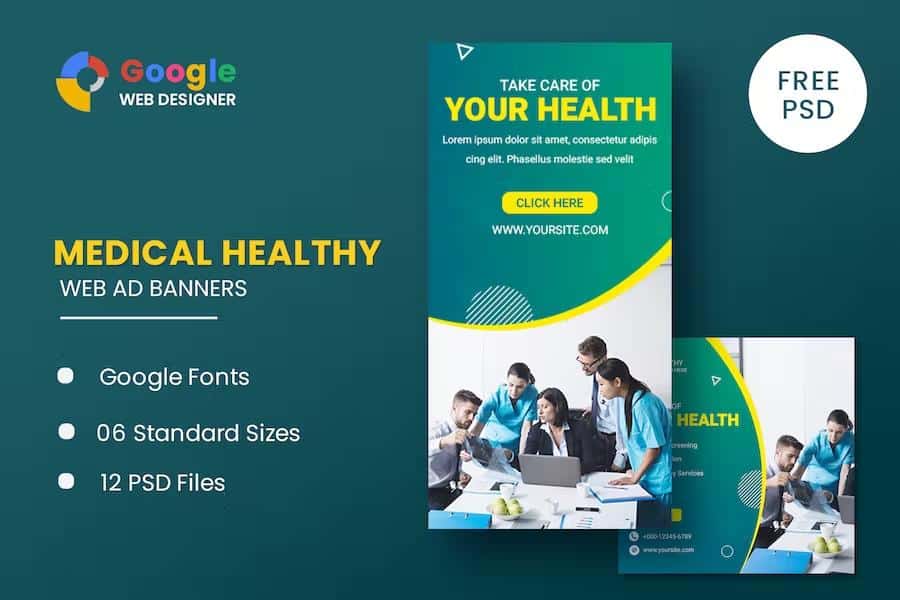
Here is a bundle of animated banner templates designed specifically for medical and healthcare advertising. Inside, you get six ready-to-use HTML5 ad templates and twelve PSD banner templates, all made with Google Web Designer, so every file stays editable in that free program. Each design follows a clean, professional medical look, with layouts suited to clinics, hospitals, pharmacies, dental practices, and similar businesses. Standard display sizes cover the most common web ad placements: 160×600 for a wide skyscraper, 180×150 for a small rectangle, 300×250 for a medium rectangle, 300×600 for a half-page, 320×50 for mobile, and 728×90 for a leaderboard. Both HTML and PSD versions are provided for every size, meaning you can switch between animated and static production without recreating the design. Dimensions are pre-configured, so there is no need to adjust the canvas or worry about aspect ratios. That makes it easy to launch a coordinated campaign across different ad slots.
All animations are built with HTML5 and CSS3 effects, which keeps the banners lightweight and based on open web standards. Instead of relying on Flash or heavy JavaScript libraries, these templates use standard web technologies that run natively in browsers. Text in the banners is set using Google Web Fonts, meaning the typography remains crisp and readable without requiring you to install or embed font files. Because the projects are native Google Web Designer files, every element can be edited directly in that application. You can change the headline text, adjust the background color, reposition objects, modify the animation timing, update the call-to-action button, and add your own destination links. PSD files accompany the HTML templates, giving you the same layouts as layered Photoshop documents. These two file types share the same design. This means you can produce alternate versions, create static fallback banners, or fine-tune the artwork down to individual pixels before exporting.
Related products
 Themeforest
A few important details to know before you download. Photographs and illustrations shown in the demo previews are not included in the package. Those images belong to their original creators and are used only for display purposes. If you want to run your banners with the exact same visuals, you must reach out to the image authors and get permission, or simply substitute your own photos and graphics. PSD templates make this exchange simple because every layer is clearly labeled, so you can drag in a replacement image without shifting other elements. HTML files are equally easy to update inside Google Web Designer; just point the image source to your own file. This workflow keeps the final product legally clean and lets you tailor the visuals to your specific service or branding. Placeholder graphics are there to show the intended style, not to act as a free stock photo library.
For a medical practice, a health blog, or an advertising agency working on a healthcare account, this template bundle covers the busy part of banner production. You get a consistent visual system across six common ad sizes, so your animated message stays recognizable whether someone sees it on a mobile phone, a desktop sidebar, or a wide page header. The project files are built for Google Web Designer, which is free software, so you can open, edit, and export the banners without buying any additional tooling. If you already work in Photoshop, the included PSDs let you create static versions or adjust the artwork in a familiar environment. All the standard dimensions are already set, and the animation structure is in place, which means your main job is to add your own text, logo, and approved images. Once that is done, you can preview the animations in the editor and export the final HTML files for ad servers that accept HTML5 creatives.
- Item type
- template
- Category
- HTML Templates
- Version
- Latest Version
- Availability
- In stock
- Delivery
- Digital
- Last updated
- August 2, 2026
For shoppers browsing HTML Templates, Medical Animated Banner GWD is recorded as a template. The page below separates supplied product information from general store and license terms.
Usage rights depend on the license selected at checkout. Review the complete terms before using this item for client work, redistribution, SaaS, or more than one end product.