Medicust - Health and Medical XD Template Latest Version
HTML Templates Themeforest 4.8 (4.3K reviews)
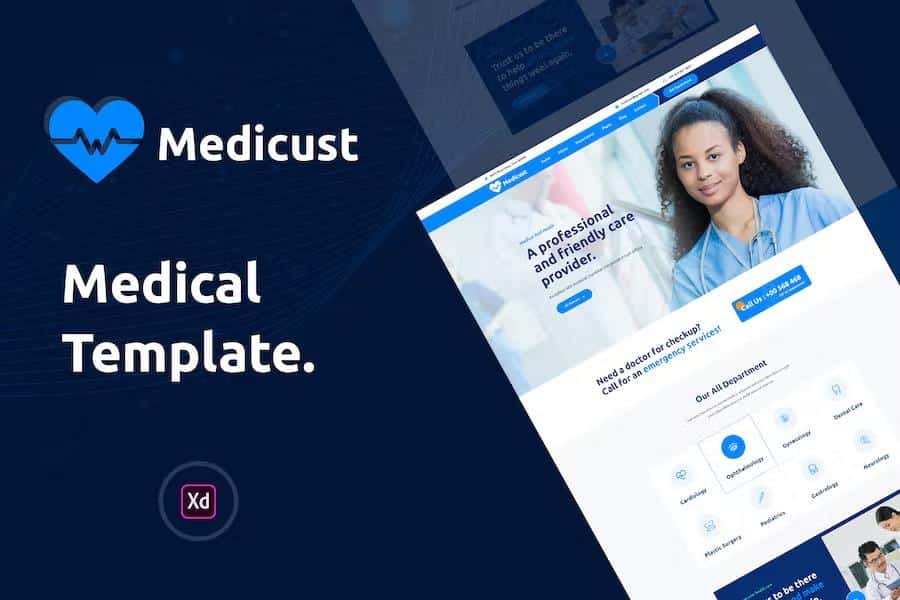
Medicust is a digital layout file created for clinics, hospitals, independent doctors, and pharmacy businesses. Medical practitioners such as general surgeons, ophthalmologists, psychiatrists, dentists, psychologists, physiotherapists, veterinarians, and gynecologists can use these pre-designed pages to build their web presence. The layout structure originates from a study of existing medical websites, gathering essential sections onto a single canvas to display professional services clearly. Multiple homepage areas give business owners space to highlight treatments, introduce staff members, and promote medical products directly to visitors. Customizing the appearance relies on a flexible color palette that allows administrators to change hues easily, while image placeholders accept custom photographs to match individual branding needs. Building this project requires the Adobe XD application along with specific typography files mentioned in the accompanying documentation. Anyone planning to construct a medical website will find that this layout offers a structured starting point for organizing information neatly on desktop and mobile screens.
The layout package contains seven distinct page files built for Adobe XD. First in the sequence is the main homepage layout, which establishes the primary visual style for the entire site. Second is the about page, giving organizations space to share their background, mission statements, and staff credentials. Third is the department details layout, which focuses on specific medical services and specialized care options. Fourth and fifth are the blog and blog details layouts, intended for publishing articles, health tips, and clinic updates. Sixth is the contact layout, featuring a map area and messaging fields so patients can reach out easily. Seventh is the standard 404 error page layout for handling broken links on the domain. A PDF documentation file accompanies these designs to explain basic setup steps for new users. Every screen adheres to a standard 1170 pixel grid system to keep visual alignments consistent across different viewports. Designers constructed these digital canvases using established user interface elements and grouped folders to keep the workspace tidy.
Layer organization follows a logical hierarchy within the Adobe XD file structure. Folders group related interface items together, helping editors locate specific buttons, text boxes, and background graphics quickly. Active and hover states are included for interactive elements, providing visual cues for how buttons should react when clicked or hovered over by a site visitor. FontAwesome and Flaticon symbol sets supply the iconography throughout the layouts, while Google Fonts provides the Ubuntu typography used for headings and body copy. Modifying these assets simply requires selecting individual layers from the sidebar panel inside the editing software. Colors adapt to brand requirements through straightforward palette adjustments, and the placeholder graphics can be swapped out for real photography. Because stock photographs from the preview are excluded from the purchase, site owners must supply their own imagery to populate the visual spaces. The underlying framework remains entirely open to modification, letting developers adapt the design to fit particular institutional preferences or regional healthcare requirements without starting from scratch.
Working with this template requires a compatible desktop system and an active installation of Adobe XD. Users must also download and install the Ubuntu font family onto their operating systems to ensure text renders correctly across all artboards. The provided documentation outlines the initial preparation steps for getting the workspace ready for editing. Professionals familiar with vector design software will recognize the standard layer naming conventions and grouping methods used throughout the project files. Building a functional website from these visuals requires exporting the graphic assets and writing separate code, since this product consists solely of design files rather than a live content management system theme. Healthcare providers, web designers, and digital agencies often use such visual layouts to present concepts to clients before writing any code. By organizing all essential medical website sections into a cohesive visual format, the product saves layout time and establishes a clear blueprint for the final development phase of the project.
 Themeforest
- Last updated
- August 2, 2026
- Delivery
- Digital
- Availability
- In stock
- Version
- Latest Version
- Category
- HTML Templates
- Item type
- template
The Medicust - Health and Medical XD Template listing is available in HTML Templates as a template. Check the description, item facts, and purchase details to assess its relevance to a project.
Usage rights depend on the license selected at checkout. Review the complete terms before using this item for client work, redistribution, SaaS, or more than one end product.