MEETUP - Events Responsive Email Template With Mailchimp Access Latest Version
HTML Templates Themeforest 4.8 (2.5K reviews)
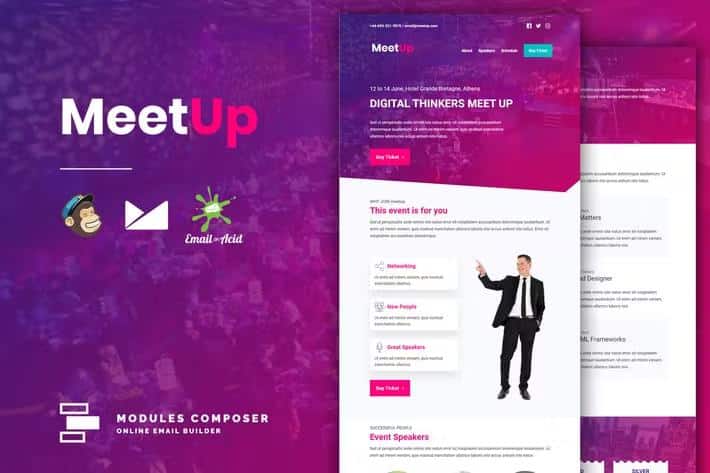
MeetUp is a responsive email template built specifically for event announcements, conference invitations, and startup newsletters. Instead of forcing you to work with a single fixed layout, it gives you a set of pre-designed modules that can be arranged, edited, and swapped to create your own design. You can change text, links, images, and background colors without touching code because the template works with Modules Composer, a simple drag-and-drop style online builder. That means you can assemble a polished email in a short session, then save it and send it to your audience. Each module can be reordered or duplicated, giving you unlimited variations without starting over. The template follows a modern, minimal aesthetic, so your content stays the focus rather than the decorations around it. It also includes instructions for getting started, which is helpful if you are new to email design. The result is an email that feels tailored to your event.
The biggest practical advantage here is compatibility. MeetUp includes a dedicated Mailchimp version, and also exports clean HTML that works with Campaign Monitor, Klaviyo, HubSpot, and dozens of other email service providers, including ActiveCampaign, Constant Contact, Sendinblue, MailerLite, Marketo, ConvertKit, and more. That removes the headache of having to rebuild your email inside each platform's editor. The exported files come as HTML or ZIP, and each platform's native features remain supported during customization. If you plan to send through a popular service or a private server, the template gives you a solid starting point. The underlying code is organized and commented, so small adjustments by hand are straightforward. Modules Composer handles visual editing, while the raw HTML remains available for fine-tuning. This dual path means you are never locked into one editing style. You can move from design to send without extra friction. A how-to guide walks you through the upload steps for the major providers.
More from this category
 Themeforest
Design-wise, MeetUp is built to look sharp on any screen. It uses responsive coding so the layout stacks and resizes cleanly on phones and tablets, and it's retina ready, so images and text stay crisp on high-resolution displays. The template supports external image hosting, meaning you can store your photos on your own server or media library and simply update the URLs—no need to embed heavy files. Background images are also supported, including in Outlook, which is often a tricky requirement. For typography, you can choose from over 900 Google Fonts and apply them across the email. The content management setup lets you style text, add links, swap images, and adjust backgrounds from a visual dashboard. The design itself is minimal and clean, which makes it easier for readers to focus on your event details rather than distracting visual noise. Text remains legible, buttons stay tappable, and images scale properly. This level of polish matters when recipients open your email on the go.
The purchase includes three ready-to-use files: a standalone HTML version, a Mailchimp version, and a Campaign Monitor version. The standalone file works with any email service that accepts custom HTML, so you are not restricted to just the big names. MeetUp has been tested across a wide range of email clients, including Gmail web and mobile, Outlook 2003 through 2016, Apple Mail, Yahoo, Office 365, and many others. That testing does not mean every rendering quirk disappears, though. Web font support remains limited in certain clients, so the template falls back to standard fonts when needed. Also, the photos and icons shown in the demo are not included in the download; they are just visual placeholders. You will need to supply your own images or use free sources like Pexels or Unsplash. Keeping that in mind, the template gives you a reliable foundation for building event emails quickly, without starting from scratch.
- Last updated
- August 3, 2026
- Delivery
- Digital
- Availability
- In stock
- Version
- Latest Version
- Category
- HTML Templates
- Item type
- template
The catalog entry for MEETUP - Events Responsive Email Template With Mailchimp Access is grouped with HTML Templates and classified as a template. Available product information is shown below with related items from the local catalog.
Usage rights depend on the license selected at checkout. Review the complete terms before using this item for client work, redistribution, SaaS, or more than one end product.