Modal Popup Box For Visual Composer 1.4.8
Wordpress Plugins Codecanyon 4.8 (4.1K reviews)
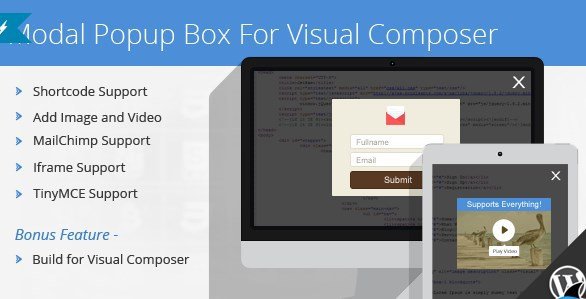
Modal popup boxes give website owners a way to show extra content without making visitors leave the page they're on. This plugin brings that functionality to WordPress sites that use Visual Composer, the popular page builder. Instead of relying on separate browser windows or forcing a full page refresh, the modal box opens right on top of the current view. That keeps the visitor’s place intact and makes interactions feel quicker. The plugin is built specifically for Visual Composer, which means you can manage popups straight from the editor you already use. You gain a tool for delivering announcements, embedded media, sign-up forms, or any other content that fits a floating window. Since it works as a dedicated plugin, you don't need to write custom code or wrestle with conflicting scripts. The whole idea is to give you a straightforward method for adding popups while keeping the rest of your site untouched.
The plugin includes several practical features that cover the typical reasons for adding a popup. Shortcode support lets you insert a modal box anywhere a shortcode is accepted, so you control placement without digging into template files. You can add both images and video, which makes it useful for product showcases, tutorials, or promotional clips. Mailchimp support means the popup can connect directly to your email list, capturing subscriber sign-ups without routing visitors through a separate page. Iframe support allows you to embed external content like maps, forms, or other websites inside the popup. TinyMCE support gives you the familiar WordPress editor for building the popup body, so those who are used to writing posts won't face a new interface. These tools work together inside the same popup, so a single modal could present a video, an embedded map, and a newsletter sign-up form all at once. That combination gives you a lot of flexibility in a small package.
With Visual Composer, adding the popup to a page becomes a visual task rather than a procedural one. You choose the content and set conditions through the interface the plugin provides. The modal box avoids the traditional pop-up overhead, meaning no extra browser windows and no reloading the entire page just to show a form or a video. This approach feels less intrusive and keeps the site’s performance snappy. For site owners who already rely on Visual Composer for layout, adding this plugin extends the builder's reach. You don't have to switch contexts or learn another system. The popup is simply one more element you can configure within a familiar workflow. That integration is what separates this from a generic modal plugin that might require shortcode memorization or custom styling. And because the plugin is designed for Visual Composer, it fits into the same editing experience you use for every other part of your page.
More from this category

Easy Digital Downloads Recently Viewed Items Addon
 Easy Digital Downloads

Easy Digital Downloads Content Restriction Addon
Easy Digital Downloads

Easy Digital Downloads Per Product Emails Addon
Easy Digital Downloads
At its core, this is a functional plugin for a specific need. If you run a WordPress site with Visual Composer and you want popups that display media, collect emails, or present embedded material, this gives you a direct path. The features are spelled out plainly: support for shortcodes, images, videos, Mailchimp, iframes, and TinyMCE. Each one serves a clear purpose. You won't encounter obscure filters or undocumented extensions. The plugin comes as a standard WordPress plugin file, ready to install like any other. It focuses on the modal box function, so you get the essentials without a pile of unrelated extras. There are no complicated setup procedures or hidden settings. What you see in the feature list is what you get. That clarity is a real plus. For someone comfortable with Visual Composer, this is a practical addition to their toolkit, letting them add interactive elements without loading down the site with unnecessary weight.
- Item type
- plugin
- Category
- Wordpress Plugins
- Version
- 2.0.1
- Availability
- In stock
- Delivery
- Digital
- Last updated
- August 10, 2026
Modal Popup Box For Visual Composer is one of the Wordpress Plugins items recorded as a plugin. The content below uses the supplied listing information and current local catalog data.
Usage rights depend on the license selected at checkout. Review the complete terms before using this item for client work, redistribution, SaaS, or more than one end product.