MonsterInsights – Dimensions Addon 2.0.6
Wordpress Plugins Monsterinsight 4.8 (3.1K reviews)
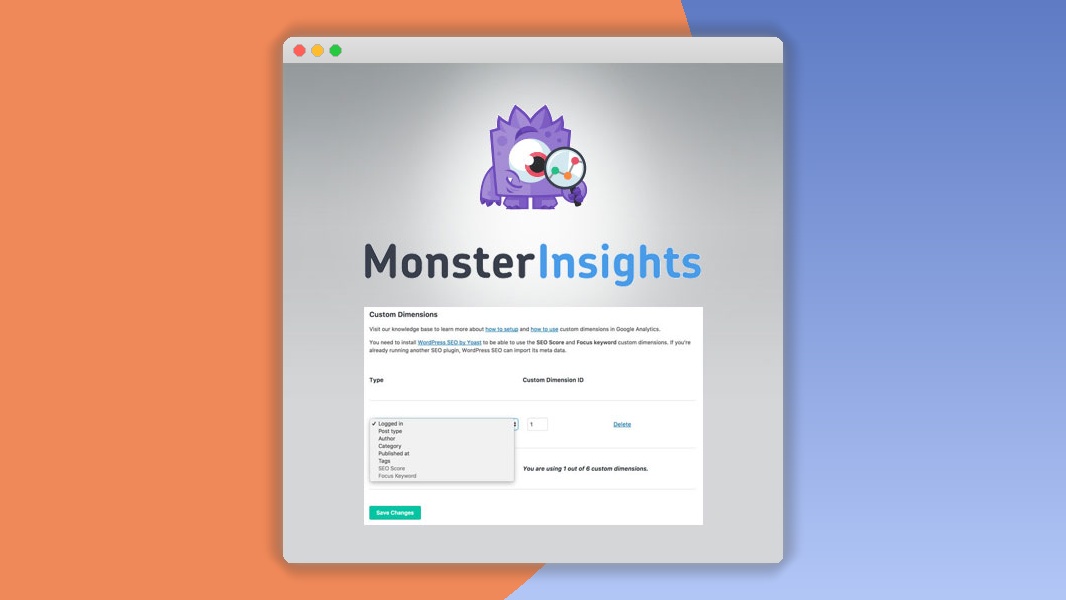
The MonsterInsights Dimensions Addon is an extension for the MonsterInsights WordPress plugin that lets you send custom tracking data to Google Analytics. Standard analytics only show pageviews, sessions, and basic audience information. This addon captures additional details that are specific to your site, such as which author wrote a post, what category or tag it belongs to, or what post type it is. It then passes those details along with your existing analytics data so you can see them in your Google Analytics reports. This means you can break down your traffic by these custom attributes instead of looking at everything as one undifferentiated lump. You can finally answer questions about content performance that regular reports leave unanswered, like which authors bring in the most engaged readers or which sections of your site keep visitors on the page longest. The setup happens right inside the MonsterInsights settings area, so you don't need to write custom code to get started.
This addon lets you define exactly which dimensions matter for your content strategy. Common presets include author, category, tag, post type, and user ID, and you can add your own labels for anything else your site organizes by. You might track post authors to see who brings in the most engaged readers. You might track categories and tags to understand which topics perform best across new and returning visitors. You could also track user IDs for logged-in members, so you can follow their journeys across devices and sessions. Because you configure the dimension names yourself, the addon adapts to whatever structure your site already uses. Custom taxonomies that are specific to your niche can be tracked too. That flexibility is useful for blogs, online stores, publishers, and membership sites alike. The data lands in Google Analytics, where you can create segments and secondary dimensions to compare content groups against each other.
Beyond content tracking, the addon strengthens e-commerce reporting. If your store assigns products to authors or categories, those attributes can be forwarded to Google Analytics as well, giving you product-level detail beyond simple revenue figures. The addon also supports tracking logged-in user roles, which can help you understand how different member levels behave. Privacy is addressed through GDPR-friendly settings that respect consent rules. For developers, the addon exposes hooks and filters that allow further customization, so you can extend the tracking to meet unusual requirements. It's built to be lightweight, with minimal effect on page loading speed, and it works across all major browsers. The code is carefully written to avoid conflicts with common WordPress caching setups, so dimension data still transmits reliably on busy sites. It also validates dimension names before sending, which cuts down on configuration mistakes. Updates have improved compatibility with WordPress core and fixed edge cases around caching plugins and custom post types.
More from this category

 Beaver Builder

Using the addon requires MonsterInsights to be installed, activated, and connected to a Google Analytics account. Once that's ready, you open the Dimensions settings page inside MonsterInsights and enable the dimensions you want to send. Some dimensions need a matching index set up in your Google Analytics property, which the plugin's setup wizard guides you through. After configuration, the addon silently collects the relevant data in the background whenever visitors browse your site. You can then examine the results in Google Analytics reports alongside your existing metrics. Custom dimensions appear as additional columns in your reports, making them easy to read. This turns raw visitor numbers into information you can act on, such as identifying which authors deserve more promotion or which content categories resonate best with a particular audience segment. The whole process is handled through existing MonsterInsights menus, so the addon feels like a natural part of the plugin rather than a separate tool.
- Last updated
- August 11, 2026
- Delivery
- Digital
- Availability
- In stock
- Version
- 1.3.12
- Category
- Wordpress Plugins
- Item type
- plugin
The catalog entry for MonsterInsights – Dimensions Addon is grouped with Wordpress Plugins and classified as a plugin. Available product information is shown below with related items from the local catalog.
Usage rights depend on the license selected at checkout. Review the complete terms before using this item for client work, redistribution, SaaS, or more than one end product.