Multi Purpose Banners HTML5 D28 - GWD & PSD Latest Version
HTML Templates Codecanyon 4.8 (2.8K reviews)
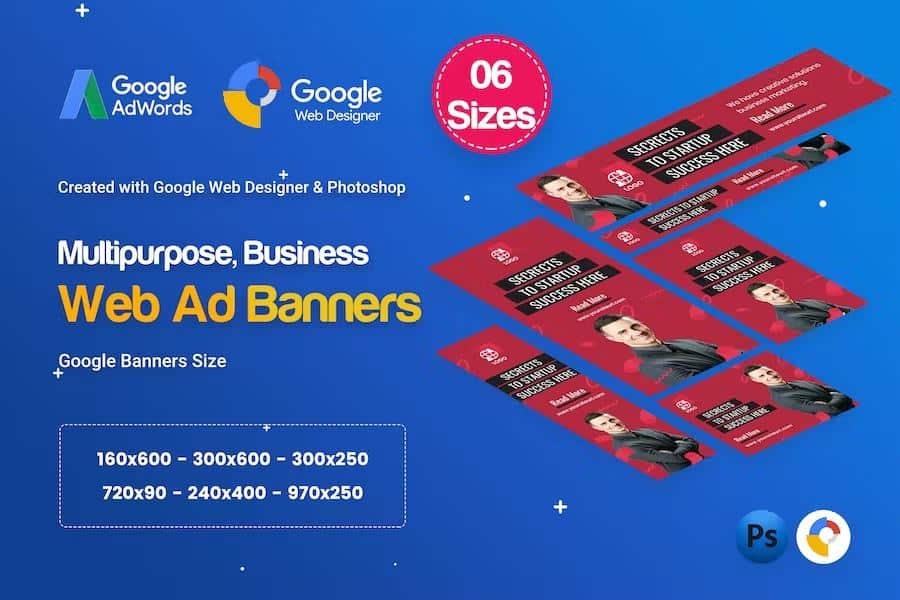
This banner template pack provides six polished ad designs built for business promotions, corporate campaigns, and general marketing use. Each of the six designs arrives in two matching formats: an HTML5 Google Web Design file and a layered PSD file. That pairing lets you start with the PSD to refine colors, swap photography, or adjust typography, then move to the HTML5 file when you are ready to build an animated display banner. The layouts follow standard Google Ads display dimensions, so the finished files fit into common ad placements without awkward resizing. The visual style leans contemporary: clean backgrounds, flat color panels, and bold headline areas. Nothing in the templates is hidden or flattened. Every layer is named and organized, and all text and colors remain fully editable, which makes these files dependable when you need to adapt them to a specific brand or campaign. The result is a set of banners you can hand off or publish quickly.
Google Web Designer builds these files as genuine HTML5 banner projects rather than static exports. Open the GWD file and you get a full timeline-based editing environment where you can animate elements, set events, and preview the banner in different ad sizes. Since the included sizes match Google Ads specifications, the files are structured for the kind of display campaigns run through Google's advertising platforms. The PSD counterparts mirror the same layouts, so you can prepare print variations, social versions, or client presentations while keeping the design consistent across all files. Each layer in the PSD carries a simple descriptive name, so you avoid hunting through dozens of generic labels to find the headline layer or the background panel. Everything from the logo space to the call-to-action button is grouped logically, so moving an element or swapping a placeholder requires no guesswork. Both formats stay in sync visually, so what you design in one environment carries cleanly into the other.
The templates carry a general-purpose look. They work for announcements, product launches, service promotions, event notices, and comparable display ads without locking you into a narrow visual theme. Since colors and text stay fully editable, the six designs can become dark tech-themed banners, bright retail sale ads, restrained finance pieces, or anything between. Six distinct layouts mean you are not stuck with one composition stretched into different sizes. Instead, the six PSD and six GWD files provide real creative variety across the set, which is helpful when a campaign needs several different display creatives. The neutral color palette and clean typography give you a starting point that tolerates heavy customization, so your client's brand colors will not feel like a poor fit. Each layout sets aside clear space for a headline, a short message, and a call-to-action button, letting you insert your own copy quickly. That structure makes the templates dependable for quick edits.
The files are built around Google Ads display sizes, the standard dimensions used across display campaigns. This keeps the banners ready for typical advertising workflows: you edit the PSD, prepare the HTML5 in Google Web Designer, then export for your ad platform. Because the GWD files are true HTML5 projects, animations are not baked into flat GIFs; you can revisit the timeline, adjust easing, change duration, and swap assets after the initial build. The PSDs are equally open. Layers are named and grouped by element, so altering a background color or replacing placeholder text happens in seconds. For someone who creates banners regularly, this pack reduces setup time because the project structure, sizing, and file organization are already handled. The six designs share a consistent visual language, so a set of ads produced from these templates looks cohesive across different colorways. The package suits designers who prefer a structured starting point over a blank canvas.
 Themeforest
- Last updated
- August 2, 2026
- Delivery
- Digital
- Availability
- In stock
- Version
- Latest Version
- Category
- HTML Templates
- Item type
- template
For shoppers browsing HTML Templates, Multi Purpose Banners HTML5 D28 - GWD & PSD is recorded as a template. The page below separates supplied product information from general store and license terms.
Usage rights depend on the license selected at checkout. Review the complete terms before using this item for client work, redistribution, SaaS, or more than one end product.