Multi-Purpose Banners HTML5 D52 - GWD & PSD Latest Version
HTML Templates Codecanyon 4.8 (145 reviews)
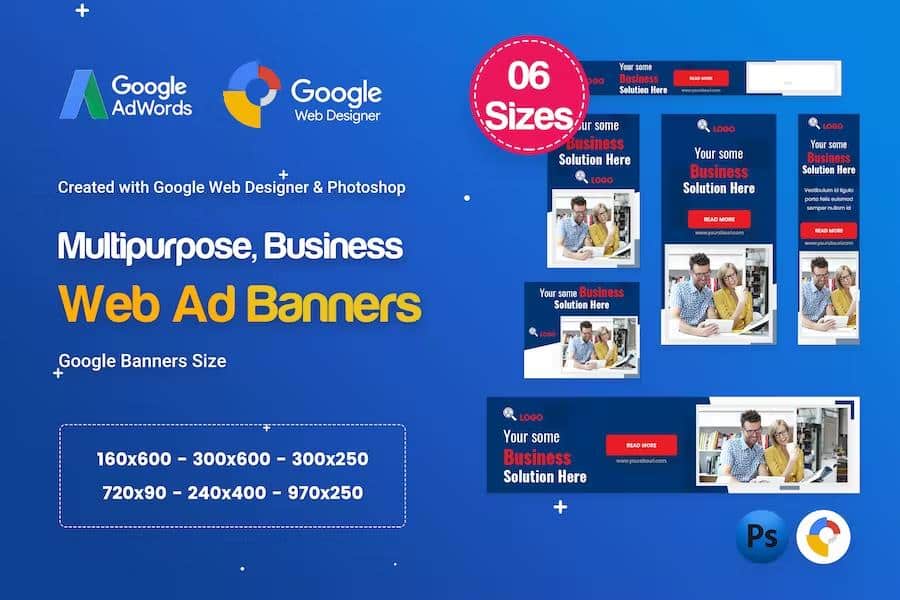
This banner pack gives you twelve design files built around one unified visual concept. Six come as HTML5 projects created in Google Web Designer, and six match up as layered Photoshop files. Each format serves a different purpose, yet both share the same underlying layout structure. The HTML5 versions are ready for modern display advertising, while the PSDs deliver traditional image output for static placements. Everything was assembled with the standard Google Ads size specifications in mind, so the dimensions align with common display network positions. You can use the set to introduce a company, run a seasonal promotion, support a marketing campaign, or advertise an online money-making opportunity, and the same designs work across different parts of an ad plan. Because the templates are not locked to any specific industry or niche, you can adapt them to whatever message you need to communicate, which is what makes the pack genuinely multi-purpose.
All twelve files follow the standard Google Ads size system, which is helpful if you have run display campaigns before and know how strict ad networks can be about dimensions. When a banner matches the expected size exactly, it uploads without extra cropping or stretching. The HTML5 files were built in Google Web Designer, so they open directly in that software and are ready for the same workflow you would use for any project created there. Opening a pre-built project is far faster than assembling a banner from an empty stage, especially when the dimensions already fit common ad placements. The PSD files mirror the same layouts, so you can produce static versions of each banner without redoing any design work. Everything stays organized by layer name, which makes locating individual elements simple even if you are picking the project up weeks later. Consistent naming across all twelve files means the time you spend learning one template carries over to the next.
The visual style leans on the material design approach that has become common in modern web advertising: flat surfaces, clear visual hierarchy, and restrained decoration. That means the banners look current without leaning on heavy gradients or dated effects. Each layout was built to hold a headline, a supporting line of text, a call-to-action area, and a background image or color block without feeling crowded. Because the design is clean and corporate in tone, it reads well for business introductions, product announcements, and promotional offers. Twelve different compositions make up the set, so a campaign that needs several banner sizes does not repeat the exact same arrangement everywhere. That variety keeps the ads cohesive while still giving each placement its own visual rhythm. The overall look stays neutral enough that a company logo, brand colors, and campaign-specific photography will define the final result. Nothing about the layouts forces a particular industry on you, which matters when one purchase needs to cover several campaigns.
Every element in both file formats was set up to be edited directly. Colors and text are not flattened into the design, so changing a headline or swapping a brand color takes a few clicks rather than rebuilding the banner. The PSD layers are named clearly and organized from the start, which is a small thing until you open a file with dozens of unnamed layers and have to hunt for the right one. HTML5 projects are equally open; you can adjust the text content and restyle elements inside Google Web Designer's interface. All colors can be replaced, so matching a specific brand palette is straightforward. Text layers accept new copy without affecting the positioning of other elements. Because the files are templates rather than finished one-off ads, they are meant to be reused and adapted. That makes them useful for someone who produces ads regularly and wants a dependable starting point that is already correctly sized and structured.
Other products to consider

 Themeforest
- Last updated
- August 2, 2026
- Delivery
- Digital
- Availability
- In stock
- Version
- Latest Version
- Category
- HTML Templates
- Item type
- template
Multi-Purpose Banners HTML5 D52 - GWD & PSD is one of the HTML Templates items recorded as a template. The content below uses the supplied listing information and current local catalog data.
Usage rights depend on the license selected at checkout. Review the complete terms before using this item for client work, redistribution, SaaS, or more than one end product.