Newscodes - News, Magazine and Blog Elements for Wordpress 2.3.2
Wordpress Plugins Codecanyon 4.8 (1.5K reviews)
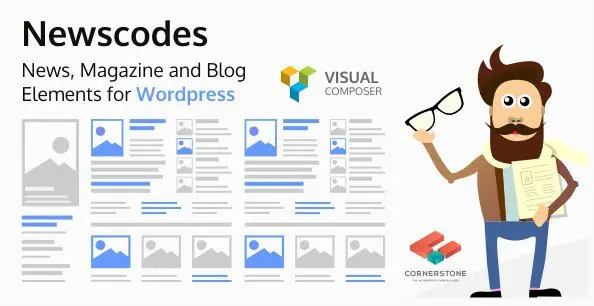
Newscodes is a WordPress toolkit designed specifically for displaying news, magazine, and blog content in structured layouts. It works alongside your existing theme, giving you a collection of post elements that can be placed into any page, widget, or template area. Instead of relying on the default blog archive style, you gain command over how each story appears. The plugin ships with more than twenty distinct post layouts, including various grid arrangements, horizontal sliders, and compact list styles. Every layout is independent, so you can mix several elements on a single page without conflict. That flexibility makes it practical for homepages, category landing pages, and author sections where different sections need different visual treatments. The included style manager keeps custom appearance settings organized, letting you save and reuse a look instead of rebuilding it each time. The core idea is modularity: you pick the elements that fit your content plan and arrange them as needed.
The style system goes beyond simple skinning. Newscodes includes a full style manager and editor, so each element can inherit a predefined style or use a custom one created in seconds. You can control spacing, fonts, color schemes, hover effects, and border treatments across every layout. Since style definitions are stored separately from layout markup, changing the look of a site does not require rebuilding the structure. The tabbed elements are especially useful for compact areas, letting you combine several post listings into a single widget or module. Visitors can click between tabs to see different categories, tags, or recent posts without leaving the page. Multiple custom styles can be saved and applied to different sections, which is helpful for sites that want unique presentations for different content types. A style library lets you duplicate an existing style as a starting point and branch off with minor tweaks. The editor gives immediate visual feedback, so adjustments feel less like guesswork.
Related products
 Codecanyon
Post filters give you precise control over which stories appear in each element. You can narrow content by post type, taxonomy, and meta fields, so one layout might pull only featured articles from a specific category, while another shows items flagged with a certain tag. Taxonomy filters make it easy to build targeted sections without writing custom queries. Meta filters add another layer, letting you include or exclude posts based on custom field values. These filters stack, so you can set a precise condition for almost any content situation. The ajax load option lets visitors paginate through results without a full page refresh, which keeps browsing smooth and fast. This works well for grid and list elements where users expect continuous scrolling or load-more buttons. Ratio options are also included, giving you consistent image dimensions across elements. Cropping and alignment can be controlled at the element level, preventing the uneven thumbnails that often plague news layouts.
Featured posts can be highlighted with large images and overlaid text, creating a strong focal point for a homepage. Standard grids and lists cover the rest of the display needs, from compact teaser lists to multi-column card arrangements. A marquee ticker delivers headlines in a scrolling horizontal bar, ideal for breaking news strips or top stories. These elements are not limited to the blog post post type; they can also be pointed at custom post types, expanding their usefulness beyond traditional editorial content. Each element carries its own configuration, so changing one module does not affect the others. That separation keeps the interface predictable, even when a page stacks several different layouts together. The product fills a practical need for WordPress site owners who want more editorial presentation options without installing a heavy page builder or writing custom PHP. It is a focused toolkit that respects the WordPress workflow while significantly widening the range of possible layouts.
- Last updated
- August 2, 2026
- Delivery
- Digital
- Availability
- In stock
- Version
- 5.6
- Category
- Wordpress Plugins
- Item type
- plugin
Newscodes - News, Magazine and Blog Elements for Wordpress is cataloged as a Wordpress Plugins under plugin. Review the preview and recorded details alongside the original description before purchase.
Usage rights depend on the license selected at checkout. Review the complete terms before using this item for client work, redistribution, SaaS, or more than one end product.