Notify3 - Notification Email + Themebuilder Access Latest Version
HTML Templates Themeforest 4.8 (1.9K reviews)
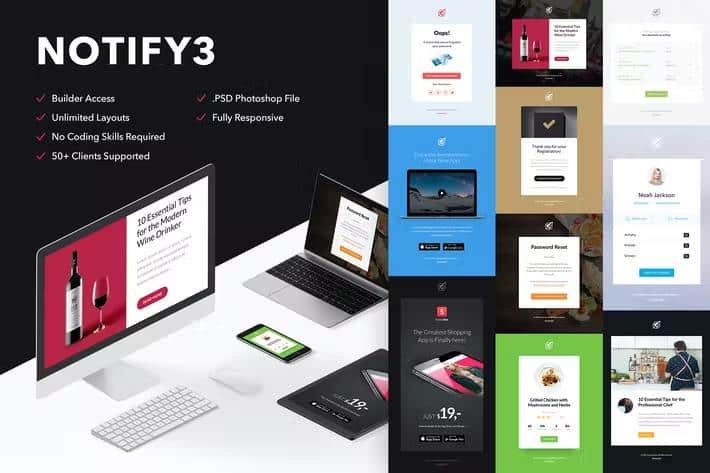
Notify3 is a complete email marketing package centered around a versatile notification template and access to an online building tool. Buyers receive standard HTML files alongside specific layout formats tailored for popular email platforms like MailChimp and Campaign Monitor. Alongside the code files, the package includes original Photoshop source documents for users who prefer designing layout elements manually before coding. The main goal of this product is to provide email marketers and designers with a clean foundation for sending professional newsletters and announcements. Because the design follows a full-width structure, messages maintain a modern appearance across wide desktop screens and narrow mobile displays alike. Cleanly commented source code makes it straightforward for developers to inspect the markup and adjust styling rules directly in their preferred text editors. While raster and vector images shown in promotional previews are excluded from the final download due to licensing limits, the structural layout provides designated spaces to insert custom visuals. Standard web fonts are utilized throughout the templates to ensure readability, though certain email clients may automatically substitute fallback typography if specific fonts fail to load properly during viewing.
More from this category
 Themeforest
Building custom layouts happens through an online interface where creators can arrange content blocks using drag and drop functionality. Modules can be duplicated, deleted, or repositioned easily without requiring advanced coding knowledge. Changing background colours, editing text blocks, and linking images to custom web URLs takes only a few clicks inside the workspace. Undo and redo controls are available for reversing adjustments made during the design process. A responsive preview mode lets creators check how messages will appear on different screens before exporting finished files to the desktop. Users working with Campaign Monitor benefit from integrated layout and repeater tags that allow direct text, button, and image editing after importing the template. However, full builder hosting is not part of the package, meaning the design tool functions as an online composition space rather than software installed on private servers. Users should note that certain email applications handle background images differently, such as Microsoft Outlook versions that might restrict background stretching or Gmail omitting specific CSS rules on background elements.
Compatibility extends across a wide range of desktop, web-based, and mobile email reading programs. Supported environments include Apple Mail, Thunderbird, OperaMail, Windows Mail, and Lotus Notes across various desktop operating systems. Webmail services such as Outlook.com, Yahoo Mail, and AOL Mail display the templates correctly under normal conditions. Older desktop software like Microsoft Outlook 2003, 2007, and 2010, along with Outlook Express, are also accounted for in the structural coding. Mobile devices running iOS or Android render the layouts accurately, though the Gmail mobile application has known rendering limitations with certain template structures. FreshMail, ActiveCampaign, StampReady, iContact, Constant Contact, and Aweber integration options give marketers flexibility when choosing a distribution provider for their campaigns. Standard web fonts appear reliably across Apple Mail, iOS Mail, and native Android clients, while alternative programs default to standard system typefaces. Reviewing individual platform constraints helps prevent unexpected visual discrepancies after broadcast.
Setting up the template requires importing the provided HTML files directly into an email distribution service or editing the code locally. Background images that fail to stretch properly in specific webmail environments can be corrected by uploading larger dimensions that cover the entire frame. Small customization assistance is available from the support team for buyers who need help adjusting specific template elements after purchase. Design inspiration and graphic assets used during the creation of the original previews draw from various open resource collections, including SplitShire, Unsplash, and GraphicBurger. The combination of static files, editable Photoshop documents, and modular layout tools gives email creators multiple methods for producing finished newsletters. Each component works together to reduce the time spent formatting code from scratch for routine announcements. Marketers can focus entirely on drafting messaging content and selecting imagery rather than worrying about cross-client layout breaking.
- Last updated
- August 2, 2026
- Delivery
- Digital
- Availability
- In stock
- Version
- Latest Version
- Category
- HTML Templates
- Item type
- theme
Listed under HTML Templates, Notify3 - Notification Email + Themebuilder Access is a theme. This presentation keeps the product name and recorded facts intact while organizing the details for easier review.
Usage rights depend on the license selected at checkout. Review the complete terms before using this item for client work, redistribution, SaaS, or more than one end product.