Online Education Animated Banner Google Web Design Latest Version
HTML Templates Codecanyon 4.8 (585 reviews)
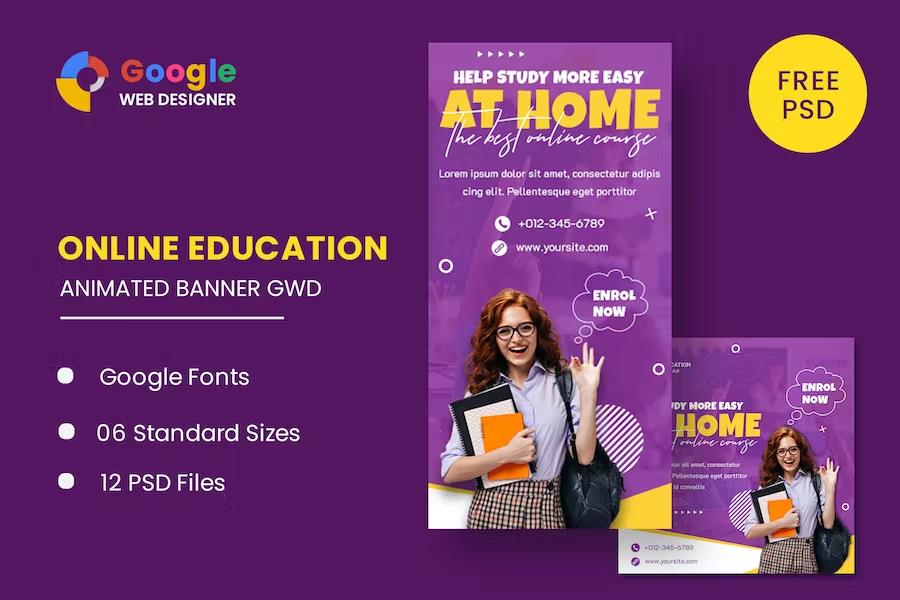
This collection of animated banner templates focuses entirely on the online education niche. Schools, course creators, and e-learning platforms can use these designs to promote lessons, webinars, or enrollment periods. Each file was built with Google Web Designer, a free tool that runs on Windows, macOS, and Linux. The animations feel lively without being distracting, using small movements in text, icons, and background shapes to catch a viewer's eye. All templates share a consistent visual language of soft colors, open books, graduation caps, and friendly typography. That means a complete advertising campaign can look unified from the first impression. These templates work for display advertising on websites, blogs, social platforms, and ad networks that accept HTML5. Nothing here requires a developer, a paid subscription, or an advanced animation background to understand. Every banner is self-contained, with its motion timeline and interactive elements fully intact inside the file. It is a practical starting point for any education-focused ad campaign.
The package includes six standard banner sizes that cover the most common placements on the modern web. You get a 160×600 skyscraper, a 180×150 rectangle, a 300×250 medium rectangle, a 300×600 half-page, a 320×50 mobile leaderboard, and a 728×90 leaderboard. Each dimension is delivered as a separate, ready-to-use HTML ad template. Animation effects are built with HTML5 and CSS3, which means they run natively in browsers without additional plugins or embedded video files. Movements include gentle fading, sliding text, floating icons, and subtle hover interactions. Because the animations are written in standard web code, they remain lightweight and fast to load. This makes the set a reliable choice for ad servers and marketing teams that care about page speed and file size. Creative files are organized clearly by size, so the right banner for a slot is easy to find. All six templates share the same styling cues, so they pair well together on a single campaign.
Editing these banners begins with Google Web Designer, which Google distributes as a free download. The template files open directly in that program, so every text layer, image, and animation keyframe is available for modification. Colors can be swapped from a central theme palette, and all headline copy exists as editable text rather than flattened images. Google Web Fonts are used throughout the typography, meaning the typefaces in your final ad remain crisp on any device and can be changed with a couple of clicks. Because the timeline structure is left exposed, speeding up, slowing down, or removing an animation takes only a minimal understanding of the interface. This templating approach keeps the original design style intact, so you spend time on content rather than rebuilding motion from scratch. For a designer or marketer who needs to produce variations quickly, this workflow shortens turnaround considerably. The files work directly inside Google Web Designer, keeping the whole editing process inside one familiar tool.
Related products
 Themeforest
The download includes two complementary material sets. Six HTML ad templates are ready to use in their final form, fully coded and animated for direct placement. Also, twelve PSD banner templates present the same designs in layered Photoshop format for those who prefer to edit raster elements. This dual delivery lets you edit all artwork in PSD files and then export to HTML as needed. The preview images used in the demo displays are neither included in the main download nor owned by the seller. They come from external authors and appear only to show how the templates should look with real photography. To use professional photos from the previews in a live campaign, you must obtain those images separately and follow the original creators' licensing rules. Many users replace the preview photos with their own course screenshots, illustrations, or stock images. The templates are structured for that kind of substitution, so swapping visuals does not disturb the animation or layout.
- Last updated
- August 2, 2026
- Delivery
- Digital
- Availability
- In stock
- Version
- Latest Version
- Category
- HTML Templates
- Item type
- template
Online Education Animated Banner Google Web Design is one of the HTML Templates items recorded as a template. The content below uses the supplied listing information and current local catalog data.
Usage rights depend on the license selected at checkout. Review the complete terms before using this item for client work, redistribution, SaaS, or more than one end product.