Opium - Creative Photography, Portfolio HTML Template Latest Version
HTML Templates Themeforest 4.8 (3.3K reviews)
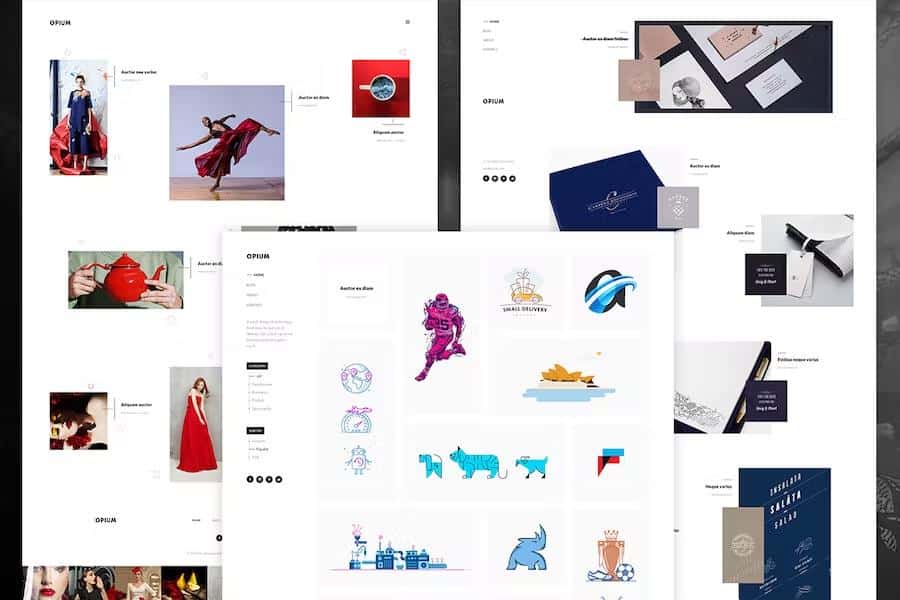
Opium is a creative HTML template built for photography and portfolio websites. Its visual style sits between modern and minimal, with a clean layout that lets your images take center stage. That makes it a natural choice for photographers, but the same structure works just as well for digital agencies, freelancers, designers, and studios. The color scheme and text are easy to change, so you can adapt the look to match your own brand or a client's identity without rebuilding anything from scratch. The template doesn't push you toward one particular aesthetic. Instead, it gives you a flexible foundation where the work itself remains the primary focus. Every element feels intentional, from the spacing to the typography, so visitors can browse your projects without distraction. That clarity matters for a portfolio, because the strongest thing you can offer is a direct view of what you create. If you're showing personal work or client commissions, this design keeps the presentation clean and professional.
Opium comes with all the static pages you'd expect from a complete portfolio template: a home page, an about page, a project detail page, a blog post detail page, and a contact page. That full set gives you a real starting point rather than a single-page demo. The template is organized in a straightforward way, so you won't spend hours hunting for files or figuring out which section does what. Every part has a clear purpose, and navigation flows naturally from one page to the next. The pages are already linked, so you can move from your home page to a project case study, then to your about page, and finally to the contact form without missing a connection. The blog post detail page handles written content as well. This gives you a functional website out of the box, not just a static mockup. Replace the placeholder text and images with your own material and you're ready.
Similar products
 Themeforest

A few built-in effects add life to the browsing experience without feeling gimmicky. Animations trigger as you scroll, keeping visitors engaged as they move through your work. Parallax backgrounds give depth to certain sections, and the creative masonry layout breaks away from a strict grid so photos of different sizes can sit together in a more organic, gallery-like arrangement. This is especially useful when your images vary in aspect ratio, because the space gets filled naturally instead of forcing everything into uniform boxes. Opium also includes multiple header styles, so you're not locked into the same navigation look on every page. You can pick a different placement or visual treatment that suits the feel of each section. The effects are subtle enough for a professional audience but noticeable enough to create a strong first impression. The combination keeps the site feeling contemporary and polished, while still being easy to navigate and fast to load.
On the technical side, Opium includes working contact and subscribe forms, so you don't have to wire them up yourself. Both are ready to connect to your preferred email or newsletter service. The template uses Google Fonts, keeping typography sharp and fast-loading across devices. The layout is fully responsive, so your portfolio will look correct on phones, tablets, and desktop monitors without a separate mobile version. The HTML and CSS are validated to web standards, giving you a solid foundation for further customization. The package also includes PSD files, so you can rework the design in Photoshop before touching the code. One thing to note: the demo images are for preview only and don't come with the template files. You'll need to replace them with your own photography or artwork before launching. That's standard for portfolio templates, but worth remembering. Once you add your own visuals, the design adapts to whatever you put in front of it.
- Last updated
- August 2, 2026
- Delivery
- Digital
- Availability
- In stock
- Version
- Latest Version
- Category
- HTML Templates
- Item type
- template
The available listing for Opium - Creative Photography, Portfolio HTML Template places it among HTML Templates products. It is presented here as a template with its supplied description and purchase information.
Usage rights depend on the license selected at checkout. Review the complete terms before using this item for client work, redistribution, SaaS, or more than one end product.