Ovio - Bootstrap Based Responsive Dashboard - Admin Template Latest Version
HTML Templates Themeforest 4.8 (1.0K reviews)
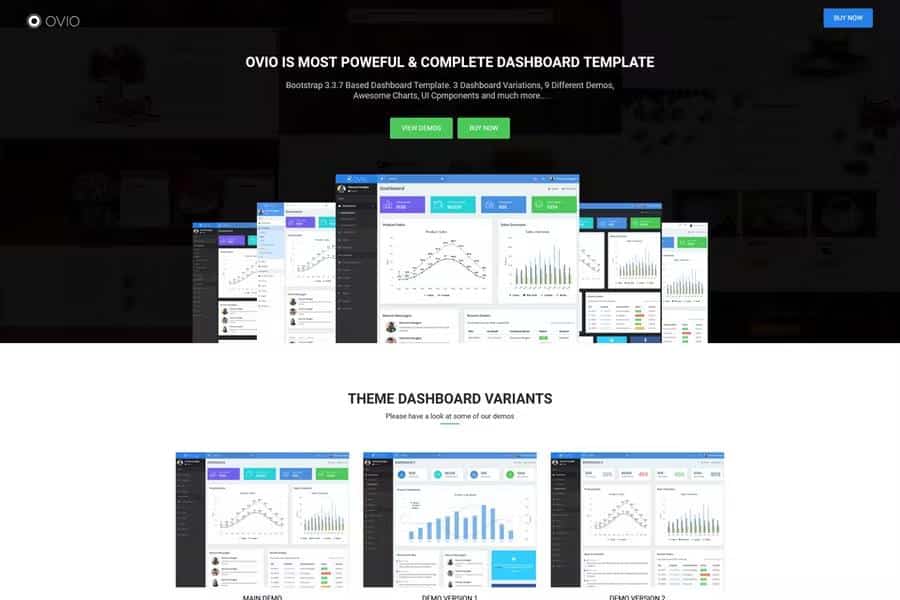
Ovio presents a practical take on admin templates: it starts with the Bootstrap framework, so the underlying HTML5 and CSS3 are structured in a way most developers already know. This is a fully responsive dashboard kit, and the layout shifts naturally to fit phones, tablets, and large displays. You get three different dashboard designs in the download, and those combine into nine separate demo pages that show off various arrangements. Fullwidth and boxed layout modes are available, letting you decide whether the interface stretches across the entire screen or stays centered with breathing room on the sides. There is also an RTL demo version for anyone working on Arabic, Hebrew, or other right-to-left projects. The template includes all the standard Bootstrap components, so tabs, modals, forms, and tables behave the way you would expect. The pages are not just placeholders; they are built to be rearranged and reused as a solid starting structure.
Beyond the basic page structure, Ovio carries a large set of ready-to-use widgets and UI components. You will find buttons, cards, progress bars, alerts, badges, and form controls already styled and organized. The package also includes several chart options, so you can display data without hunting for a separate library. Everything is enhanced with jQuery plugins that extend the standard Bootstrap behavior, which keeps the interface feeling responsive and interactive. For icons, the template uses Font Awesome, a widely recognized icon set, and Google Fonts are integrated to handle typography. These components are organized so you can quickly copy and paste blocks into your own pages. Rather than building every element from scratch, you can pull what you need and adjust spacing, color, and text. The documentation explains where each plugin is loaded, which helps when you want to remove unused scripts. The collection covers the majority of things an admin panel typically needs, from tables to navigation menus.
Other products to consider

 Themeforest

Customizing Ovio starts with the template's own documentation, which walks through the layout and the main files. The code is organized with separate stylesheets and clearly named folders, so you can locate the specific CSS that controls colors, fonts, and spacing. Changing the look does not require any special tooling; a simple text editor is enough. The template is built to work across modern browsers, so the pages render consistently in Chrome, Firefox, Safari, and Edge. There are default color schemes, but you can adjust the styles directly if you prefer a different brand palette. Since the template relies on Bootstrap, many custom themes and third-party snippets can be dropped in without compatibility issues. That means adding your own navigation, sidebar behavior, or page transitions is more straightforward than starting from an empty HTML file. Documentation also covers basic setup instructions for opening the template in your browser, and it explains how the demo pages relate to the finished product.
Ovio is best understood as a complete starting point for building an admin shell. You can open one of the three dashboard demos, see how the widgets are assembled, and then replace the sample data with your own. The nine demos offer enough variety to get a sense of how the layout grid handles different content densities, from dense data tables to simpler calendar views. The included components cover common admin needs, so the main work becomes populating the interface with actual information rather than writing basic UI code from scratch. Because the template is plain HTML and CSS, it keeps things uncomplicated. You do not need a complex build system or command-line tools to start using it; downloading the files and opening them in a browser is enough. All the example pages are included, so you can compare how each demo is structured. That makes Ovio suitable for quick internal tools, client projects, or a personal dashboard.
- Last updated
- August 18, 2026
- Delivery
- Digital
- Availability
- In stock
- Version
- Latest Version
- Category
- HTML Templates
- Item type
- template
Ovio - Bootstrap Based Responsive Dashboard - Admin Template is cataloged as a HTML Templates under template. Review the preview and recorded details alongside the original description before purchase.
Usage rights depend on the license selected at checkout. Review the complete terms before using this item for client work, redistribution, SaaS, or more than one end product.