PixGridder Pro Page Grid Composer for Wordpress 3.3.4
Wordpress Plugins Codecanyon 4.8 (3.2K reviews)
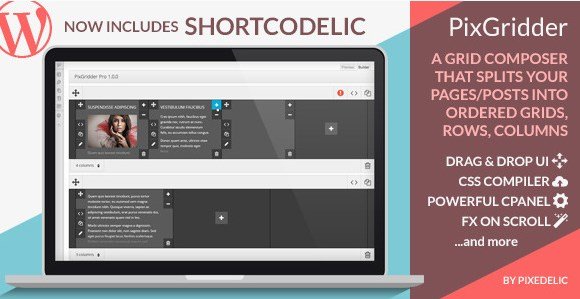
PixGridder Pro is a WordPress plugin for anyone who wants structured layouts on posts and pages. It splits a content area into ordered grids, rows, and columns, so text, images, and other elements can sit side by side rather than forming one long vertical stack. The plugin comes from Codecanyon, a commercial marketplace, and arrives as a standard zip file that you upload and activate in WordPress. Once active, it gives you the tools to define custom column structures without writing code. That covers landing pages, directory listings, comparison blocks, or any content that benefits from separate cells. The plugin focuses on removing the manual effort from grid creation, letting you concentrate on the content inside each cell. It is a targeted tool, not a full page builder, and it stays quiet until you actually need a grid. You can rearrange the layout at any time, and the resulting structure remains part of your normal post content.
Other products to consider
 Codecanyon


PixGridder Pro's main interface relies on a drag-and-drop system, so you can rearrange rows, columns, and grid cells directly on the page and watch the layout update as you work. A built-in CSS compiler handles all the styling, translating your layout choices into clean stylesheet rules automatically. There is no need to hand-write CSS for a multi-column design, and the resulting output stays consistent across posts and pages. The drag-and-drop also applies to the content inside each cell, so you can move an image, heading, or text block from one cell to another without recreating it. That makes it easy to try out a few arrangements before settling on one. Column and row counts can be changed even after content is placed, with the compiler updating the front-end styles accordingly. The whole process stays inside your normal editing workspace, so you never have to jump to a separate page builder.
Beyond the editor, PixGridder Pro includes a separate control panel, which the plugin calls the Cpanel. This panel acts as a central hub for managing grid defaults, such as the default number of columns, gutter widths, and spacing rules. Instead of setting the same options on each individual page, you define them once in the Cpanel, and every new grid follows those defaults. Custom presets can also be saved for layouts you use regularly. These settings apply globally or per layout, depending on how you organize your presets. The other major feature is Fix On Scroll. This allows a specific grid element to remain fixed in place while the rest of the page scrolls normally. It is suitable for sticky sidebars, persistent call-to-action boxes, or any content that should remain visible during long reads. The freeze behavior is applied per grid element, so you decide which parts hold still and which move within the grid structure itself.
PixGridder Pro is not a replacement for a full page builder, but it is a focused solution for anyone who needs structured grid layouts inside WordPress posts and pages. It works with the content you already create, adding a layer of layout control that the default editor does not provide. The plugin suits users who prefer a lightweight approach over installing a heavy page builder for the sake of a few multi-column sections. Since it is distributed as a standard zip file from Codecanyon, installation is straightforward and there are no external services or accounts to configure. The combination of drag-and-drop editing, an automated CSS compiler, a central Cpanel for defaults, and Fix On Scroll gives you a compact set of tools for producing ordered, readable page structures. It is not trying to do everything, but it does a specific job well: turning your written content into a clearly arranged grid on the front end.
- Last updated
- August 12, 2026
- Delivery
- Digital
- Availability
- In stock
- Version
- 1.0.9
- Category
- Wordpress Plugins
- Item type
- plugin
This listing covers PixGridder Pro Page Grid Composer for Wordpress, a Wordpress Plugins from plugin. Use the source description and recorded item details below to check whether it fits the intended project.
Usage rights depend on the license selected at checkout. Review the complete terms before using this item for client work, redistribution, SaaS, or more than one end product.