Post Navigation Preview Wordpress Plugin 1.0
Wordpress Plugins Codecanyon 4.8 (3.6K reviews)
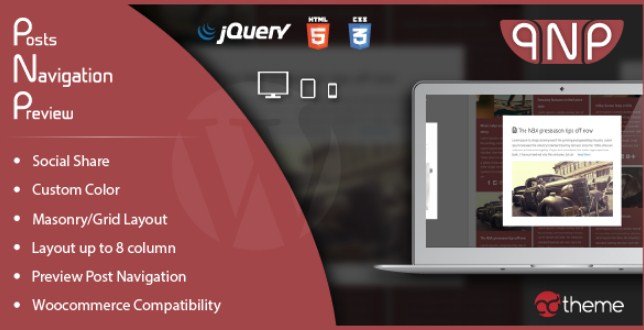
Post Navigation Preview is a WordPress plugin that changes how visitors move between posts and products. Instead of a bare text link saying 'Next Post' or 'Previous Post,' your readers get a visual preview of the article or product they're about to open. The plugin works with regular blog posts and WooCommerce items, so content sites and online shops can both put it to use. A small arrow or clickable area opens a preview window showing a thumbnail image and the title. This gives people a quick look before they decide whether to move on. Two different preview styles are included, and you can pick the one that suits your site's look. Site owners can place the navigation wherever it fits best, whether that's below an article, inside a sidebar, or anywhere a shortcode can go. The whole thing is designed to feel like a natural part of the page, not a separate widget that stands out.
More from this category
 Ninja Forms
Masonry and grid are the two layout options provided. Masonry stacks items in a staggered arrangement, useful when you have thumbnails of different heights. Grid lines everything up in neat rows and columns. Both are responsive, so they adjust automatically when someone views the site on a phone or tablet. The plugin gives you control over the colors for each shortcode you create. That means you can set different accent colors for a preview on the blog and a preview on the product page. This flexibility lets you match the preview to your theme without touching the main stylesheet. Customization is done through the shortcode parameters, but you don't need to write any code by hand. You just edit the values in the shortcode and the style updates right away. The widget support works the same way. You can place a navigation preview widget in a sidebar or footer, and it will share the same responsive behavior.
Setting up the plugin takes a few minutes. Once it's activated, you can drop a shortcode into any post, page, or widget area. The most basic version shows the next and previous post links with their previews. The same shortcode works for WooCommerce product pages, so customers get the same visual navigation when they're browsing a shop. You can choose where the preview appears and adjust the colors from the shortcode parameters. If you prefer the widget, you don't need to remember any shortcode syntax at all. Just drag the widget into place and select your settings from the admin screen. The configuration is straightforward, and the feature set is small enough to understand at a glance. You can also mix it with other content, like a paragraph or an image, without changing the layout. Once the navigation is in place, visitors can move between items without losing their place on the page.
Having a visual preview changes the way people use your site. Instead of clicking a link and waiting to see if the next post is relevant, readers see the thumbnail and title upfront. That small bit of context helps them decide quickly, and it feels more polished than standard next and previous text links. For a shop, the same logic applies to product pages. Customers can glance at the following item without leaving the current one. The styling options let you match the navigation to your theme, so it doesn't look tacked on. The setup is simple, and the same shortcode works whether you add it to a blog, a custom post type, or a product page. For anyone who wants a more visual way to move through content, this plugin delivers that without changing how WordPress works underneath. You get to keep the original post order and behavior, just with a clearer view of what's coming next.
- Item type
- plugin
- Category
- Wordpress Plugins
- Version
- 3.0.7
- Availability
- In stock
- Delivery
- Digital
- Last updated
- August 9, 2026
Post Navigation Preview Wordpress Plugin is cataloged as a Wordpress Plugins under plugin. Review the preview and recorded details alongside the original description before purchase.
Usage rights depend on the license selected at checkout. Review the complete terms before using this item for client work, redistribution, SaaS, or more than one end product.