Product Countdown WordPress Plugin 4.2.4
Wordpress Plugins Codecanyon 4.8 (4.2K reviews)
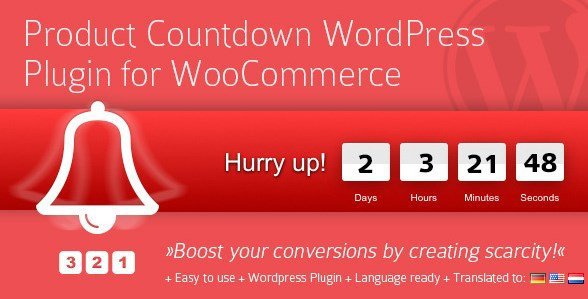
Product Countdown is a WordPress plugin built specifically for WooCommerce stores that run time-limited promotions. Its original home is Codecanyon, and WooCrack supplies the identical product file you would get from the original author. The plugin's function is to display a countdown timer on any product you've set as on sale, transforming a discount into an offer with a visible deadline. Shoppers see exactly how many days, hours, minutes, and seconds remain before the sale expires, which gives them a reason to act quickly. The timer works in harmony with WooCommerce's built-in sale scheduling, so if you already define start and end dates for a discounted product, the countdown reflects those settings automatically. For store owners, this removes the need to design custom timer scripts or manually update anything when a sale begins. Because the countdown only appears on products with active sales, normal listings stay clean and unaffected. The result is a focused solution that doesn't clutter your store.
One of the primary ways this plugin communicates the deadline is through a popup window anchored to the top of the page. This fixed top placement keeps the countdown visible as visitors scroll through product details, so the remaining time stays in their field of view. You have direct control over how that popup looks. A built-in color picker lets you choose the background color to match your brand, and a separate option handles the font color for the timer digits and labels. If you want a particular sale to stand out even more, you can apply custom CSS to any individual countdown. There's also a global CSS setting that applies styling rules across every countdown on your site at once, which is handy when you want a consistent look but still want the flexibility to override it for special promotions. The combination of per-countdown and global styling means you can treat every sale as its own event or keep everything on-brand with minimal effort.
Related products
 Codecanyon
Setting up Product Countdown doesn't require any coding knowledge. After installing the plugin, you can activate the countdown per product through the WooCommerce product editor, and the popup appears right away during the sale window. For store managers juggling multiple sales at once, the global settings provide a way to establish a default style that applies to every countdown automatically, reducing repetitive configuration. The plugin is also WPML ready, meaning it works with the popular multilingual plugin to display countdown text in the languages used by your store. That makes it suitable for shops selling across different countries or regions. From a marketing perspective, the effect is straightforward: showing a ticking timer next to a discounted price creates a sense of scarcity. Shoppers understand that the deal won't last forever, and that simple awareness often translates into faster purchasing decisions and fewer abandoned carts. You don't have to touch a line of code or fiddle with shortcodes to get the timer running.
Every download of Product Countdown comes as the same .zip file you would receive from the original author's sales page. Nothing is modified, stripped down, or missing, so the package installs exactly as intended. WooCrack scans the distribution to confirm it's free of viruses before release, letting you upload it to WordPress without worrying about hidden malware or altered code. Because this is a standard WordPress plugin, installation follows the familiar routine: upload the archive, activate it, and the countdown options show up in the WooCommerce product editor. The archive holds the countdown scripts and the integration files that connect with WooCommerce's sale system, so everything works together once activated. For anyone managing a WooCommerce store who wants to add urgency to sale items, the plugin delivers that capability without custom development. Once active, it stays out of the way until a sale is live, then the timer appears and does the persuading for you.
- Last updated
- August 2, 2026
- Delivery
- Digital
- Availability
- In stock
- Version
- 42.3
- Category
- Wordpress Plugins
- Item type
- plugin
Product Countdown WordPress Plugin is listed in Wordpress Plugins as a plugin. The supplied description, preview, version, price, and recorded product details are collected here for review.
Usage rights depend on the license selected at checkout. Review the complete terms before using this item for client work, redistribution, SaaS, or more than one end product.