Questionar – FAQ Accordions for Elementor 1.1.6
Wordpress Plugins Codecanyon 4.8 (5.0K reviews)
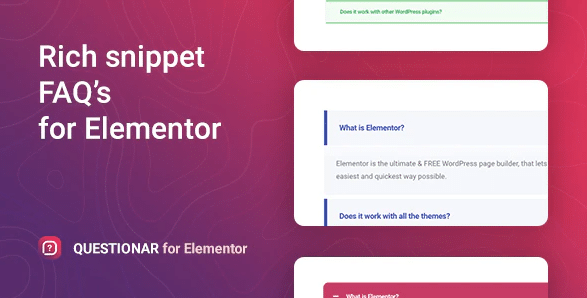
Questionar operates as a specialized add-on built specifically for the Elementor page builder to introduce a fully functional frequently asked questions accordion directly into your website layout. Instead of relying on a separate standalone plugin that requires shortcodes or complex configuration screens, this tool functions as a native widget located right inside the standard Elementor editing panel. You simply drag the element onto your page canvas alongside standard headings, images, and text blocks. The resulting interface renders a clean vertical list of questions where each entry functions as an interactive button. Visitors click any specific question to trigger an animated sliding action that reveals the corresponding answer directly underneath. Behavior controls give site builders the ability to choose whether multiple answers remain expanded simultaneously or if opening a new question automatically closes the previous one. This straightforward interactive mechanism helps organize lengthy text blocks by allowing users to quickly scan topics and read only the specific details they actually care about, all without adding clutter to the main screen layout.
Managing the text content for the accordion takes place entirely inside the visual Elementor editing interface using familiar form controls. Clicking on the active widget brings up an organized list where every individual entry contains designated text fields for a single question and its matching answer. Adding new items, removing outdated entries, and rearranging the sequence of questions happen through basic drag and drop actions. The available text fields accept standard formatted content, enabling creators to insert hyperlinks, bullet points, or basic HTML markup where necessary. Because the editing environment updates in real time, every adjustment reflects on the preview instantly, allowing you to spot typographical errors or layout mistakes before publishing the page. This direct workflow eliminates the need to jump between separate administration screens, save drafts constantly, or reload browser windows just to check your work. The entire text creation process remains confined to a single sidebar, keeping your attention focused squarely on organizing the information clearly for your readers.
Similar products
 Shopmagic

Visual styling options rely entirely on the native design controls provided by the Elementor platform, allowing you to match the accordion appearance to your existing theme aesthetics. You can modify background colors for the clickable question bars, adjust text colors for both questions and answers, style the answer container backgrounds, and define borders between individual items. Typography controls provide direct access to font families, sizes, weights, and line heights so the text matches the rest of your typography hierarchy. Additional customization choices let you select different icons for the open and closed states, while spacing controls adjust padding and margins around each item to fit specific layout containers. Every styling parameter uses standard sliders, color pickers, and dropdown menus that require zero CSS coding knowledge. These global styling rules apply uniformly across all items in the widget by default, maintaining a consistent visual presentation throughout the entire section without requiring manual adjustments for every single entry.
Placement options remain flexible because the self-contained widget drops into any column, section, or page layout you build within the site editor. Common locations include dedicated support hubs, product landing pages, checkout areas, and informational blog posts where addressing common concerns helps clear up buyer hesitation. Installing the software involves uploading a standard WordPress plugin package through your dashboard just like any other extension. Once activated, the widget populates the Elementor sidebar automatically without generating any standalone admin menus or background configuration panels that might clutter your dashboard. Visitors benefit from a tidy, space-saving display that eliminates excessive vertical scrolling on long pages. Creators benefit from a tool that extends their familiar page building routine without introducing steep learning curves or complicated setup procedures.
- Item type
- template kit
- Category
- Wordpress Plugins
- Version
- 2.2.2
- Availability
- In stock
- Delivery
- Digital
- Last updated
- August 9, 2026
This listing covers Questionar – FAQ Accordions for Elementor, a Wordpress Plugins from template kit. Use the source description and recorded item details below to check whether it fits the intended project.
Usage rights depend on the license selected at checkout. Review the complete terms before using this item for client work, redistribution, SaaS, or more than one end product.