Smart Before After Viewer 1.4.5
Wordpress Plugins Codecanyon 4.8 (330 reviews)
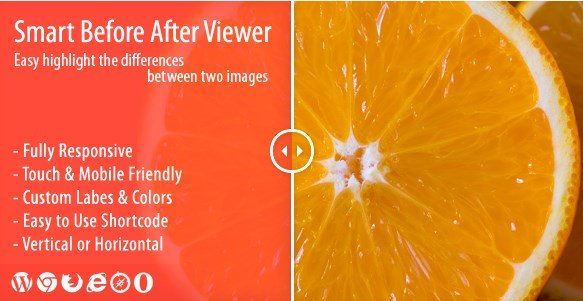
This plugin turns a simple pair of images into an interactive comparison tool. As a WordPress plugin, it integrates directly into your site's dashboard, letting you place a before-and-after viewer anywhere you can insert a shortcode. You upload two images, choose how you want them displayed, and visitors can slide a handle back and forth to see the transformation. That makes it handy for showing off renovation projects, photography retouching, skincare results, or any visual change you want to highlight. It works with any two images you upload, as long as WordPress can display them. The interface stays clean and focused, so the viewer never overwhelms the content around it. Because it was built as a commercial plugin, you get a polished, well-tested package rather than a workaround that breaks when you update your theme. Setup takes only a few minutes, and you don't need to write a line of code to get it running.
Visitors can interact in two ways. They can drag the divider with their mouse or finger, which feels familiar and precise on desktops. Alternatively, they can simply hover over the image to move the comparison point automatically, which works especially well for quick glances. Both methods respond smoothly on touch devices, so mobile visitors aren't left out. The layout automatically adjusts to fit any screen size, meaning the viewer looks as good on a small phone as it does on a wide monitor. You can also choose between horizontal and vertical orientations. A horizontal slider moves left and right, while a vertical slider reveals the difference by moving up and down. That flexibility lets you match the direction to the nature of your images, whether the change is on the left side, bottom edge, or anywhere in between. Visual feedback is immediate, and the transition stays smooth so the viewing experience doesn't feel janky.
Customization options give you control over how the viewer appears. You can add your own labels to each side, so the viewer might say "Before" and "After," or you could use names that describe specific stages, like "Day 1" and "Day 30." Colors for the handle, borders, and text can be adjusted to coordinate with your site's existing palette. Rather than having to edit settings every time you want to add a new comparison, the plugin includes a shortcode generator. This small tool lets you pick your images, set your preferences, and then copies a ready-to-use shortcode into your clipboard. Paste that shortcode into any post, page, or widget area, and the viewer appears exactly where you placed it. This makes it easy to create multiple before and after viewers without duplicating effort or messing with complicated configuration arrays. The interface is straightforward enough for beginners, yet flexible enough for developers who want precise control.
Similar products
 Analytify
This plugin arrives as a standard WordPress zip package, so you install it the same way you would any other plugin. Its original author distributes it through Codecanyon, a common marketplace for premium plugins. The viewer is fully responsive and works on touch devices, so it adapts to any screen size. The plugin is extremely easy to use, with drag and hover interactions that feel natural. There are no hidden setup steps, and the shortcode generator removes the guesswork from placing the viewer in your content. For anyone who shares visual results, this viewer is a straightforward addition. It does one thing and does it well, without adding bloat to your WordPress dashboard. The horizontal and vertical orientations, along with custom labels and colors, cover the main customization needs. Given how often before-and-after sliders are needed for portfolios, fitness transformations, or home remodels, it's a practical option for site owners who value clarity and simplicity.
- Last updated
- August 9, 2026
- Delivery
- Digital
- Availability
- In stock
- Version
- 5.5.0
- Category
- Wordpress Plugins
- Item type
- plugin
This page summarizes the available listing data for Smart Before After Viewer in Wordpress Plugins. The item type is recorded as plugin, with further details shown below.
Usage rights depend on the license selected at checkout. Review the complete terms before using this item for client work, redistribution, SaaS, or more than one end product.