Smart Navigation Widgets 2.5.3
Wordpress Plugins Codecanyon 4.8 (1.7K reviews)
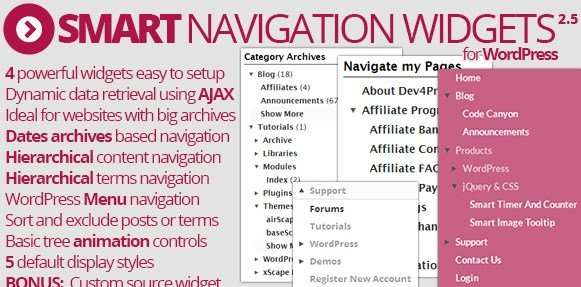
Smart Navigation Widgets is a WordPress plugin that changes how archive lists behave on your website. Rather than dumping every month, category, or page title into a sidebar, it presents a compact widget that reveals only a small portion of the archive at first. Visitors see top-level entries and can drill down level by level through AJAX, so the browser never reloads while moving from year to month to post. Typing, clicking, and exploring happen smoothly in the background. The entire process runs asynchronously, with no waiting for a fresh page load. That keeps long archive lists manageable and the sidebar clean. The result is an archive system that feels quick and uncluttered, no matter how many years of content your site holds. The idea is simple, but it makes a real difference for sites with deep content histories. Its purpose is straightforward: limit the options shown at each step while still letting readers reach the exact post they want.
The plugin includes three distinct widget types. The Date Based Archives widget starts with a list of years. Clicking a year expands to show its months, and clicking a month reveals the individual posts from that period. The Taxonomy Archives widget works the same way but for categories, tags, or any custom taxonomy you have registered. It presents top-level terms first and lets visitors expand each one to see subterms and their associated content. The Hierarchy Content widget is designed for pages or any post type with parent-child relationships. It shows parent items and allows users to expand nested child pages level by level. Each widget can be placed in any standard widget area, so you control where and how these tools appear. They also respect the normal widget settings, giving you options to adjust titles and display preferences through the familiar WordPress admin interface. All three share the same AJAX-driven approach, so they behave consistently across your site.
More from this category
 WPForms
The widgets make archive browsing more direct. A visitor does not need to guess which month a post was published or which category contains the right article. The archive grows on demand, so the choices stay limited and relevant at each step. This cuts down on scrolling and keeps your sidebar compact. For site owners, the plugin requires no coding. Once installed, you simply drag one of the widgets into a sidebar or footer area and pick which archive structure you want to display. The widget settings appear in the WordPress customizer or widget editor, letting you rename the title and choose the base level of the hierarchy. Because everything relies on WordPress's built-in widget system, the plugin works alongside your existing theme and other widgets without any special arrangement. That makes it approachable for beginners while still giving experienced users flexibility. The interface mirrors the WordPress dashboard, so there is no separate control panel to learn.
Distribution happens through Codecanyon, a long-running marketplace for developer-made WordPress products. That means you get a proper plugin package intended for standard use, not a modified or repackaged script. The download arrives as a single .zip file that you upload through your WordPress admin panel, just like any other plugin. Once activated, the widgets become available in your theme's widget areas, and you can start using them immediately. There are no separate services to connect, no third-party accounts, and no external dependencies. The plugin focuses entirely on archive browsing, so the scope stays narrow and the feature set stays manageable. For bloggers, news sites, or content-heavy websites, this is a straightforward way to present older material without overwhelming the reader. It simply turns the typical archive list into an interactive, expandable menu. The plugin also supports multiple widget instances, so you can place a date widget here and a taxonomy widget there if your layout calls for it.
- Item type
- plugin
- Category
- Wordpress Plugins
- Version
- 1.11.0
- Availability
- In stock
- Delivery
- Digital
- Last updated
- August 3, 2026
The Smart Navigation Widgets listing is available in Wordpress Plugins as a plugin. Check the description, item facts, and purchase details to assess its relevance to a project.
Usage rights depend on the license selected at checkout. Review the complete terms before using this item for client work, redistribution, SaaS, or more than one end product.