Sweipe - Responsive WordPress Mobile Theme Latest Version
Others Themeforest 4.8 (1.8K reviews)
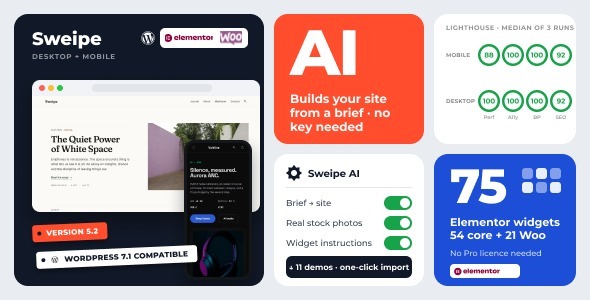
Sweipe — the mobile-first WordPress theme that builds your site from a brief
Describe your business in a few sentences. Sweipe AI plans the pages, builds them, photographs them, reviews them and writes the copy. Then you open Elementor and tell any widget what you want in plain words. AI is included with the licence — no account to open, no API key to paste — on top of everything Sweipe already was: a theme designed at 390px first and opened out to desktop, eleven complete demos, 75 Elementor widgets, a full options panel and a performance layer that inlines used CSS out of the box.
Browse the live demos →
Related products
 Themeforest

Sweipe AI: from a brief to a finished site
The setup wizard asks one question: what is the site about? Write it the way you would tell a friend — “an independent pet shop in Istanbul, natural food, beds and toys, home delivery” — and pick the language you want the site in. From there:
- Plan. Sweipe AI picks the pages your business needs and fills each one with sections chosen from a library of a few hundred sections across all the Elementor demos: a hero from one demo, a pricing table from another, a product grid from a third. You edit the plan before anything is built — rename pages, reorder or drop sections.
- Build. The site is assembled and imported like a demo, with the plugins it needs installed on the way. Every placeholder image is replaced with a real stock photo chosen for your brief and cropped to the exact size of the slot it fills.
- Review. The built pages are inspected — their structure, and on a public site screenshots of every page on a phone and a desktop — then corrected and rebuilt where something is off.
- Copy. The site name, menus and every page are written around your brief, in your language. Each page’s texts can be undone at any time.
Prefer a demo as it is? The wizard ranks the eleven demos for your brief, imports the one you choose and offers to rewrite its copy page by page, with Apply and Undo.
In Elementor: tell the widget, don’t hunt for the control
Every Sweipe widget has an AI tab. Type “two columns, rounded cards, a soft shadow, dark background, hide the counts” and click Apply: the widget’s own options and styles are set, and Elementor’s undo takes it back. Widgets with real copy also offer Improve, Shorten, Lengthen, a tone change, Proofread and Translate, in place. Product grids and post lists get the instruction box and leave your content alone.
What the service receives is what you ask it to work on: your brief, the texts, the plan and the page report. Nothing runs on a schedule, nothing leaves your site without a click, and the model runs on our servers, so your licence is the only key you will ever need.
Eleven demos, one click each
Every demo is a complete site — pages, menus, widgets, images, Elementor templates and WooCommerce products. Pick one in the setup wizard and it builds itself. Five business sites, five full shops and a blog.
- Sweipe General — magazine / blog, built with the block editor
- Studio Ferro — creative agency, filterable portfolio and case studies
- Northline — consulting, services pages and an insights blog
- Hale & Moreau — law firm, English + Portuguese with a language switcher
- Pulsewave — SaaS startup, pricing table and feature bento grid
- Brickline — construction, project gallery and before/after slider
- Ember Roasters — coffee roastery shop, English + Turkish
- Marlow — fashion shop with a lookbook
- Nordhaus — furniture shop with room categories
- Voltline — electronics shop, dark theme, spec tables and countdown deals
- Paws & Co. — pet supplies shop with sale badges and delivery info
Built to score
Sweipe ships a performance layer, not a plugin recommendation. Used CSS is inlined per page so the first paint needs no blocking stylesheet; the full sheets load afterwards. Swiper only loads on pages with a carousel. Below-the-fold images stop competing with your hero for bandwidth. HTML and custom CSS are minified on output. All of it is on or off from one panel.
75 Elementor widgets — free Elementor, no Pro licence
Sweipe does not require Elementor Pro. The companion plugin ships its own header and footer builder, its own loop grid and carousel, its own form widget, and a complete WooCommerce widget set. Everything below works on the free Elementor plugin.
WooCommerce, built for the thumb
Five demos are full shops. Shop archive, category tiles, single product, cart, checkout and My Account are templated, and every product grid has its own responsive Columns and Gap controls in Elementor — set four across on desktop, two on a phone, without touching CSS.
Everything from panels, nothing from code
Colours, typography, navbar, side panels, footer, buttons and forms, loading screen, favicons, Add to Home Screen, social integrations, WooCommerce behaviour and the performance layer are all controls. If it is an Elementor widget it is an Elementor control; if it is site-wide it is in the Sweipe panel. Child theme included for the rest.
What’s included
- Sweipe parent theme and child theme
- Sweipe Companion plugin, bundled inside the theme — no separate download
- Eleven one-click demos with all images and content
- Setup wizard: installs the companion plugins, imports your demo, done
- Custom post types for Portfolio and Testimonials
- Contact forms with submissions stored in WordPress
- Progressive web app features — Add to Home Screen, web app manifest, loading screen
- Off-canvas drawer menus, left and right, with widgets
- Polylang and WPML compatibility, including WooCommerce page mapping
- Translation ready with a .pot file
Requirements
- WordPress 6.4 or newer, tested up to 7.1
- PHP 8.0 or newer
- Elementor (free), WooCommerce, Contact Form 7 and Meta Box — all installed for you by the setup wizard, all free from wordpress.org
ChangeLog
18.09.2026 - ver 5.2.2 (Sweipe Companion plugin 1.2.2)
    - Fixed: File uploads in the Form widget. The browser refused every file, a required upload
      field never passed, and a field taking several files lost their links and email attachments.
    - Security: The Form widget checks each uploaded file's type (by its content, not only its
      name) and size on the server, against the field's own list and limit, so a request that
      skips the page cannot store any other kind of file.
    - Improved: The Lottie widget's player ships with the plugin instead of loading from a CDN,
      so visitors' browsers make no third-party request for it.
    - Fixed: On phones the Stats widget was several hundred pixels taller than its content.
    - Fixed: Escaping, input and translation fixes in the post type labels, the form submissions
      screen, the review form and a few widgets, found with WordPress's Plugin Check tool.

17.09.2026 - ver 5.2.1 (Sweipe Companion plugin 1.2.1)
    - New: AI credits. Every license includes 200 credits a month (a full site build is about ten,
      a widget edit one); the balance and reset date show in the wizard.
    - New: Agent access. A REST surface under /wp-json/sweipe/v1/agent/ (status, demo import, plan,
      build, review, copy rewrite) with WordPress Application Passwords, so a script or an AI agent
      (Claude Code, Cursor, any MCP client via the mobius-mcp server) can set the site up without
      the wizard.
    - Improved: the wizard's AI steps report credit balance and clearer errors when the service
      declines a request.

16.09.2026 - ver 5.2.0 (Sweipe Companion plugin 1.2.0)
    - New: Sweipe AI, included with your license. No API key, no account: it runs on our servers and
      is gated by your purchase code.
    - New: Build a site from a brief. Describe the business, pick a template, edit the plan, and the
      wizard assembles the pages from a library of sections across all Elementor templates, imports
      the result, reviews it on screenshots, fixes what it finds and writes the copy around your
      brief in your language.
    - New: Real stock photos. Every placeholder image of a generated site is replaced with a photo
      chosen for the brief (Pexels), cropped to the exact size of the placeholder.
    - New: Brief step in the setup wizard; the demos are ranked for your business.
    - New: Rewrite an imported demo's copy page by page from the brief, with Apply and Undo (wizard
      step and Sweipe > AI screen).
    - New: AI tab on every Elementor widget. Describe what you want in plain words and the widget's
      own options and styles are set; Elementor undo takes it back. Widgets with text also get
      Improve, Shorten, Lengthen, tone, Proofread and Translate in place.
    - New: Sweipe > AI screen to switch the features on or off and test the connection.
    - Compatibility: WordPress 7.1 (6.4 or newer), PHP 8.0 or newer.

15.09.2026 - ver 5.1.1 (Sweipe Companion plugin 1.1.1)
    - New: Switches and Delivery Slot Check widgets. The library is now 75 Elementor widgets
      (54 general + 21 WooCommerce).
    - New: Page Layout box gets a "Hide the page title" option for pages that print their own heading.
    - New: Products widget gets a "fade on hover" add-to-cart style that stays in the card flow.
    - New: Defer scripts option under Performance (theme and plugin scripts by default, or
      everything on the page).
    - Fixed: Used CSS switched itself off on pages with large stylesheets, so those pages loaded
      every stylesheet before the first paint.
    - Fixed: The bundled companion plugin was not offered as an update after a theme update.
    - Fixed: Demo export lost the site vertical, so an imported restaurant demo came up as a blog.
    - Fixed: Elementor editor crashed on pages with a Schedule Grid.
    - Fixed: Customizer 404 on the preview script and control stylesheet, and a jQuery error from
      the sidebar widget markup.
    - Fixed: Price ranges broke into three lines on narrow cards, and the dash sat closer to one
      price than the other.
    - Fixed: Variation sale price was underlined.
    - Fixed: Sticky add to cart bar on phones covered the last row of the footer.
    - Fixed: Fulfilment picker showed "Pick a time" before anything was ordered.
    - Fixed: Table widget column widths were ignored; stacked tables now switch to label/value rows
      at 40 characters.
    - Fixed: Meta rows printed a stray dot after the last item; case study meta grid mis-aligned.
    - Fixed: Some Elementor widgets registered a control twice, so the second one never showed.
    - Compatibility: WordPress 7.1 (6.4 or newer), PHP 8.0 or newer.

07.09.2026 - ver 5.1.0 (Sweipe Companion plugin 1.1.0)
    - Five new Elementor widgets: Chip Group, Stats, Timeline / Stepper, Ledger List, Schedule Grid.
    - New app chrome as theme parts: bottom navigation bar, edge sheets (focus trap, scrim,
      scroll lock), snackbar, floating action button (standard / extended / basket), navbar sub-bar.
    - Five new header layouts (bottom-nav, collapsing, centered, pill, rail) and four new footer
      patterns (app-bar echo, tonal stack, sheet, slab).
    - Four add-to-cart mechanics on both product grids: button, quantity stepper (new set-quantity
      endpoint), size picker using WooCommerce's own variation form, and link-to-product.
    - Product card slots: colour swatches from attribute terms, unit price, stock, rating, meta.
    - Four sale-badge forms, including an edge rule; per-product image tint shared by both grids.
    - Chip filter row on the shop archive, with an optional filters-in-a-sheet mode on phones.
    - Material-3 elevation scale (levels 0-5 plus a tint token); shadow-sm/md/lg become aliases,
      so existing components inherit the new material language with no markup change.
    - 44px touch-target floor applied theme-wide from a single token.
    - Accessibility: AA contrast corrections to muted text, in-stock green, footer headings,
      breadcrumbs and review counts; the quantity stepper now announces to screen readers.
    - Fixes: clamped product-card titles no longer cut through their second line; mailto:/tel:
      links no longer clip in a stacked contact row; .htaccess handling on multisite.

05.09.2026 - ver 5.0.1 (Sweipe Companion plugin 1.0.2)
    - Changed: demo packages moved to private storage. Demo Import now asks for your
      purchase code and fetches a short-lived download link, so a purchase code is
      required for demo import on every site (localhost included).
    - Fixed: imported media kept the exporter's month folder in page and Elementor
      content, leaving images broken after an import.
    - Documentation: changelog added, license section updated.
    - Note: Sweipe 5.0.0 can no longer download demos; update to 5.0.1.

30.08.2026 - ver 5.0.0
    - Rebuilt: the theme is now Elementor-based. WPBakery, Revolution Slider and Kirki are gone.
    - New: eleven complete demos with one-click import and a guided setup wizard.
    - New: Sweipe Companion plugin, bundled inside the theme — 59 Elementor widgets,
      the options panel, the demo importer and the form submissions screen.
    - New: header and footer builder using free Elementor templates.
    - New: performance panel — per-page used-CSS inlining, conditional Swiper loading,
      block-editor stylesheet control, minified assets, HTML and custom-CSS minification.
    - New: WooCommerce widget set (20 widgets) with responsive Columns and Gap controls
      on every product grid.
    - New: contact forms with submissions stored in WordPress.
    - New: Polylang and WPML compatibility including WooCommerce page mapping.
    - Improved: accessibility — all demos score 95-100 on Lighthouse accessibility.
    - Compatibility: WordPress 6.4 minimum, tested to 7.1. PHP 8.0 minimum.

14.07.2021 - ver 3.0.1
    - WordPress 5.8.* compatible.
    - WPBakery Page Builder bumped up to latest version.
    - Revolution Slider bumped up to latest version.
    - Demo content update.
    - Slider demo content update.
    - JS Plugins update.
    - Main files downloaded now contains plugins.
    - Gutenberg block style fixes.
    - Workaround for google fonts with space in their name added by Kirki option panel,
    - Sticky post redesigned.
    - Block styles enqueued for better gutenberg support.
    - Image captions aligned.
    - Blockquote block styles fixed.
    - Style of password protected posts form redesigned.
    - Continue Reading link is now button.
    - Theme author block redesigned.
    - Alignment fixes made.
    - Redesigned Image captions for better visibility.
    - Title with markup fixed.
    - Gallery column support fixed to 9.
    - Gallery image caption line clamp set to 2.
    - Pagination redesigned.
    - Improvements for desktop visibility.
    - Fixed problem on hiding loading screen. Sometimes jQuery window on load event wouldn't fire and loading screen wouldn't disappear.
    - Fixed visual issues with WooCommerce buttons.
    - Many other fixes and improvements.

03.04.2020 - ver 2.1.6
    - New Envato Theme Check compatibility.
    - Started using Firebase Storage as custom plugin CDN for faster and more reliable source.
    - Replaced Aq_Resize with a new custom function.
    - Fixed TGM Plugin Activation warnings.
    - Custom widgets moved out from core theme code to FlatMobile Sidebars plugin.
    - Child theme updated to version 1.0.1 for compatibility.

    - Full WordPress 5.4 compatibility checked.
    - Compatibility with the Contact Form bumped up to 5.1.7 version.
    - Compatibility with the Kirki Option Panel bumped up to 3.1.0 version.
    - Compatibility with the WooCommerce bumped up to 4.0.1 version.
    - Compatibility with the WPBakery Page Builder bumped up to 6.1 version.
    - Sweipe Sidebars plugin updated to 1.1 version Now this plugin contains custom widgets.
    - Sweipe VC Extend plugin updated to 1.5 version.

01.03.2020 - ver 2.1.4
    - Compatibility: WordPress 5.3.x
    - Compatibility: Updated all plugins.

10.10.2016 - ver 2.1.3
    - Compatibility: WordPress 4.6.1
    - Compatibility: WooCommerce 2.6.7

    - Update: Sweipe VC Extend version to 1.2
    - Update: Sweipe Post Types version to 1.1
    - Update: Contact Form 7 version to 4.5.1
    - Update: WooCommerce version to 2.6.7
    - Update: Visual Composer version to 4.12.1
    - Update: Revolution Slider to 5.3.0.2
    - Update: Kirki version to 2.3.5

    - Fixed: Search Page
    - Fixed: Testimonials
16.08.2016 - ver 2.1.2
    - Fixed: Annoying flickering scroll issue
16.08.2016 - ver 2.1.1
    - Fixed: In WebApp mode, lightboxes were not working
16.08.2016 - ver 2.1
    - Improved: WebApp capability
    - Improved: Add to HomeScreen feature

    - Update: Demo Content
29.07.2016 - ver 2.0
    - Compatibility: WordPress 4.5.3
    - Compatibility: WooCommerce 2.6.4

    - Update: Contact Form 7 version to 4.4.2
    - Update: WooCommerce version to 2.6.4
    - Update: Visual Composer version to 4.12

    - Fixed: Demo homeslider
25.05.2016 - ver 1.9.2
    - Fixed: An issue with old PHP version.
    - Fixed: Logo was not linked to Home Page.
25.05.2016 - ver 1.9
    - New Feature: Add to Home Screen for iOS, Android, Blackberry and Playbook devices. Also this feature has variety of options at Customization panel.
    - Updated: Visual Composer from 4.11.1 to 4.11.2
    - Updated: Contact Form 7 from 4.4.2 to 4.4.3
    - Updated: TGMPA to 2.6.1
    - Updated: Kirki from 2.3.1 to 2.3.2
    - Updated: Kirki was bundled within theme files, removed it and added as a TGM plugin
    - Updated: Typography section on Appearance -> Customize reworked and better option table added. It’s easier to work with typography options now.
    - Updated: Increased the tap size of top right button which opens right panel.
31.03.2016 - ver 1.8
    - Updated: Theme is now compatible with HTTPS SSL Certificates.
    - Updated: Visual Composer to 4.11.1.
    - Updated: WooCommerce to 2.5.5.
    - Fixed: Compatibility issues with WooCommerce 2.5.5
03.03.2016 - ver 1.7
    - Fixed: Footer social icon changes
    - Fixed: Footer copyright text changes
25.02.2016 - ver 1.6
    - Added: New options to menu items
    - Fixed: Some hosts were caching child themes style.css even after change
    - Fixed: Ripple effect
    - Fixed: Custom CSS and Custom JS codes were not working
24.02.2016 - ver 1.5
    - Added: Ripple effect for menu is available
    - Added: Icon support for menu items
    - Fixed: Loading screen is now present
23.02.2016 - ver 1.4
    - Added: Alternative panel reveal effect with blur
    - Fixed: Problem changing body text color
    - Updated: Option Panel
    - Updated: Visual Composer
- Last updated
- September 24, 2026
- Delivery
- Digital
- Availability
- In stock
- Version
- Latest Version
- Category
- Others
- Item type
- theme
Sweipe - Responsive WordPress Mobile Theme is one of the Others items recorded as a theme. The content below uses the supplied listing information and current local catalog data.
Usage rights depend on the license selected at checkout. Review the complete terms before using this item for client work, redistribution, SaaS, or more than one end product.