Takei - Blog and Magazine HTML Template Latest Version
HTML Templates Themeforest 4.8 (3.3K reviews)
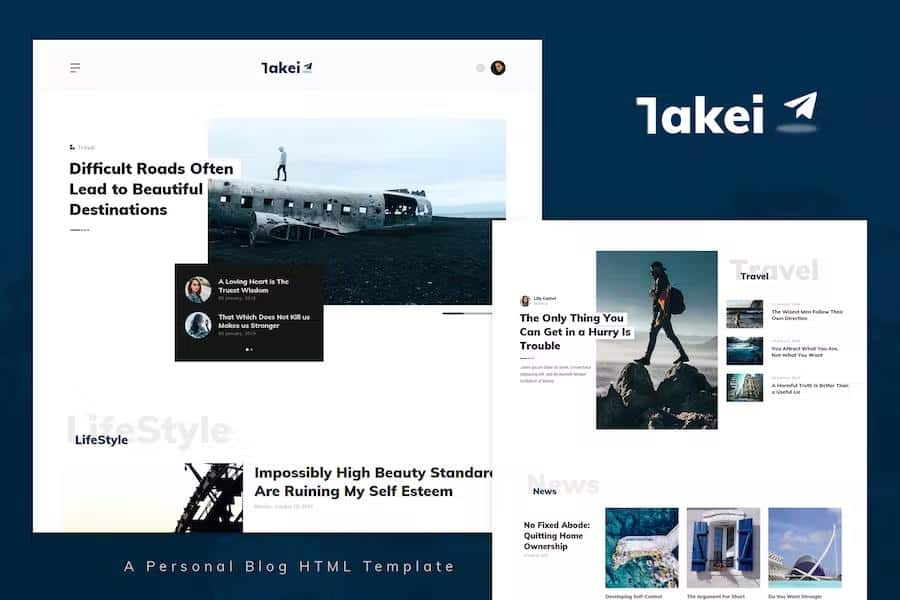
Takei is an HTML template built for blogs and online magazines. It presents a clean, modern look that works across different content types, whether you're running a personal journal, a marketing blog, or a corporate blog. The layout is fully responsive, so readers get a consistent experience on phones, tablets, and desktops. The design feels flat and crisp, with plenty of white space that keeps articles readable and photography prominent. Because it is a static HTML template, it can be hosted almost anywhere and pairs well with existing backends or static site generators. The homepage layouts are flexible enough for both text-heavy and image-heavy sites. The template comes with several demo variations you can use right away. While it is a single product, the bundled demos let you choose a starting point that matches the tone of your content, whether that's minimal, editorial, or slightly more playful. No premium builder is required; you edit the HTML files directly.
The core strength of Takei is its modular block system. Instead of a single fixed layout, the template is assembled from distinct, reusable sections. You can combine these blocks to form new page layouts without having to write code from scratch. That flexibility is what makes the template feel less restrictive than most pre-built themes. For example, you might take a featured post grid, add a sideways list, and then place a newsletter signup area. Every new combination results in a different page structure, so you can create unique landing pages for individual topics or campaigns. This approach makes redesigns much simpler than working with a hard-coded layout. If you want to change the order of sections on the homepage, you can move blocks around. Adding an extra category page is a matter of reusing existing blocks. The modularity also means that you can keep a consistent visual style across your entire site while varying the arrangement of content.
Similar products

 Themeforest


The code inside Takei is clean, friendly, and well commented. Anyone with basic HTML and CSS skills can open the files and understand how the template is structured. This is especially useful when you need to adjust colors, typography, or spacing. The template uses valid HTML5 and is organized with SEO best practices in mind. Search engines can read the structure clearly, which helps your pages get indexed. All the primary files are included: HTML files, CSS files, JavaScript files, and a documentation set. The documentation explains how to get started, how to modify key elements, and how to work with the included components. Because everything is well commented, you do not need to rely on guessing when you are trying to find the right style rule or script call. Developers get a fast start, and beginners can learn how templates fit together while editing. This gives you a reliable starting point.
Takei is designed to work reliably across all major browsers, and its responsive grid adapts to various screen sizes without fuss. The built-in jQuery-enhanced slider adds visual interest for featured articles or photo galleries, and you can control the effects according to your preference. You can also adjust the animation speed or transition style if you want. Color variations are not hard-coded; the template supports unlimited color changes, so you can match your brand identity. All files are well documented, and the package includes the online documentation for quick reference. There are no proprietary frameworks locking you in, so you can extend the template using your own code when needed. For someone launching a personal blog or a small news website, Takei gives you a solid foundation without forcing you into a rigid system. You can replace the demo content with your own articles, images, and links, and the structure remains stable. The template is open to modification.
- Last updated
- August 2, 2026
- Delivery
- Digital
- Availability
- In stock
- Version
- Latest Version
- Category
- HTML Templates
- Item type
- template
Takei - Blog and Magazine HTML Template is listed in HTML Templates as a template. The supplied description, preview, version, price, and recorded product details are collected here for review.
Usage rights depend on the license selected at checkout. Review the complete terms before using this item for client work, redistribution, SaaS, or more than one end product.