TheGuide - Online Documentation WordPress Theme 1.0
Wordpress Themes Themeforest 4.8 (3.1K reviews)
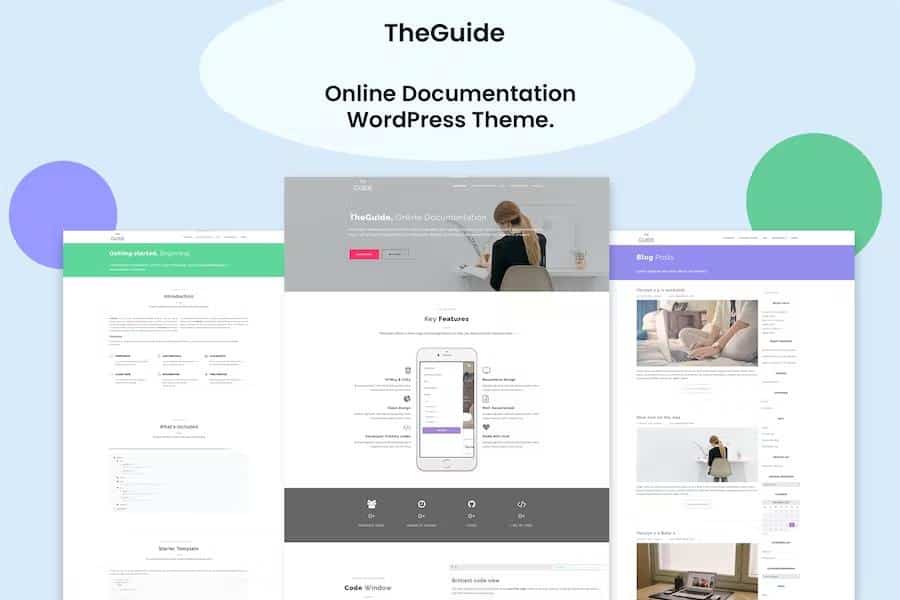
TheGuide is a high-performance WordPress theme made specifically for online documentation. It gives you a structured way to publish software manuals, API references, framework guides, plugin documentation, and template instructions. The theme is built on Bootstrap, so the underlying grid and interface elements are dependable and consistent across different screen sizes. Many built-in components are included for constructing interactive documentation pages, and you can rearrange them with a drag-and-drop page builder instead of writing code. This approach is meant to speed up the process of getting your documentation online. If you prefer using Elementor, TheGuide is compatible with that builder as well, so you can stick with the editing workflow you already know. The whole package is designed to let you get a documentation site up and running without friction, no matter the size of your project, so you can focus on your content and the people who read it.
TheGuide is fully responsive, which means your documentation site adapts to whatever device a visitor happens to use. Someone reading on a phone sees a layout arranged for a small screen, while on a desktop the wider display is used to show more content at once. Because the theme is built on Bootstrap, this responsiveness is part of the foundation rather than an afterthought. Navigation menus adjust, content reflows, and everything remains aligned on tablets and phones. There is no separate mobile site to manage, and you do not need to install extra plugins for basic responsiveness. The theme simply handles the sizing and spacing for you, so your documentation remains the focus of the page. This dependable behavior across devices means you can spend your time improving your content instead of troubleshooting layout breaks on different screen sizes. Whether readers use a laptop or a small phone, the theme presents your guides in an orderly, readable format.
Getting started with TheGuide does not require building a site from a blank canvas. The one-click demo importer brings in sample pages, settings, and placeholder content, so you can see how the theme is meant to look and then replace that material with your own. Within minutes, you have a working documentation site that mirrors the design structure shown in the preview. After the demo is loaded, the Redux theme options panel gives you a single, organized place to adjust site-wide settings. Colors, layout choices, header styles, and other configuration options are laid out clearly instead of being scattered across separate screens. You can also use the theme options to change the fonts for the body, headers, headings, and menu, keeping the visual identity consistent. This combination of a fast importer and an approachable options panel reduces the initial setup time considerably. Rather than guessing where certain settings live, you can open one panel and make the changes you need.
Typography plays a large role in how readable and professional your documentation feels, and TheGuide gives you direct control over it. The theme includes access to more than 600 Google Fonts, so you can pick a typeface that matches your project's brand or your personal preference. From the Redux theme options panel, you can assign different fonts to specific parts of the site: body text, headers, headings, and menu items. That means you can use a clean sans-serif font for paragraphs and a distinctive font for section titles, or keep everything uniform across the site. Changing the font does not require touching any code or stylesheets. You simply select the font you want from the options menu, and the theme applies it to the live site. For a documentation theme, clear typography matters because users are often scanning for answers quickly. TheGuide's font options help you create a comfortable reading experience that feels intentional and polished.
Related products

Kids Planet - A Multipurpose Children WordPress Theme for Kindergarten and Playgroup
 Themeforest
Sushico - Sushi and Asian Food Restaurant WordPress Theme
Themeforest
Snow - Minimal & Clean WordPress Portfolio Theme
Themeforest
- Last updated
- August 12, 2026
- Delivery
- Digital
- Availability
- In stock
- Version
- 1.4.2
- Category
- Wordpress Themes
- Item type
- theme
The catalog entry for TheGuide - Online Documentation WordPress Theme is grouped with Wordpress Themes and classified as a theme. Available product information is shown below with related items from the local catalog.
Usage rights depend on the license selected at checkout. Review the complete terms before using this item for client work, redistribution, SaaS, or more than one end product.