Vision - Multipurpose Elementor Pro Template Kit Latest Version
Elementor Kits Themeforest 4.8 (2.6K reviews)
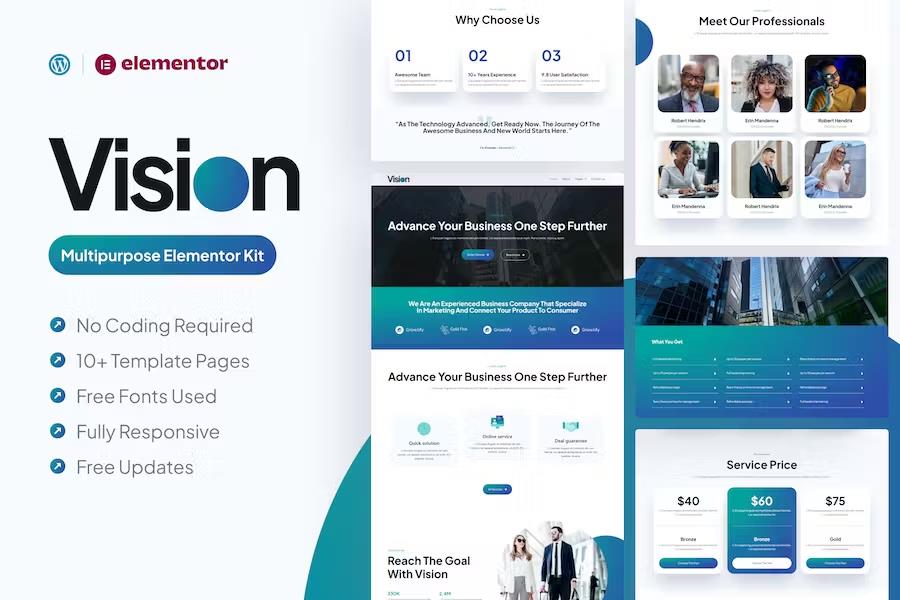
Vision functions as a multipurpose Elementor template kit built specifically for service-oriented websites. Anyone building a professional web presence can use these pre-designed layouts to skip starting from scratch. The package includes more than eleven pre-built pages constructed with a clean, modern visual style. Every section features careful layout arrangements designed to present business offerings clearly. Page creation happens entirely through the Elementor page builder interface. Users adjust layouts, swap text, and modify colors using simple drag-and-drop actions without writing any custom computer code. The kit relies on the Plus Jakarta Sans font from Google fonts to establish readable typography across all device screens. Building an online presence for consultancies, agencies, or independent service providers becomes straightforward because the structural foundation is already finished. Site builders simply select the layouts they need, import them into a WordPress installation, and begin swapping placeholder content with their own business details. The design aesthetic remains consistent from page to page, helping maintain a polished brand image for visitors arriving from search engines or direct links.
More from this category

Guarden - Garden & Landscaping Services Elementor Template Kit
 Themeforest
Writerly – Content Writing & Copywriting Elementor Template Kit
Themeforest
SSB - Football School & Club Elementor Template Kit
Themeforest
Twelve distinct templates make up the core contents of this digital product. The included files cover a homepage, an about us page, a team page, a general services overview, and individual service detail layouts. Additional pages handle project portfolios, pricing plans, client testimonials, blog archives, single post views, contact forms, and a standard 404 error page. Header and footer designs are also provided to complete the structural framework of the site. Each individual layout adapts to different screen sizes automatically, ensuring proper responsiveness on desktop monitors, tablet displays, and smartphone screens. This multi-device adaptability means visitors experience consistent formatting regardless of the hardware they use to browse the internet. Designers structured these layouts to accommodate standard business content requirements, meaning fewer adjustments are necessary to fit typical company information into the designated sections. The portfolio layouts display previous work effectively, while the pricing tables present service tiers clearly to prospective clients evaluating different purchase options.
Implementing the kit requires a WordPress website equipped with specific plugins. Required tools include the Envato Elements plugin, ElementsKit Lite, Elementor Header & Footer Builder, and Premium Addons for Elementor. Certain templates and features within the kit also require the paid Elementor Pro plugin for full functionality. Setting up the files involves installing the Envato Elements plugin, uploading the downloaded kit file directly through the WordPress dashboard, and checking for missing dependencies via the displayed installation prompts. Global kit styles import first to establish typography and color rules across the site. Individual templates then import into the Elementor saved templates repository for later use. Page creation involves adding a new WordPress page, launching the Elementor editor, selecting the full-width page template setting, and inserting the imported page layouts through the template library folder icon. This setup process keeps all visual editing grounded inside the familiar Elementor workspace, allowing site owners to maintain control over their content without managing complicated backend database settings.
Demo images sourced from Envato Elements appear in the preview presentation of this kit. Purchasers must license these specific images separately from Envato or substitute them with their own photographs and graphics before publishing the site live. The package provides the structural wireframes, page designs, and styling rules, leaving the specific media assets up to the site owner to supply. Free upcoming updates deliver future layout additions and maintenance adjustments as the kit evolves. Support resources remain accessible through the standard plugin menus inside the WordPress admin panel should questions arise during the initial setup phase. By organizing standard corporate pages into a unified collection, this template kit reduces the hours usually spent planning site architecture and designing individual page sections from blank canvases. Businesses gain a functional, responsive website framework that prioritizes service presentation and visitor engagement through organized visual hierarchies and clean typography choices.
- Item type
- template kit
- Category
- Elementor Kits
- Version
- Latest Version
- Availability
- In stock
- Delivery
- Digital
- Last updated
- August 2, 2026
Vision - Multipurpose Elementor Pro Template Kit is one of the Elementor Kits items recorded as a template kit. The content below uses the supplied listing information and current local catalog data.
Usage rights depend on the license selected at checkout. Review the complete terms before using this item for client work, redistribution, SaaS, or more than one end product.