Visual Composer Addon - HTML5 Audio Player PRO 3.5.2
Wordpress Plugins Codecanyon 4.8 (2.1K reviews)
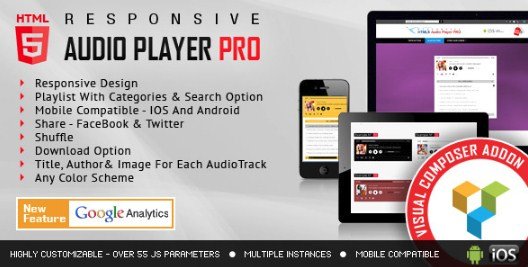
This is a Visual Composer addon that brings an HTML5 audio player into your WordPress page builder. The addon registers a new content element in your page builder library, which means you can insert it using the same drag-and-drop interface you already use for other components. It's a product from the Codecanyon marketplace, designed to be dropped into any existing layout. The player works on all major browsers and mobile devices, so site visitors get consistent audio playback whether they're on a phone, tablet, or desktop. It's not a standalone plugin; it extends Visual Composer's own set of content elements, letting you place the player anywhere you'd normally put a row, column, or widget. With HTML5 at its core, there's no need for Flash or other deprecated technology. The addon gives you a functional audio interface that can handle single tracks or entire playlists, all controlled from the familiar Visual Composer backend.
The feature set is straightforward and practical. It covers the essentials most audio setups need while leaving out extras. Playlists come with a built-in search field, so visitors can quickly find a specific song or episode without scrolling through a long list. There's also a download option, which lets you decide whether listeners can save the audio file directly from the player. The color scheme is fully adjustable, meaning you can match the player to your site's existing palette rather than being stuck with a default skin. Responsive design ensures the player adapts to whatever screen size is viewing it, keeping layout intact on small phones and large monitors alike. Configuration happens directly inside the Visual Composer interface, so you don't need to touch a separate settings page or write any code. Everything is handled through dropdowns, text fields, and color pickers. Those controls appear only when you enable them, so the player stays as simple or as full-featured as you want.
From a design perspective, the player keeps things clean and unobtrusive. It can sit comfortably in a sidebar, within a content column, or as part of a larger media block. The search and download controls are optional, so you can strip the player down to just play, pause, and track navigation if that's all you need. Playlists display track names clearly, and the current song remains highlighted during playback. The audio element itself is native HTML5, which means it relies on the browser's built-in media engine. That approach improves compatibility and reduces the chance of script conflicts. The highlighted track updates automatically as playback advances, which helps visitors keep their place in longer lists. Because it's a Visual Composer addon, the player inherits the same styling and responsive behavior as the rest of your page builder content. This makes it a good fit for podcasters, musicians, or anyone running a site that regularly publishes audio.
Similar products

 Codecanyon

The package you receive is the exact zip file distributed by the original author, so there are no reworked files, extra wrappers, or modified code. That matters if you plan to update the addon through your normal process, because the file structure matches what the developer intended. As with any third-party extension, you'll need Visual Composer (now WPBakery Page Builder) already installed for this addon to function. If you're familiar with installing plugins through the WordPress admin, you won't encounter any surprises. The player itself works independently of what theme you use, since it only relies on the page builder's framework. Once uploaded and activated through the WordPress admin, it appears as a new element in your Visual Composer content library. From there, adding an audio player to any page is just a matter of dragging the element into place and configuring the few options you need. All settings are presented visually, so no coding skills come into play.
- Item type
- plugin
- Category
- Wordpress Plugins
- Version
- 15.0
- Availability
- In stock
- Delivery
- Digital
- Last updated
- August 2, 2026
Visual Composer Addon - HTML5 Audio Player PRO is cataloged as a Wordpress Plugins under plugin. Review the preview and recorded details alongside the original description before purchase.
Usage rights depend on the license selected at checkout. Review the complete terms before using this item for client work, redistribution, SaaS, or more than one end product.