Widget Ninja WordPress Plugin 1.60
Wordpress Plugins Codecanyon 4.8 (2.9K reviews)
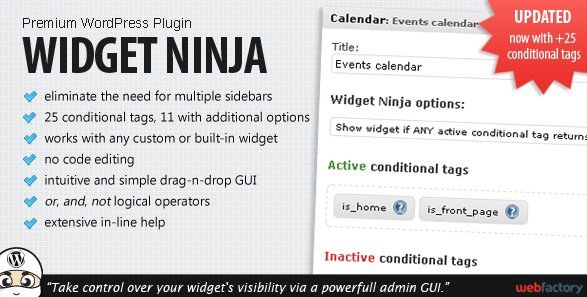
Widget Ninja is a WordPress plugin for taking control over where and when widgets appear. Instead of building multiple sidebars and then assigning each one to a different part of your site, you work with a single, familiar widget screen. The plugin adds a visibility panel to every widget you already have. From there, you set rules that decide whether that widget shows up on the page someone is viewing. The whole idea is to give each widget its own set of instructions without touching your sidebar templates. Once you save a widget, the rules take effect immediately. The interface is drag and drop, so you reorder widgets normally, then simply toggle conditions on each one. It is distributed through Codecanyon, and the version you get is the exact file from the original author. That matters for updates and consistency, though you still manage installation through the normal WordPress plugins screen.
The core of Widget Ninja is its collection of over 25 conditional tags. These are the same kinds of checks WordPress uses internally, but presented as simple choices. For example, you can show a widget only on your blog index, only on single posts, or only on pages that carry a certain category. Some tags cover user status, so logged-in visitors see different widgets than guests. Others look at dates, archives, or custom post types. The full list covers a wide range of WordPress conditions, and the plugin displays them all in a simple dropdown. Among those 25 conditions, eleven offer extra options, letting you narrow things down further. A tag that checks for a page, for instance, can also let you pick a specific page from a dropdown. That allows you to target content precisely without writing a single line of code. All conditions are chosen through the widget edit screen, so there is no separate configuration page to learn.
More from this category

 Restrict Content Pro
Where Widget Ninja really stands out is the way you can combine those conditions. You are not limited to one rule per widget. Instead, you can build a logical statement that uses AND, OR, and parentheses to express exactly when the widget should appear. Say you want a call-to-action box on blog posts, but only if the visitor is logged out and the post is in a certain category. That kind of rule is simple to put together. You can even use multiple conditions on a single widget to build very specific targeting. This removes the need to maintain dozens of sidebars, each customized for a narrow slice of your site. One sidebar layout can host many widgets, and each widget decides for itself whether it is relevant to the current view. The same idea works for hiding unused widgets on pages where they don't matter, so visitors see a cleaner layout. This makes the plugin valuable for news sites, shops, membership areas, and any WordPress site with a ranged audience.
Setting this up is straightforward because the plugin sits right inside the standard widget management area. Nothing about your existing sidebar structure changes until you start adding visibility rules. The drag-and-drop editor works exactly as you'd expect, and the conditional options are listed directly below each widget. This keeps the learning curve low and makes it easy to review or change rules later. For site owners who have been using complicated theme functions or multiple sidebar injection methods, Widget Ninja offers a cleaner alternative. You receive the original Codecanyon zip file, the same one the author distributes, so there are no modified files or surprising extras. The plugin is managed just like any other WordPress extension, which means updates and removal follow the familiar path.
- Item type
- plugin
- Category
- Wordpress Plugins
- Version
- 1.6.2
- Availability
- In stock
- Delivery
- Digital
- Last updated
- August 2, 2026
The Widget Ninja WordPress Plugin listing is available in Wordpress Plugins as a plugin. Check the description, item facts, and purchase details to assess its relevance to a project.
Usage rights depend on the license selected at checkout. Review the complete terms before using this item for client work, redistribution, SaaS, or more than one end product.