Woocommerce Bulk Edit Variable Products & Prices 2.7
Wordpress Plugins Codecanyon 4.8 (1.6K reviews)
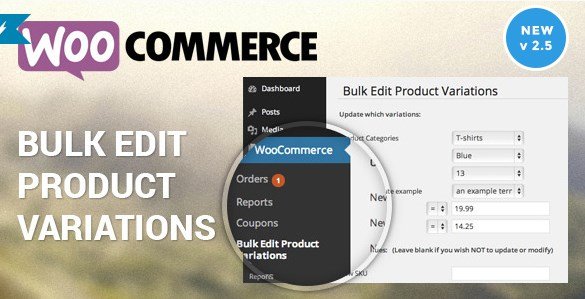
This is a practical tool for anyone running a WooCommerce store with more than a handful of products. Manual editing works fine for a few items, but once you have dozens or hundreds, changing a single detail like a price or SKU becomes tedious. That is where this extension steps in. It lets you select multiple products and update their fields in one operation. Both simple products and variable products are covered, so you are not limited to one type. The process is straightforward: choose the products you want to affect, set the values, and apply the changes. What would normally take hours of clicking through each product page is reduced to a few minutes of focused work. It is a utility product, not a flashy add-on, and it does its job quietly and efficiently. For store owners who frequently adjust inventory, prices, or product details, this kind of bulk editing makes daily operations far less painful.
Related products
 Wpfomify

The extension covers the core fields that most stores need to update in bulk. You can edit SKU codes, stock levels, regular prices, sale prices, weight, and height. These are the details that change frequently as products move through inventory or seasonal promotions. Instead of opening each product individually, you can set these values across a selection of items at once. For example, if a shipping provider changes rates, you can update the weight and height for a whole group of products in one pass. If you are running a clearance sale, you can adjust sale prices without touching each listing. The tool also handles stock numbers, which is especially useful when you receive a large shipment and need to update quantities quickly. Because the changes apply to your selected products directly, you retain full control over which items get updated. You are not forced to edit your entire catalog; you choose the scope.
Variable products have multiple variations, each with its own price, stock, SKU, and other attributes. Editing these manually is even more time-consuming than editing simple products, because each variation sits under a parent product and must be opened separately. This extension allows you to work with variable products in the same bulk fashion. You can edit variations directly, changing their prices or stock without opening every product page. Additionally, the plugin includes a feature for increasing or decreasing all prices within a category. This is handy for applying a uniform markup or discount across a group of products. You set the percentage or fixed amount, choose the category, and the tool adjusts the prices accordingly. If you need to raise prices due to supplier costs or run a storewide sale, this saves a considerable amount of manual work.
This is a third-party extension for WooCommerce, distributed through Codecanyon. It is not a standalone system; it plugs into an existing WooCommerce setup. Store owners who need to keep large catalogs current will find it useful. The main benefit is time saved. Instead of spending hours on repetitive edits, you can apply changes in a few steps. You do not need to work through a complicated import process or maintain a separate spreadsheet. Because the tool works directly with your product data, the updated values appear in your product listings right away, just as they would after a manual edit. It is designed for people who want to get the job done without fuss. The focus is on core fields and price adjustment, not on feature overload. That makes it straightforward to learn and use. For anyone managing an online store, having this kind of control over product data is a solid convenience.
- Last updated
- August 9, 2026
- Delivery
- Digital
- Availability
- In stock
- Version
- 1.0.1
- Category
- Wordpress Plugins
- Item type
- plugin
The Woocommerce Bulk Edit Variable Products & Prices listing is available in Wordpress Plugins as a plugin. Check the description, item facts, and purchase details to assess its relevance to a project.
Usage rights depend on the license selected at checkout. Review the complete terms before using this item for client work, redistribution, SaaS, or more than one end product.