WP – Author Box 2.2
Wordpress Plugins Codecanyon 4.8 (2.1K reviews)
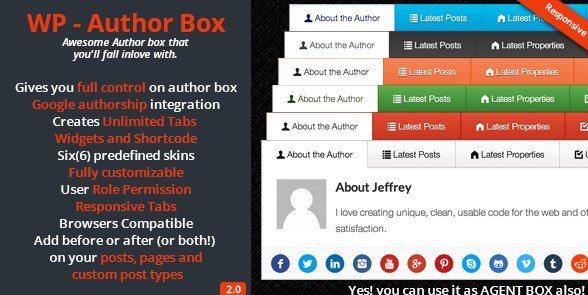
WP – Author Box is a WordPress plugin that places a clean, organized author information section below every post on your site. Instead of letting your writers fade into the background, this tool gives them a visible identity with their name, biography, and relevant links right where readers expect them. It works for single-author blogs and multi-author publications alike, helping you build trust with your audience and giving regular contributors the recognition they deserve. The plugin is distributed through Codecanyon, and you receive the exact plugin file released by the original developer. Installation follows the standard WordPress process, so you can upload it, activate it, and begin shaping your author boxes within minutes. No coding skills are necessary to make it function. Once activated, the plugin automatically inserts an author profile area beneath your post content, and you control exactly what appears there. This makes it a straightforward addition to any existing WordPress setup.
The plugin includes Google authorship integration, which connects author profiles with their Google presence, a feature that can support search visibility. It also gives you unlimited tab widgets and shortcodes, so you can place author information beyond the standard post footer—maybe in a sidebar, a landing page, or any other widget-ready area. Six built-in skins are available, letting you match the author box to your theme's style without touching CSS. You have full control over the appearance and content of each box, including which fields display and how they are arranged. User role permissions allow you to decide which user groups can view or modify the author box settings, which is helpful when you work with guest writers or contributors. The tabs are responsive, so they adjust smoothly to mobile and tablet screens, keeping your layout neat across devices and preventing awkward overflow. On mobile, the layout stays readable.
The plugin solves the problem of anonymous content. Many blogs list a post with no clear indication of the author, which can feel impersonal. WP – Author Box changes that by adding a professional byline area that gives each writer a face and a voice. For multi-author sites, it creates a consistent format for every contributor, so your readers know what to expect. The tab system is particularly useful for organizing information. You might have one tab for the author's bio, another for their recent posts, and a third for social profiles. Because the tabs are unlimited, you can build as many sections as you need. Shortcodes extend the functionality even further, letting you reuse author boxes anywhere in your content. This is a practical way to turn a simple WordPress feature into a structured part of your site's design.
Customization is where this plugin really gives you control. You can adjust colors, spacing, and typography to fit your brand. The six skins serve as starting points, and from there you can fine-tune every detail. If you run a business site, you might want a minimal, understated box; if you operate a lifestyle magazine, you can choose a brighter, more expressive layout. The user role permission system adds another layer of control, ensuring that only trusted administrators change the settings. You can also manage the order of tabs. For developers or site owners who need durable, predictable behavior, the plugin is straightforward and does not clutter your dashboard with unnecessary options. It is distributed as a standard plugin file, so you own the installation and can keep using it as long as you like. All the essential author box functions are included without requiring an account or recurring subscription. This plugin is a solid addition to any WordPress site that values clear authorship and wants a professional way to display it.
Similar products

Easy Digital Downloads PayPal Adaptive Payments Addon
 Easy Digital Downloads

Easy Digital Downloads Message Addon
Easy Digital Downloads
Easy Digital Downloads Gravity Forms Checkout Addon
Easy Digital Downloads
- Item type
- plugin
- Category
- Wordpress Plugins
- Version
- 1.5.3
- Availability
- In stock
- Delivery
- Digital
- Last updated
- August 11, 2026
This listing covers WP – Author Box, a Wordpress Plugins from plugin. Use the source description and recorded item details below to check whether it fits the intended project.
Usage rights depend on the license selected at checkout. Review the complete terms before using this item for client work, redistribution, SaaS, or more than one end product.