WP OS Desktop Backend 1.160
Wordpress Plugins Codecanyon 4.8 (4.6K reviews)
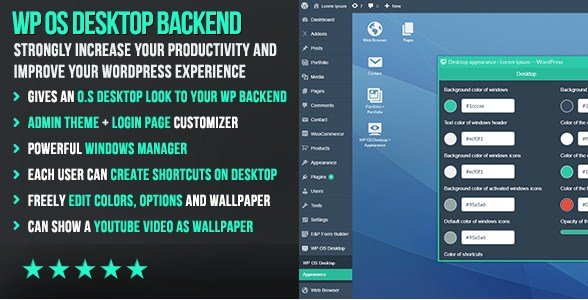
WP OS Desktop Backend is a WordPress plugin that changes how you interact with the administration area. Instead of the usual single-page dashboard layout, it turns the backend into something similar to a desktop operating system. You get windows that you can open, drag, resize, and close just like on a computer. The plugin is distributed through Codecanyon, which means you receive the standard release that follows the marketplace's documentation and update system. It is designed for anyone who spends a lot of time managing WordPress sites and wants a more flexible, visual way to handle routine tasks. For many people, the default admin panel is just a long list of links; this plugin replaces that with an actual workspace. That might sound abstract, but once you see the admin panel open as multiple floating windows, it starts to make sense. The core idea is to give site administrators a familiar and efficient interface for moving through the tools they use daily.
The central feature is the windows manager. You can open any admin page inside its own window, then arrange those windows on your screen however you like. That means you can have the post editor open next to the media library, or keep a settings page handy while you work on content. Each window behaves the way you would expect: move it around, resize it, minimize it, or bring it to the front. There is also a desktop shortcut system. With one click, you can create a shortcut to any admin page or tool you use often. These shortcuts sit on a virtual desktop, so you no longer need to dig through the WordPress menu every time. Instead of clicking through several layers of menus, you just click the shortcut on the desktop when you need it. This is especially useful for clients or editors who only use a handful of admin screens.
Related products
 Jet Plugins
Customization is a major part of the plugin. Each user who logs into the site can have their own desktop layout and their own admin theme. The plugin doesn't force one look on everyone; instead, individual users can choose colors, backgrounds, and how windows are arranged. This makes it a good fit for multi-author sites where different people prefer different working styles. You can also customize the login page directly from the plugin, which means your branding stays consistent from the moment someone enters their credentials. One unusual addition is support for video wallpapers from YouTube. You can set a YouTube video as the background of your desktop, so instead of a static wallpaper, you get motion behind your windows. That is a visual flourish you don't see in most admin tools, and it makes the whole interface feel less like a standard dashboard. It is a different way to experience the backend.
The plugin is designed to be easy to configure. Most of the settings are straightforward to reach and adjust, so you're not spending hours on setup. Beyond the core features, there are additional options that aren't listed in detail here, but the official documentation provides a full overview. The distribution goes through Codecanyon, which means you are getting the same plugin file that the original author releases. It works with WordPress sites and is aimed at administrators who want a more visual, organized alternative to the default admin layout. If you've ever found the standard backend cramped or cluttered, this desktop approach gives you a different way to work. It may not be for everyone, but for those who like the idea of windows, shortcuts, and a customizable admin workspace, it offers a clear and tangible change. You still get all the functionality of the standard dashboard, just presented in a more flexible layout.
- Last updated
- August 9, 2026
- Delivery
- Digital
- Availability
- In stock
- Version
- 3.8.11
- Category
- Wordpress Plugins
- Item type
- plugin
The WP OS Desktop Backend listing is available in Wordpress Plugins as a plugin. Check the description, item facts, and purchase details to assess its relevance to a project.
Usage rights depend on the license selected at checkout. Review the complete terms before using this item for client work, redistribution, SaaS, or more than one end product.