X Docs Wordpress Product Documentation Creator 1.1.1
Wordpress Plugins Codecanyon 4.8 (2.3K reviews)
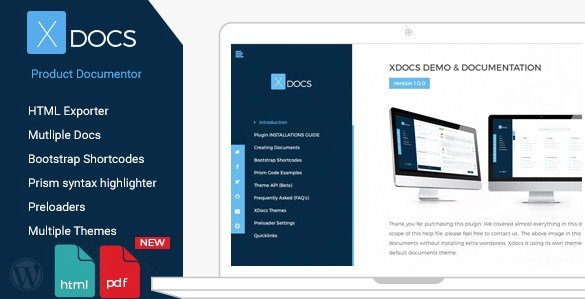
X Docs is a WordPress plugin built for people who need to publish product documentation without fighting a complicated system. It comes from Codecanyon, where it's sold as a standard plugin download, and it installs just like any other plugin you'd upload through the WordPress dashboard. The core purpose is straightforward: you create documents that explain a product, then present them either online as part of your site or as downloadable files. Everything runs inside your existing WordPress installation, so there's no separate platform to learn or subscribe to. For someone running an e-commerce store, a software company, or a hardware brand, that means product manuals and help guides live in the same place as the rest of your content. The plugin gives you the tools to build those documents the way you want them, using your own layout choices rather than forcing a fixed template on every page.
The template system is built on Bootstrap, which is a widely used front-end framework. That matters because Bootstrap-based pages are responsive by default and look clean on phones, tablets, and desktops. The plugin includes its own set of Bootstrap shortcodes, so you can add buttons, grids, alerts, tabs, and other interface pieces directly inside your documentation without writing a line of code. The shortcodes cover common needs like callout boxes, progress bars, card layouts, and collapsible sections, so the final pages don't look like plain text dumped into a browser. You work in the WordPress editor, drop in a shortcode, and the styled element appears when the document renders. There is also a custom themes API for people who want deeper control. If you know how WordPress themes work, you can register your own theme or modify existing templates. This makes the plugin flexible for developers while still being usable for someone who just wants a clean, functional documentation page.
Creating multiple documents is handled from a dedicated section in your WordPress admin. Each document is separate, so one site can host manuals for several products at once, each with its own structure and content. The plugin lets you organize pages into sections and arrange them into a proper reading order. When a document is ready, you can export it or download it as an HTML file. That file works outside WordPress, which is useful if you need to send a manual to a client, bundle it on a USB drive, or upload it somewhere else. Offline and online versions come from the same source content, so you're not maintaining two copies. Configuration is kept simple through settings screens rather than code files, and the plugin stays inside the familiar WordPress admin interface. The focus throughout is on getting documentation built and distributed without extra moving parts.
For a real-world example, think about a company that sells physical gadgets and needs to publish setup instructions online. With X Docs, those instructions become a proper document with navigation, styled components, and a consistent look. The same content can be exported as HTML and attached to support emails or posted on a download page for offline reading. Because the plugin works within WordPress, updates are made in the normal editor, and you don't need a third-party documentation service. The downloaded HTML files are entirely self-contained, meaning the recipient does not need WordPress or a special viewer to open them. If you are comfortable with the basics of WordPress, you can install X Docs, create your first manual, and get it published in a single sitting. Developers can extend it through the themes API, while non-technical users can rely on the ready-to-use Bootstrap components. The result is a documentation setup that feels native to WordPress rather than bolted on, which keeps the whole workflow predictable.

 WooCommerce.com


- Last updated
- August 10, 2026
- Delivery
- Digital
- Availability
- In stock
- Version
- 1.4
- Category
- Wordpress Plugins
- Item type
- plugin
X Docs Wordpress Product Documentation Creator appears in the Wordpress Plugins catalog and is classified as a plugin. The page focuses on information available in the listing rather than unsupported performance or compatibility claims.
Usage rights depend on the license selected at checkout. Review the complete terms before using this item for client work, redistribution, SaaS, or more than one end product.