YITH WooCommerce Minimum Maximum Quantity Premium 1.39.0
Wordpress Plugins Yithemes 4.8 (2.7K reviews)
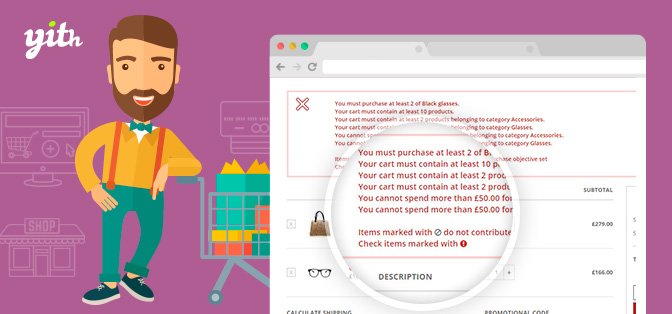
Running a WooCommerce store means dealing with all kinds of customer behavior at checkout. Some people try to add a single unit of a product that you sell by the dozen, while others attempt to order huge quantities that your packing process can't handle. YITH WooCommerce Minimum Maximum Quantity Premium is an extension built by YITHEMES to solve exactly these situations. It lets you set clear boundaries on what customers can buy, turning your product pages into a guided experience. Rather than letting an order go through that you have to manually adjust or cancel, you can establish limits before checkout begins. This plugin works within your existing WooCommerce setup and adds a set of controls that you configure from the product editing screen. The controls are clearly labeled and organized, so you don't need to dig through hidden options to find them. The result is a store that gently steers customers toward the correct purchase size without any confusion on their part.
The core feature is straightforward: you assign a minimum and a maximum quantity to any product. A minimum of five might be set for items that ship in five-unit bundles, while a maximum of two could apply to a limited-edition release. These numbers are enforced when the customer tries to add the product to the cart and again when they update quantities inside the cart. If they try to type a number below or above the allowed range, the plugin blocks the action instead of letting the total get applied. This happens instantly, so the customer knows right away that their input is outside the accepted range. Each product can have its own unique limits, so a store that sells both single greeting cards and boxed sets can use different rules for each. The enforcement happens automatically, which means you do not have to watch orders constantly or write custom code.
More from this category
Graph Paper Press Sell Media Manual Purchases Add-On
 Graph Paper Press

Graph Paper Press Sell Media MailChimp Add-On
Graph Paper Press

Graph Paper Press Sell Media Magnifier Add-On
Graph Paper Press
Beyond quantity per product, the plugin also addresses the total amount a customer spends. You can set a minimum order value, which is helpful for stores that offer free shipping above a certain price. Customers who fall short of that number will be prompted to add more items before they can proceed. You can also set a maximum order value to limit the size of a single transaction, protecting against unusual bulk orders or potential fraud. These spending rules work alongside a separate feature called purchase rules. Purchase rules let you write out the policies for your shop and have them appear on the product detail page in a clear, readable block. That way, customers see the reason behind the limits, such as "Wholesale orders require a $100 minimum," before they even put anything in their cart. This transparency helps stop the frustration of discovering a limit only after trying to check out.
When someone does attempt an order that breaks your rules, they are not greeted by a bland system error. The plugin lets you write your own error messages, so you can explain the issue in a way that sounds like your store. A message can read "Please order at least 6 bottles to qualify for bulk pricing" or "This item is limited to 3 per customer." You can customize these for each rule and each product, giving you the flexibility to match tone and phrasing to your brand. Every message appears right where the customer is, so they can correct their order immediately. For store owners, this means fewer abandoned carts, fewer support tickets asking about order sizes, and more time to spend on other parts of the business. The plugin is a practical tool, not a complicated one. It focuses on one job—keeping purchases within the boundaries you define—and does that job reliably across your entire catalog.
- Item type
- plugin
- Category
- Wordpress Plugins
- Version
- 2.0.1
- Availability
- In stock
- Delivery
- Digital
- Last updated
- August 9, 2026
This listing covers YITH WooCommerce Minimum Maximum Quantity Premium, a Wordpress Plugins from plugin. Use the source description and recorded item details below to check whether it fits the intended project.
Usage rights depend on the license selected at checkout. Review the complete terms before using this item for client work, redistribution, SaaS, or more than one end product.