AccessPress Social Pro Wordpress Plugin 2.2.1
Wordpress Plugins Codecanyon 4.8 (466 reviews)
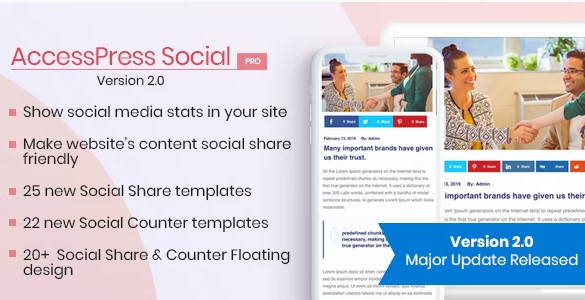
AccessPress Social Pro is a WordPress plugin distributed through Codecanyon, designed to handle two related jobs on a website. First, it lets visitors share your pages and posts across the major social networks with simple buttons. Second, it gives you a way to showcase your own social media accounts right on the site, pulling in your latest activity so the content feels current. The plugin is built for WordPress administrators who want social functionality without writing custom code or juggling multiple plugins. Everything gets controlled from the WordPress dashboard, and the setup process suits someone with basic WordPress knowledge rather than a developer. Installation follows the standard plugin package format, so you upload it like any other and it works with the normal WordPress content structure, meaning sharing and display buttons can appear alongside existing posts, pages, and widgets. There is no separate platform to configure; everything happens inside your WordPress site.
The visual side of AccessPress Social Pro is one of its main draws. You get twenty distinct design themes for the sharing buttons and display elements, which gives you room to match the look of your site instead of settling for a generic social bar. Alongside those themes, the plugin includes five animation styles that control how the buttons appear to visitors, whether that means a smooth slide-in or a subtle fade. A floating sidebar option is also included, and it comes with five pre-built themes of its own, so you can position your social links in a fixed spot on the screen where they stay visible as people scroll. Because themes are selectable, you can switch between them freely until you find the combination that fits your layout. The visual options are meant to be practical, not just decorative, so the buttons remain recognizable and easy for visitors to use.
More from this category
 Codecanyon
Content placement is handled through two standard WordPress tools: widgets and shortcodes. You can drop a social sharing widget into any widget-ready area of your theme, or place a shortcode directly inside a post, page, or custom content block. Each of these comes with a series of configurable parameters, so you decide which networks appear, what order they appear in, and how the buttons behave in a given location. This means you could put a compact sharing row at the top of blog posts and a fuller social display in the sidebar, using the same plugin but different settings. The widget and shortcode system follows normal WordPress conventions, which keeps things predictable for anyone who has worked with content blocks before. There is no need to touch theme files or learn a separate interface; the configuration happens through the same admin screens you already use for other WordPress settings. The settings apply consistently across the site.
The data behind the social displays is pulled through the latest APIs used by the major networks, and the plugin includes automatic updates for those APIs. That matters because social networks change their data formats periodically, and a plugin that stops receiving updates will quickly show outdated or broken feeds. AccessPress Social Pro is built to handle those changes as they happen, so the accounts you display should keep working without manual intervention. You also have direct control over which social media profiles get shown on your site, as well as the order they appear in. If you only want to feature two networks, you select those two; if you want all of them, you can list them in any order you prefer. Taken together, the plugin covers the two main social needs of a WordPress site: getting your content out to social audiences and bringing your social presence back onto your own pages.
- Item type
- plugin
- Category
- Wordpress Plugins
- Version
- 2.2.1
- Availability
- In stock
- Delivery
- Digital
- Last updated
- August 12, 2026
The catalog entry for AccessPress Social Pro Wordpress Plugin is grouped with Wordpress Plugins and classified as a plugin. Available product information is shown below with related items from the local catalog.
Usage rights depend on the license selected at checkout. Review the complete terms before using this item for client work, redistribution, SaaS, or more than one end product.