Ansie - Anxiety Life Coach Elementor Template Kit Latest Version
Others Themeforest 4.8 (4.0K reviews)
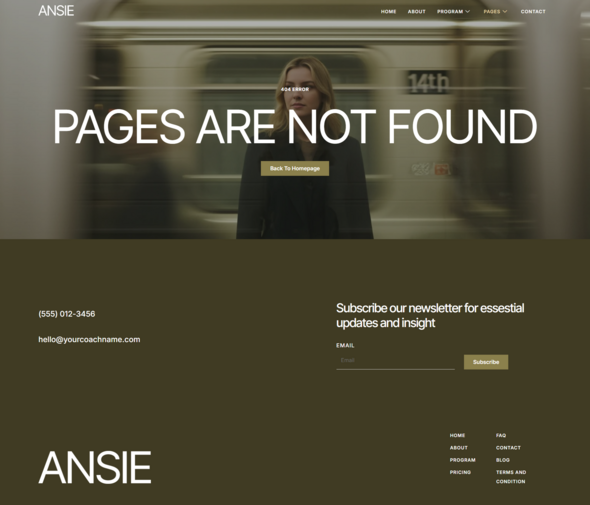
Ansie – Anxiety Life Coach Elementor Template Kit
Overview
Ansie is a calm, supportive, and modern Elementor Template Kit designed for anxiety life coaches, mental wellness practitioners, therapists, counselors, and mindfulness mentors. Built with a soothing visual style and clear content structure, Ansie helps you communicate trust, share your coaching approach, highlight programs, and encourage clients to take the first step toward emotional balance — all without writing a single line of code.
Important Note:
Other products to consider
 Themeforest
This is a Template Kit, not a WordPress theme. It includes pre-designed layouts optimized for the free version of Elementor and works perfectly with the Hello Elementor.
This Template Is Perfect For
- Anxiety and stress management coaches
- Life coaches and mindset mentors
- Mental wellness practitioners
- Therapists and counselors
- Mindfulness and self-healing programs
- Personal development coaches
Features:
- No Elementor Pro required
- Clean and professional design
- 14 pre-designed pages
- Fully responsive and customizable
- Works with most Elementor-compatible themes
Templates Included:
Required Plugin:
How to Use Template Kits:
Important Notice
This is NOT a WordPress theme. Template Kits contain design data for Elementor only and are installed using the Envato Elements plugin for WordPress or directly through Elementor.
Installation Steps
- Download your Template Kit file from Envato or ThemeForest and do not unzip it.
If you are using Safari, make sure “Open safe files after downloading” is disabled in browser preferences. - Go to Settings > Permalinks and ensure Post Name is selected.
- Go to Appearance > Themes > Add New and install & activate Hello Elementor.
This will prompt you to install Elementor if it is not already installed. - Go to Plugins and ensure Elementor and Template Kit Import are installed and updated.
If your kit requires Elementor Pro, install and connect it to your account. - Go to WordPress Dashboard > Tools > Template Kits and click Upload Template Kit Zip
(or click your kit to view it). - Check for the orange banner at the top and click Install Requirements to install required plugins.
- Click Import on Global Kit Styles first. This sets up global site styles.
- Import templates one at a time in the order shown.
Imported templates are stored under Templates > Saved Templates.
Creating Pages
- Go to Pages and create a new page, then click Edit with Elementor.
- Click the gear icon at the lower-left of the builder and set:
- Layout: Elementor Full Width
- Hide Page Title
- Click the gray folder icon to open the My Templates tab and insert the page template you want to customize.
- Set the homepage by going to Settings > Reading and choosing Static Front Page.
How to Import MetForms
If you are using Elementor Pro, you can skip installing MetForm and its blocks.
- Import the MetForm block templates.
- Import the page template where the form appears.
- Right-click and enable the Navigator.
- Locate the MetForm widget, click Edit Form, choose New, then Edit Form.
- Click the gray Add Template folder icon.
- Open the My Templates tab and insert the MetForm template
(choose No for page settings). - Customize the form as needed, then click Update & Close.
- Click Update to save the page.
Setup Global Header and Footer
- Import the header and footer templates.
- Go to ElementsKit > Header Footer and click Add New.
- Give it a title, keep Entire Site selected, and toggle Activation to On.
- Click the template title and choose Edit Content.
- Click the gray folder icon and insert the header template, then click Update.
- Repeat the same steps for the footer.
If you have Elementor Pro, headers and footers can also be customized under
Templates > Theme Builder.
Images shown in the demo are for preview purposes only and are not included in the Template Kit. You may replace them with your own images or license the original images separately.
- Last updated
- October 25, 2026
- Delivery
- Digital
- Availability
- In stock
- Version
- Latest Version
- Category
- Others
- Item type
- template kit
The Ansie - Anxiety Life Coach Elementor Template Kit listing is available in Others as a template kit. Check the description, item facts, and purchase details to assess its relevance to a project.
Usage rights depend on the license selected at checkout. Review the complete terms before using this item for client work, redistribution, SaaS, or more than one end product.